

Overview
The Sequential Agent is a type of workflow agent that executes sub-agents in a predefined and ordered sequence. Each sub-agent is executed only after the previous one has successfully completed its task, creating a structured processing pipeline. This type of agent is ideal for processes that need to follow specific steps, where each step depends on the result of the previous one, such as approval pipelines, multi-step data processing, or validation workflows.Based on Google ADK: Implementation following the standards of the Google Agent Development Kit for sequential agents.
Key Features
Ordered Execution
Sub-agents execute in specific order, one after another
Sequential Dependencies
Each step depends on the success of the previous step
Shared Context
Data passes from one sub-agent to the next automatically
Failure Control
Pipeline stops if a step fails, avoiding unnecessary processing
When to Use Sequential Agent
Ideal Scenarios
Ideal Scenarios
✅ Use Sequential Agent when:
- Processes with dependent steps: Each step needs the result of the previous one
- Approval pipelines: Cascading validations
- Data processing: Sequential transformations
- Validation workflows: Checks in specific order
- Onboarding processes: Steps that must be completed in order
- Order processing pipeline
- Document approval workflow
- Lead analysis process
- Quality verification system
- New user integration flow
When NOT to use
When NOT to use
❌ Avoid Sequential Agent when:
- Independent tasks: Sub-agents don’t depend on each other
- Parallel processing: Speed is more important than order
- Flexible workflows: Order may vary based on conditions
- Simple tasks: A single LLM agent would suffice
Creating a Sequential Agent
Step by Step on the Platform
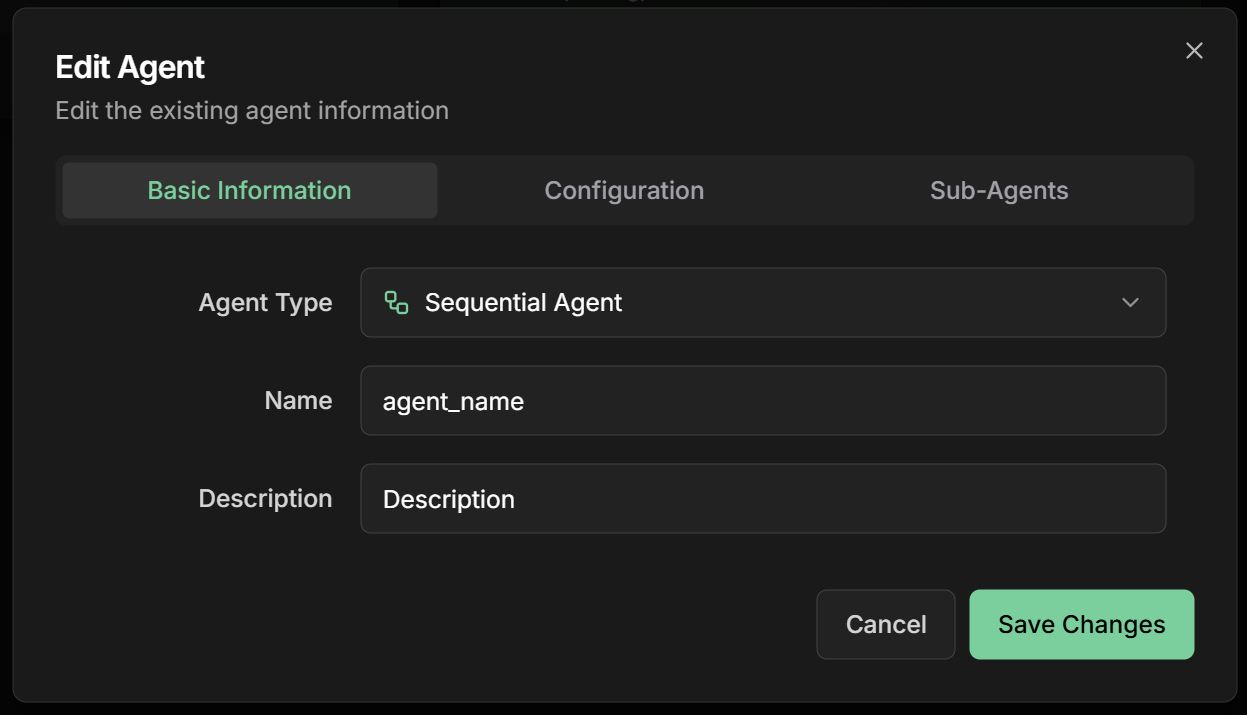
1. Start creation
1. Start creation
- On the Evo AI main screen, click “New Agent”
- In the “Type” field, select “Sequential Agent”
- You’ll see specific fields for sequential configuration
2. Configure basic information
2. Configure basic information
Name: Descriptive name of the pipelineDescription: Summary of the sequential processGoal: Objective of the sequential pipeline
3. Configure sub-agents in order
3. Configure sub-agents in order
Sub-Agents: Add agents in execution order⚠️ Important: The order of sub-agents defines the execution sequenceExample order processing pipeline: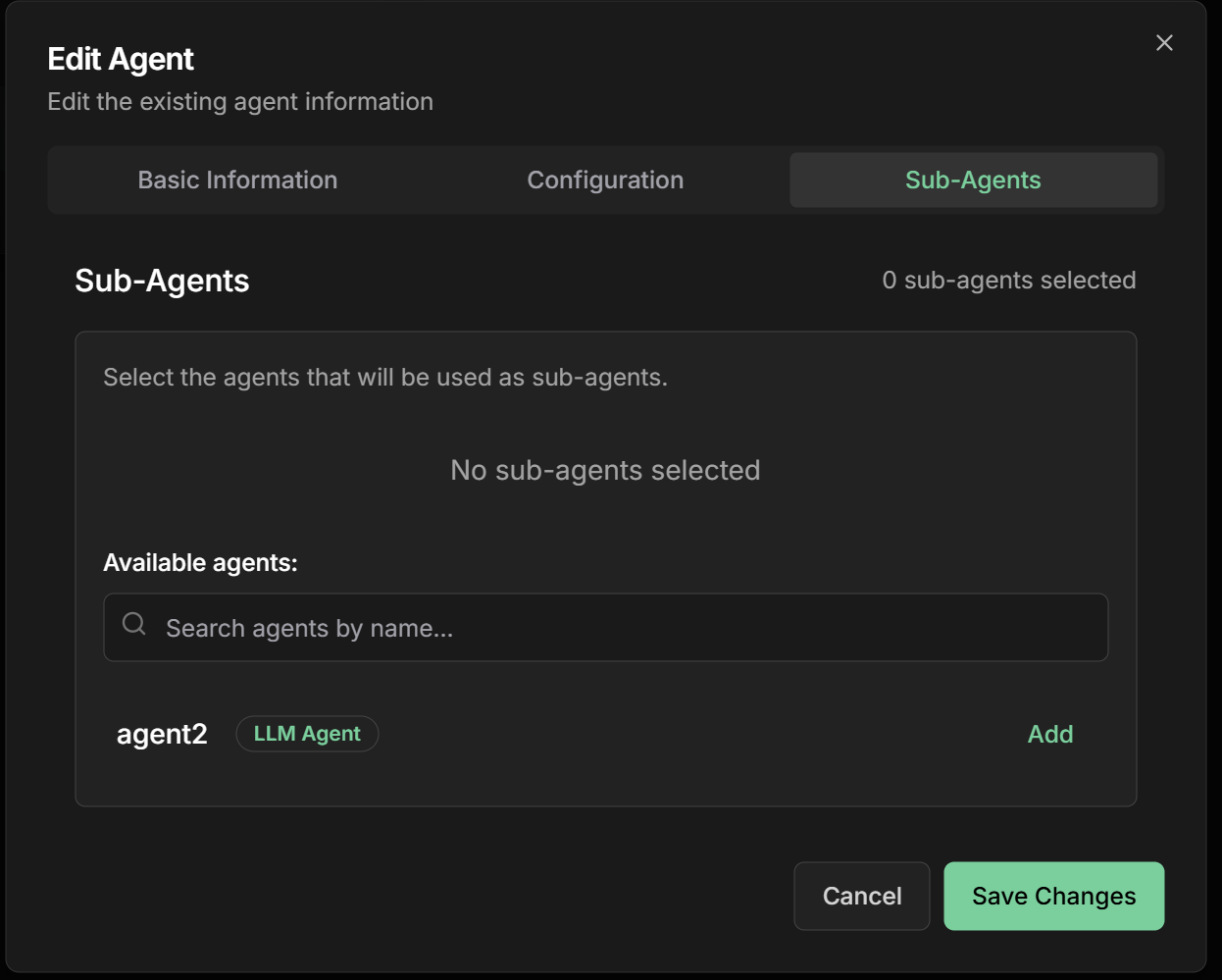
- Data Validator - Verifies order information
- Inventory Checker - Confirms availability
- Price Calculator - Calculates values and discounts
- Payment Processor - Processes transaction
- Delivery Scheduler - Defines logistics
4. Define coordination instructions
4. Define coordination instructions
Instructions: How the agent should coordinate the sequence
5. Advanced configurations
5. Advanced configurations
Timeout per Step: Time limit for each sub-agentRetry Policy: Retry policy in case of failureError Handling: How to handle errorsOutput Aggregation: How to combine results
Practical Examples
1. Order Processing Pipeline
Pipeline Structure
Pipeline Structure
Objective: Process e-commerce orders in a structured waySub-Agents in sequence:1. Order Validator2. Inventory Checker3. Price Calculator4. Payment Processor5. Delivery Scheduler
- Name:
order_validator - Description:
Validates order data and customer information - Instructions:
- Name:
inventory_checker - Description:
Verifies product availability in stock - Instructions:
- Name:
price_calculator - Description:
Calculates final prices with discounts and taxes - Instructions:
- Name:
payment_processor - Description:
Processes order payment - Instructions:
- Name:
delivery_scheduler - Description:
Schedules order delivery - Instructions:
2. Lead Analysis Pipeline
Pipeline Structure
Pipeline Structure
Objective: Analyze and qualify sales leadsSub-Agents in sequence:1. Data Enricher
- Name:
data_enricher - Description:
Enriches lead data with public information - Output Key:
enriched_data
- Name:
lead_scorer - Description:
Calculates lead score based on criteria - Instructions:
Analyze the request {{user_input}} and use data from {{enriched_data}} to calculate score - Output Key:
lead_score
- Name:
lead_classifier - Description:
Classifies lead as HOT/WARM/COLD - Instructions:
Classify based on {{lead_score}} - Output Key:
classification
- Name:
lead_router - Description:
Routes lead to appropriate salesperson - Instructions:
Route based on {{classification}} - Output Key:
assignment
3. Document Approval Pipeline
Pipeline Structure
Pipeline Structure
Objective: Approve documents through multiple validationsSub-Agents in sequence:1. Format Checker
- Validates document format and structure
- Analyzes content and completeness
- Verifies compliance with regulations
- Makes final approval decision
- Sends notifications about the result
Monitoring and Debugging
Tracking Execution
Monitoring Dashboard
Monitoring Dashboard
Important metrics:
- Current progress: Which step is executing
- Time per step: Duration of each sub-agent
- Success rate: Percentage of completed pipelines
- Failure points: Where pipeline fails most
- Throughput: How many pipelines per hour
- Status of each step (Pending/Running/Completed/Failed)
- Detailed logs from each sub-agent
- Data passed between steps
Debugging Failures
Debugging Failures
When a pipeline fails:
- Identify the step: Which sub-agent failed
- Analyze logs: Specific error messages
- Check data: Input received by sub-agent
- Test in isolation: Run sub-agent separately
- Adjust configuration: Modify instructions if necessary
Advanced Configurations
Flow Control
Conditional Steps
Conditional Steps
Conditional steps based on results:
Timeouts and Retries
Timeouts and Retries
Time and retry configuration:
- Step Timeout: 300s (default)
- Total Pipeline Timeout: 1800s (30 min)
- Retry Policy: Retry once on failure
- Retry Delay: 30s between retries
- Increase timeout for complex operations
- Configure retry only for temporary failures
- Use circuit breaker for persistent failures
State Persistence
State Persistence
Saving progress:
- Checkpoint after each step: Allows restart from failure point
- Shared state: Data available to all steps
- Rollback capability: Undo steps if necessary
- Audit trail: Complete execution history
Output Key - Workflow Result
Output Key - Workflow Result
Output Key field in the interface:The Output Key allows the Sequential Agent to save the final result of the sequential workflow in a specific variable in the shared state, making it available to other agents or processes.How it works:- Configure the
Output Keyfield with a descriptive name - The final workflow result will be automatically saved in that variable
- Other agents can access using placeholders
{{output_key_name}} - Works in nested workflows, loops, and multi-agent systems
- Use snake_case:
workflow_result,complete_process - Be specific:
credit_approval_resultinstead ofresult - Document final result structure
- Consider including metadata (time, status, steps)
- Use names that reflect the complete process
Best Practices
Pipeline Design
Pipeline Design
Fundamental principles:
- Atomic steps: Each sub-agent should have a clear responsibility
- Idempotency: Running the same step multiple times should be safe
- Early validation: Fail fast on invalid data
- Detailed logging: Record input and output of each step
- Appropriate timeouts: Avoid steps that get “stuck”
Error Handling
Error Handling
Recovery strategies:
- Fail fast: Stop immediately on critical errors
- Graceful degradation: Continue with reduced functionality when possible
- Retry logic: Retry only for temporary failures
- Circuit breaker: Avoid cascade failures
- Dead letter queue: Store failures for later analysis
Performance
Performance
Speed optimization:
- Minimize data transfer: Pass only necessary data
- Cache results: Avoid recalculating static data
- Internal parallelization: Use parallel processing within steps when possible
- Monitoring: Identify bottlenecks through metrics
- Load balancing: Distribute load across instances
Common Use Cases
E-commerce
Order Pipeline:
- Validation → Inventory → Pricing → Payment → Delivery
- Guarantees order and dependencies
Approvals
Approval Workflow:
- Analysis → Review → Approval → Notification
- Structured quality control
Onboarding
User Integration:
- Registration → Verification → Setup → Training
- Guided step-by-step experience
Data Analysis
ETL Pipeline:
- Extract → Transform → Validate → Load
- Structured data processing
Next Steps
Parallel Agent
Learn about parallel execution of sub-agents
Loop Agent
Explore agents that execute in iterative loops
LLM Agent
Return to the fundamentals of intelligent agents
Configurations
Explore advanced agent configurations
The Sequential Agent is fundamental for creating structured and reliable workflows. Use it when you need to ensure steps are executed in specific order, with each step depending on the success of the previous one.