

Overview
The Parallel Agent is a type of workflow agent that executes multiple sub-agents simultaneously, enabling parallel processing of independent tasks. Unlike the Sequential Agent, all sub-agents are started at the same time and execute concurrently. This type of agent is ideal when you have tasks that don’t depend on each other and can be executed in parallel, resulting in significant reduction of total processing time.Based on Google ADK: Implementation following the standards of the Google Agent Development Kit for parallel agents.
Key Features
Simultaneous Execution
All sub-agents execute at the same time, independently
Time Reduction
Total time is determined by the slowest sub-agent, not by the sum
Independence
Sub-agents don’t depend on each other to execute
Result Aggregation
Combines results from all sub-agents at the end
When to Use Parallel Agent
Ideal Scenarios
Ideal Scenarios
✅ Use Parallel Agent when:
- Independent tasks: Sub-agents don’t need data from each other
- Information gathering: Fetch data from multiple sources simultaneously
- Parallel analyses: Different types of analysis on the same dataset
- Multiple validations: Checks that can be done in parallel
- Batch processing: Divide large work into smaller parts
- Product analysis (price + reviews + specifications)
- Data verification (format + content + compliance)
- Market research (competitors + trends + pricing)
- User validation (email + phone + documents)
- Report generation (sales + marketing + financial)
When NOT to use
When NOT to use
❌ Avoid Parallel Agent when:
- Sequential dependencies: One task needs the result of another
- Limited resources: System doesn’t support multiple simultaneous executions
- Order matters: Execution sequence is critical
- Shared state: Sub-agents modify the same data
- Very fast tasks: Parallelization overhead doesn’t pay off
Creating a Parallel Agent
Step by Step on the Platform
1. Start creation
1. Start creation
- On the Evo AI main screen, click “New Agent”
- In the “Type” field, select “Parallel Agent”
- You’ll see specific fields for parallel configuration

2. Configure basic information
2. Configure basic information
Name: Descriptive name of the parallel agentDescription: Summary of parallel processingGoal: Objective of parallel processing
3. Configure parallel sub-agents
3. Configure parallel sub-agents
Sub-Agents: Add all agents that will execute in parallel💡 Tip: Order doesn’t matter, as all execute simultaneouslyProduct analysis example: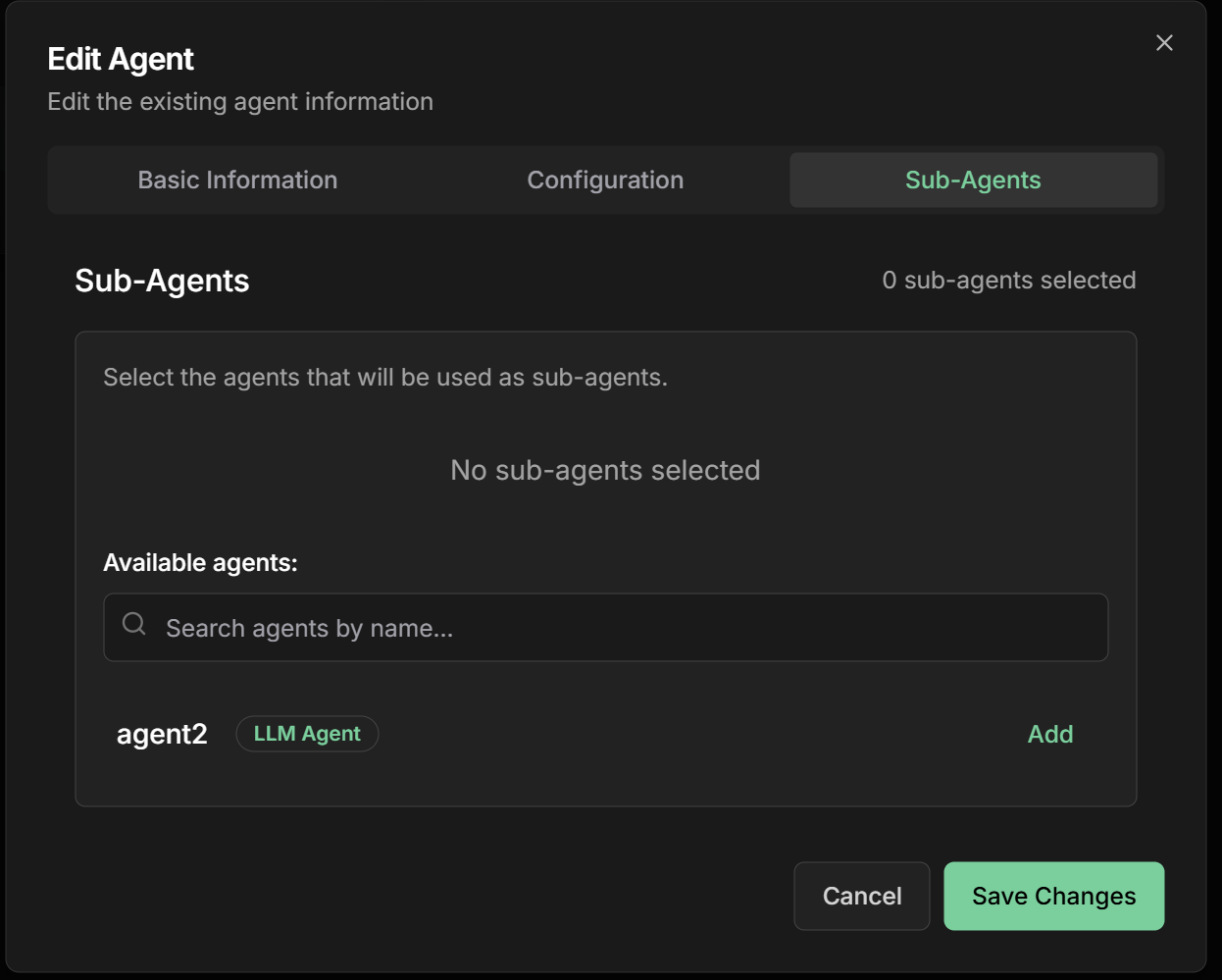
- Price Analyzer - Compares prices across different stores
- Review Collector - Fetches customer reviews
- Specification Checker - Collects technical data
- Stock Checker - Verifies availability
4. Define coordination instructions
4. Define coordination instructions
Instructions: How the agent should coordinate parallel execution
5. Advanced settings
5. Advanced settings
Global Timeout: Time limit for entire parallel processingFailure Policy: How to handle sub-agent failuresConcurrency Limit: Limit of simultaneous sub-agentsResult Aggregation: How to combine results
Practical Examples
1. Complete Product Analysis
Parallel Agent Structure
Parallel Agent Structure
Objective: Analyze product by collecting data from multiple sourcesSub-Agents executing in parallel:1. Price Analyzer
- Name:
price_analyzer - Description:
Compares product prices across different online stores - Instructions:
- Output Key:
price_analysis
- Name:
review_collector - Description:
Collects and analyzes customer reviews - Instructions:
- Output Key:
review_analysis
- Name:
spec_checker - Description:
Collects detailed technical specifications - Instructions:
- Output Key:
spec_analysis
- Name:
availability_checker - Description:
Checks stock and availability - Instructions:
- Output Key:
availability_analysis
2. Complete User Verification
Parallel Agent Structure
Parallel Agent Structure
Objective: Verify user data across multiple dimensionsSub-Agents executing in parallel:1. Email Validator
- Name:
email_validator - Description:
Validates email format and existence - Output Key:
email_validation
- Name:
phone_verifier - Description:
Verifies phone format and validity - Output Key:
phone_validation
- Name:
document_analyzer - Description:
Analyzes and validates provided documents - Output Key:
document_validation
- Name:
address_verifier - Description:
Validates and normalizes address - Output Key:
address_validation
- Name:
background_checker - Description:
Checks history and reputation - Output Key:
background_check
3. Comprehensive Market Research
Parallel Agent Structure
Parallel Agent Structure
Objective: Conduct complete market researchSub-Agents executing in parallel:1. Competitor Analyzer
- Analyzes main competitors and strategies
- Identifies market and consumption trends
- Maps price ranges and positioning
- Collects customer opinions and feedback
- Identifies market gaps and opportunities
Monitoring and Performance
Tracking Parallel Execution
Monitoring Dashboard
Monitoring Dashboard
Specific metrics for parallel execution:
- Individual progress: Real-time status of each sub-agent
- Execution time: Duration of each sub-agent
- Parallel efficiency: Speedup achieved vs. sequential execution
- Resource utilization: CPU, memory, network during execution
- Success rate: How many sub-agents complete successfully
Performance Analysis
Performance Analysis
Efficiency metrics:Speedup Calculation:Identified bottlenecks:
- Slowest sub-agent determines total time
- Shared resources can cause contention
- Network I/O can be limiting
- Balance load among sub-agents
- Optimize slowest sub-agent
- Consider caching for frequent data
Problem Debugging
Problem Debugging
Common issues in parallel execution:1. Resource Contention2. Intermittent Failures3. Inconsistent Results
Advanced Configurations
Concurrency Control
Resource Limitation
Resource Limitation
Concurrency settings:Max Concurrent Agents: Limit of simultaneous sub-agentsResource Allocation: Resource allocation per sub-agentQueue Management: Queue management when there’s a limit
Failure Handling
Failure Handling
Failure policies:Fail Fast Policy:Best Effort Policy:Retry Policy:
Result Aggregation
Result Aggregation
Combination strategies:Simple Merge:Structured Report:Custom Aggregation:
Output Key - Aggregated Result
Output Key - Aggregated Result
Output Key field in the interface:The Output Key allows the Parallel Agent to save the aggregated result of all sub-agents executed in parallel into a specific variable in the shared state.How it works:- Configure the
Output Keyfield with a descriptive name - Results from all sub-agents are collected and aggregated
- The final aggregated result is automatically saved in the specified variable
- Other agents can access using placeholders
{{output_key_name}}
- Use snake_case:
parallel_result,aggregated_analysis - Be specific:
multiple_user_verificationinstead ofverification - Document aggregated result structure
- Consider including execution metadata
- Use names that reflect the parallel nature of the process
Best Practices
Sub-Agent Design
Sub-Agent Design
Principles for parallel execution:
- Independence: Sub-agents should not depend on each other
- Idempotence: Multiple execution should be safe
- Appropriate timeouts: Prevent one sub-agent from blocking all
- Adequate granularity: Neither too small nor too large
- Balance: Sub-agents with similar execution time
Performance Optimization
Performance Optimization
Strategies for maximum efficiency:
- Profile first: Measure before optimizing
- Identify bottlenecks: Slowest sub-agent determines total time
- Smart caching: Avoid reprocessing identical data
- Batch operations: Group similar operations
- Resource pooling: Reuse connections and resources
Reliability
Reliability
Ensuring robust execution:
- Circuit breakers: Avoid failure cascades
- Health checks: Monitor sub-agent health
- Graceful degradation: Continue with reduced functionality
- Retry logic: Retry only for temporary failures
- Monitoring: Alerts for performance issues
Common Use Cases
Data Analysis
Parallel Processing:
- Multiple analyses on the same dataset
- Data collection from various sources
- Independent validations
User Verification
Multiple Validation:
- Email, phone, documents
- Background checks
- Address validation
Market Research
Comprehensive Collection:
- Competitor analysis
- Market trends
- Customer feedback
Monitoring
Continuous Surveillance:
- Multiple metrics
- Different systems
- Parallel alerts
Next Steps
Sequential Agent
Learn about ordered sequential execution
Loop Agent
Explore agents that execute in iterative loops
LLM Agent
Back to the fundamentals of intelligent agents
Configurations
Explore advanced agent configurations
The Parallel Agent is essential for maximizing efficiency when you have independent tasks. Use it to drastically reduce total processing time by executing multiple operations simultaneously.