> ## Documentation Index
> Fetch the complete documentation index at: https://docs.evo-ai.co/llms.txt
> Use this file to discover all available pages before exploring further.
# Share Agent
> Share your agents with your team through public links without authentication required
## Overview
**Share Agent** allows you to share your AI agents with your team or clients through public links. This functionality is ideal for:
* **Team collaboration** without the need for multiple accounts
* **Demonstrations** for clients or stakeholders
* **Quick access** to specific agents
* **Public testing** of functionalities
**Security**: Shared chats are publicly accessible through the generated link.
Make sure to share only with authorized people.
## How to Share an Agent
### Step 1: Access Agent Settings
1. Go to the **agents screen** in the main dashboard
2. Locate the agent you want to share
3. In the **agent card**, click on the **"Settings"** icon (⚙️)
 1. In the agent settings menu, click on **"Share Agent"**
2. You will be directed to the sharing screen
This option is available for all types of agents created on the platform.
### Step 2: Configure Sharing
On the **Share Agent** screen you will see:
* **Shared Chat URL**: Public link for agent access
* **API Key**: Specific key for this sharing
* **Access settings**: Security and control options
1. In the agent settings menu, click on **"Share Agent"**
2. You will be directed to the sharing screen
This option is available for all types of agents created on the platform.
### Step 2: Configure Sharing
On the **Share Agent** screen you will see:
* **Shared Chat URL**: Public link for agent access
* **API Key**: Specific key for this sharing
* **Access settings**: Security and control options
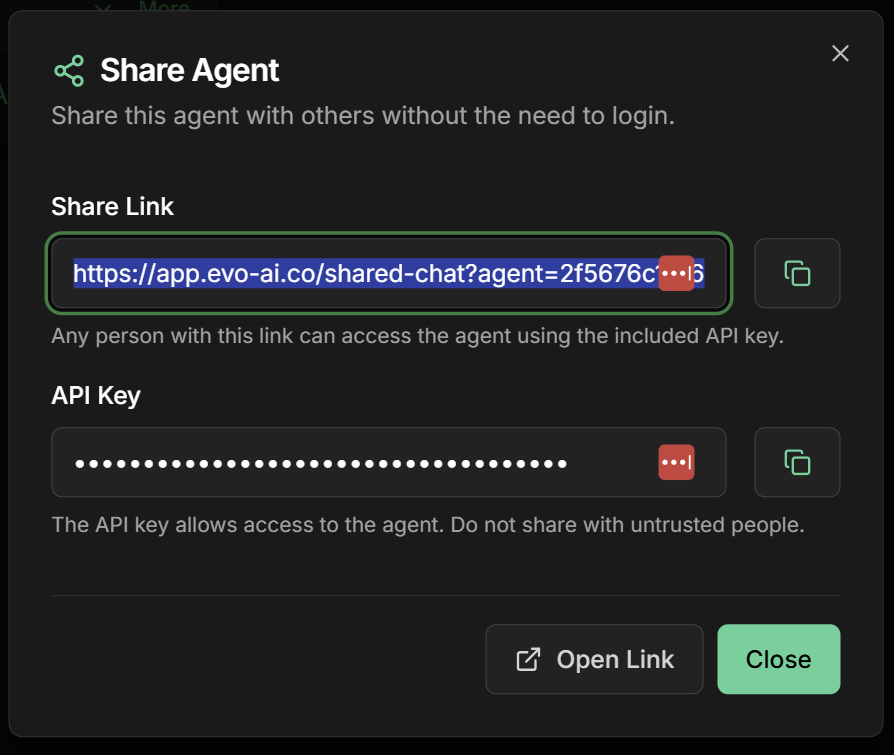 **Specific API Key**: Each sharing generates a unique API key for access control and monitoring.
**To share with your team:**
1. **Copy the URL** of the shared chat
2. **Note the API Key** if needed for integrations
3. **Share the link** with authorized people
Keep the API Key secure. It can be used to access the agent programmatically.
### Step 3: Access the Shared Chat
1. Click on **"Open Link"** in the configuration screen
2. A new tab will open with the shared chat
3. The chat will be ready for immediate use
**Specific API Key**: Each sharing generates a unique API key for access control and monitoring.
**To share with your team:**
1. **Copy the URL** of the shared chat
2. **Note the API Key** if needed for integrations
3. **Share the link** with authorized people
Keep the API Key secure. It can be used to access the agent programmatically.
### Step 3: Access the Shared Chat
1. Click on **"Open Link"** in the configuration screen
2. A new tab will open with the shared chat
3. The chat will be ready for immediate use
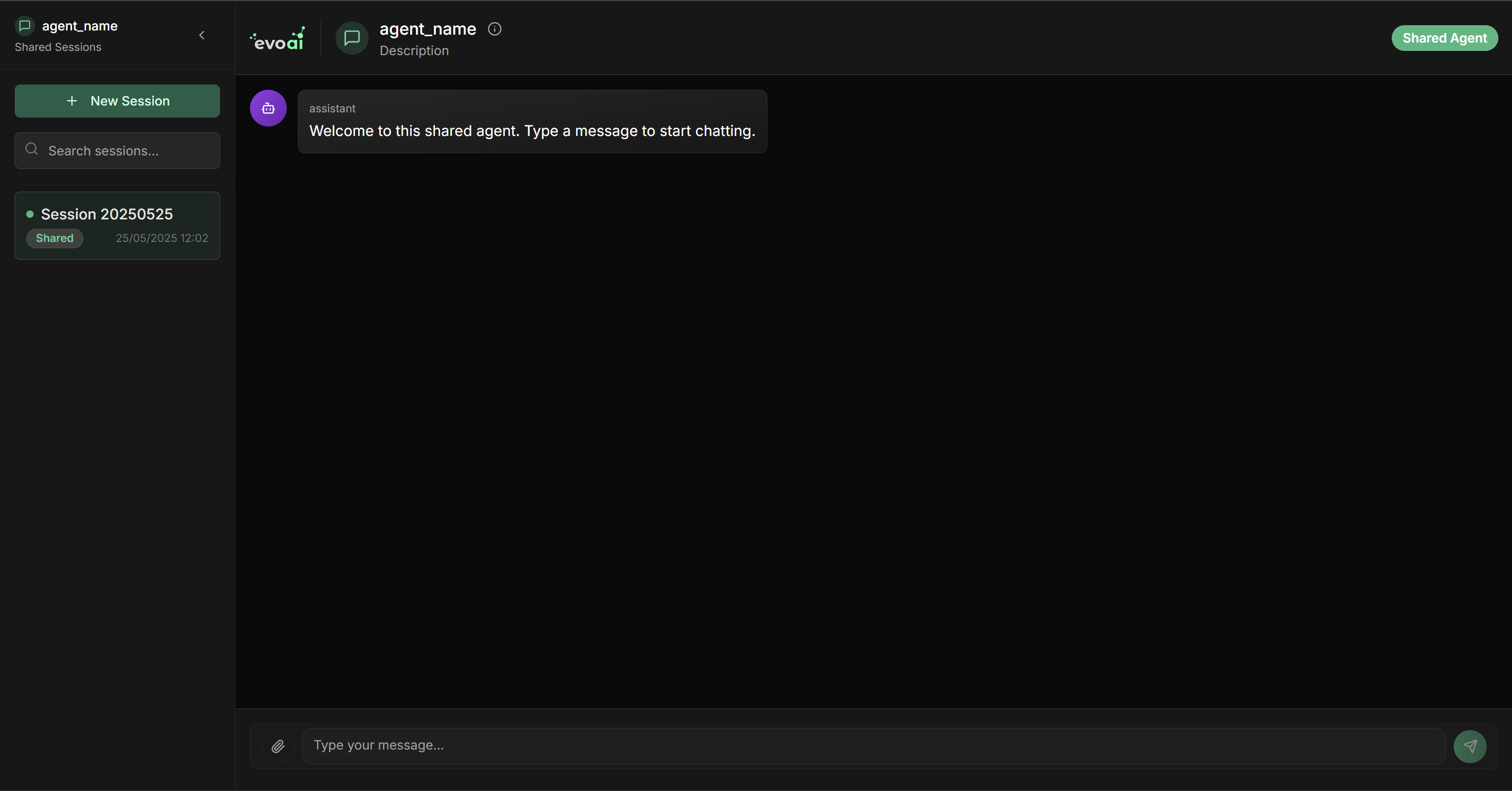 **Shared chat characteristics:**
* ✅ **No login required** - Direct access through the link
* ✅ **Simplified interface** - Focus on conversation with the agent
* ✅ **Complete functionality** - All agent capabilities available
* ✅ **Independent sessions** - Each user has their own conversation
Ideal for demonstrations, team testing, or quick access by clients.
## Use Cases
### For Teams
**Ideal scenarios:**
* Agent testing by different team members
* Functionality validation before deployment
* Training new collaborators
* Internal project demonstrations
**Benefits:**
* Immediate access without registration required
* Clean and professional interface
* Complete agent experience
* Facilitates sales closing
### For Development
Use the **generated API Key** to integrate the shared agent in:
```javascript theme={null}
// Integration example
const response = await fetch('https://app.evo-ai.co/api/shared-chat', {
method: 'POST',
headers: {
'Authorization': `Bearer ${SHARED_API_KEY}`,
'Content-Type': 'application/json'
},
body: JSON.stringify({
message: 'Hello, I need help!',
agent_id: 'shared-agent-id'
})
});
```
**Possibilities:**
* Agent regression testing
* Response validation in different scenarios
* Performance monitoring
* Usage metrics collection
## Sharing Management
### Security and Control
**Recommendations:**
* 🔒 **Share only with authorized people**
* 🔄 **Regenerate links periodically** for greater security
* 📊 **Monitor usage** through platform metrics
* ⚠️ **Revoke access** when necessary
Shared links are public. Do not include sensitive information in agent settings.
**Available metrics:**
* Number of conversations started
* Average session time
* Messages exchanged
* Peak usage hours
Access metrics through the main platform dashboard.
### Limitations and Considerations
**Important points:**
* 📝 **Limited history** - Conversations are not persisted indefinitely
* 🔄 **Temporary sessions** - Each access creates a new session
* ⚡ **Rate limiting** - There may be usage limits per IP
* 🎯 **Basic functionalities** - Some advanced features may not be available
**Cost impact:**
* Token usage from your main API key
* Consumption based on conversation volume
* Monitoring recommended for expense control
Set up usage alerts to avoid unexpected costs with high access volume.
## Troubleshooting
**Link doesn't work:**
* Check if the agent is still active
* Confirm that the API key hasn't been revoked
* Test in incognito mode to rule out cache issues
**Agent doesn't respond in shared chat:**
* Check if there are credits in the main API key
* Confirm that the agent model is available
* Check error logs in the main dashboard
**Access denied:**
* Confirm that the link is correct and complete
* Check if there are IP restrictions
* Test with different browsers
**Slow performance:**
* There may be high simultaneous usage volume
* Check the performance of the chosen model
* Consider optimizing agent instructions
***
🚀 **Ready!** Now you can share your agents with ease and collaborate with your team efficiently. Use this functionality for demonstrations, testing, and quick access to your AI agents!
**Shared chat characteristics:**
* ✅ **No login required** - Direct access through the link
* ✅ **Simplified interface** - Focus on conversation with the agent
* ✅ **Complete functionality** - All agent capabilities available
* ✅ **Independent sessions** - Each user has their own conversation
Ideal for demonstrations, team testing, or quick access by clients.
## Use Cases
### For Teams
**Ideal scenarios:**
* Agent testing by different team members
* Functionality validation before deployment
* Training new collaborators
* Internal project demonstrations
**Benefits:**
* Immediate access without registration required
* Clean and professional interface
* Complete agent experience
* Facilitates sales closing
### For Development
Use the **generated API Key** to integrate the shared agent in:
```javascript theme={null}
// Integration example
const response = await fetch('https://app.evo-ai.co/api/shared-chat', {
method: 'POST',
headers: {
'Authorization': `Bearer ${SHARED_API_KEY}`,
'Content-Type': 'application/json'
},
body: JSON.stringify({
message: 'Hello, I need help!',
agent_id: 'shared-agent-id'
})
});
```
**Possibilities:**
* Agent regression testing
* Response validation in different scenarios
* Performance monitoring
* Usage metrics collection
## Sharing Management
### Security and Control
**Recommendations:**
* 🔒 **Share only with authorized people**
* 🔄 **Regenerate links periodically** for greater security
* 📊 **Monitor usage** through platform metrics
* ⚠️ **Revoke access** when necessary
Shared links are public. Do not include sensitive information in agent settings.
**Available metrics:**
* Number of conversations started
* Average session time
* Messages exchanged
* Peak usage hours
Access metrics through the main platform dashboard.
### Limitations and Considerations
**Important points:**
* 📝 **Limited history** - Conversations are not persisted indefinitely
* 🔄 **Temporary sessions** - Each access creates a new session
* ⚡ **Rate limiting** - There may be usage limits per IP
* 🎯 **Basic functionalities** - Some advanced features may not be available
**Cost impact:**
* Token usage from your main API key
* Consumption based on conversation volume
* Monitoring recommended for expense control
Set up usage alerts to avoid unexpected costs with high access volume.
## Troubleshooting
**Link doesn't work:**
* Check if the agent is still active
* Confirm that the API key hasn't been revoked
* Test in incognito mode to rule out cache issues
**Agent doesn't respond in shared chat:**
* Check if there are credits in the main API key
* Confirm that the agent model is available
* Check error logs in the main dashboard
**Access denied:**
* Confirm that the link is correct and complete
* Check if there are IP restrictions
* Test with different browsers
**Slow performance:**
* There may be high simultaneous usage volume
* Check the performance of the chosen model
* Consider optimizing agent instructions
***
🚀 **Ready!** Now you can share your agents with ease and collaborate with your team efficiently. Use this functionality for demonstrations, testing, and quick access to your AI agents!