> ## Documentation Index
> Fetch the complete documentation index at: https://docs.evo-ai.co/llms.txt
> Use this file to discover all available pages before exploring further.
# MCP Server
> Configure MCP (Model Context Protocol) servers to extend your agents capabilities
## Overview
The **MCP Server** (Model Context Protocol) allows you to connect your agents to external servers that provide additional tools and functionalities. **Evo AI provides a complete library** of pre-configured MCP servers, allowing you to expand your agents' capabilities with:
* **External APIs** and web services
* **Databases** and storage systems
* **Specialized tools** for specific tasks
* **System resources** local or remote
**Evo AI Library**: MCP servers are provided and maintained by Evo AI.
You only need to configure the necessary variables and select the desired tools.
## How to Configure an MCP Server
### Step 1: Access Agent Settings
1. Go to the **agents screen** in the dashboard
2. Locate the agent you want to configure
3. Click on the **"Settings"** icon (⚙️) on the agent card and then on **"Edit"**
4. You will be directed to the agent settings screen
1. In the settings screen, locate the **"MCP Servers"** section
2. Click **"Add"** to add a new MCP server
 Each agent can have multiple MCP servers configured simultaneously.
### Step 2: Select MCP Server
1. A **library of MCP servers** maintained by Evo AI will be displayed
2. Browse through the list and select the server that meets your needs
3. Each server has a description of the functionalities it offers
4. **All servers are pre-tested** and maintained by the Evo AI team
Each agent can have multiple MCP servers configured simultaneously.
### Step 2: Select MCP Server
1. A **library of MCP servers** maintained by Evo AI will be displayed
2. Browse through the list and select the server that meets your needs
3. Each server has a description of the functionalities it offers
4. **All servers are pre-tested** and maintained by the Evo AI team
 **Curated Library**: All MCP servers are selected, tested, and maintained by Evo AI to ensure quality and reliability.
### Step 3: Configure Variables and Tools
1. After selecting the server from the library, you will see the **configuration screen**
2. Fill in only the **necessary variables** (such as API keys, URLs, credentials)
3. **No need to configure the server** - it's already ready to use
4. Evo AI takes care of all infrastructure and maintenance
**Curated Library**: All MCP servers are selected, tested, and maintained by Evo AI to ensure quality and reliability.
### Step 3: Configure Variables and Tools
1. After selecting the server from the library, you will see the **configuration screen**
2. Fill in only the **necessary variables** (such as API keys, URLs, credentials)
3. **No need to configure the server** - it's already ready to use
4. Evo AI takes care of all infrastructure and maintenance
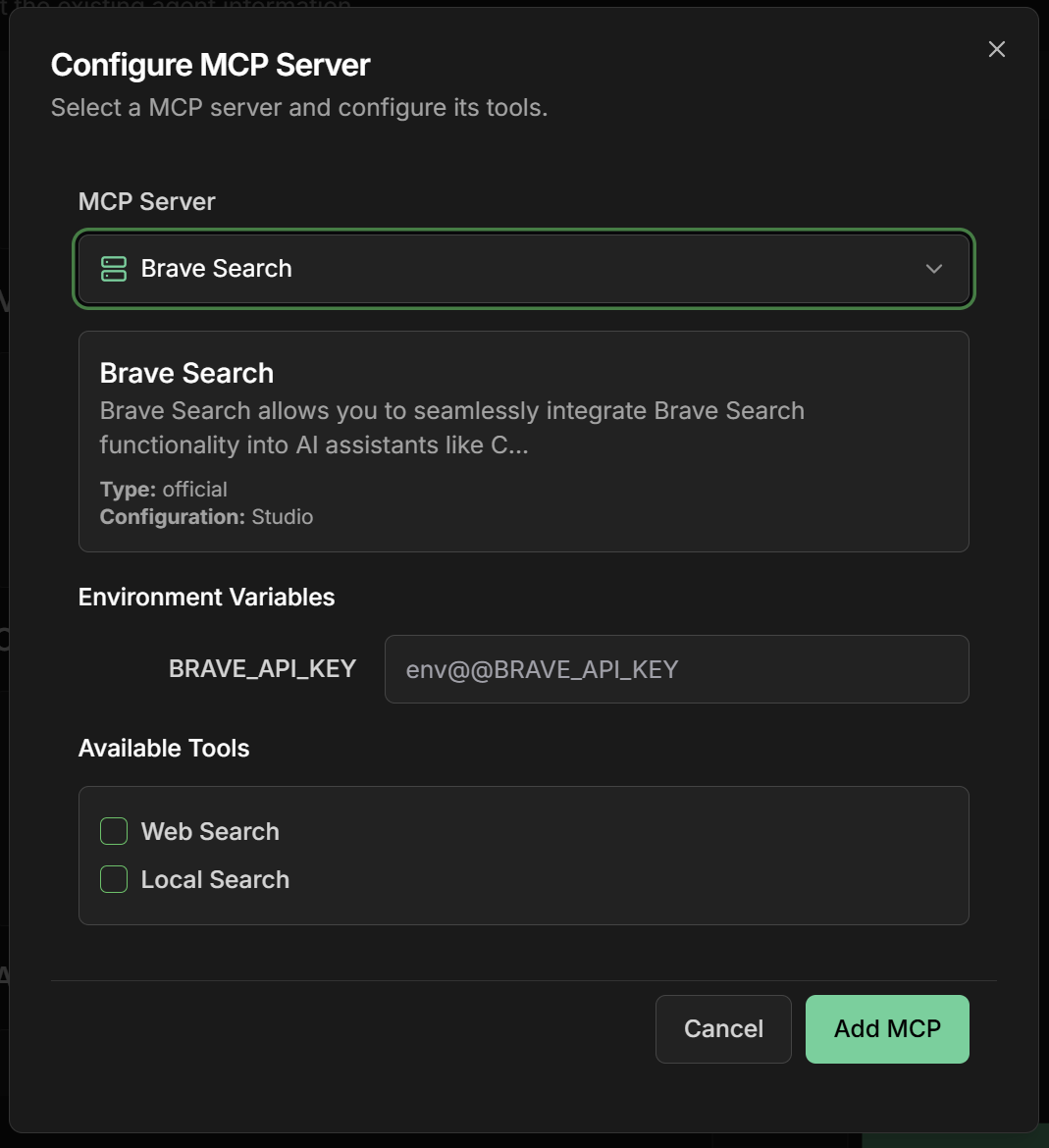 You only need to provide your specific credentials. Everything else is already configured by Evo AI.
**On the same configuration screen:**
1. **View the tools** already available from the server
2. **Check the tools** that your agent will use
3. **Configure specific parameters** only if necessary
4. **Test connectivity** before saving
**Advantages of the Evo AI library:**
* 🔍 **Pre-tested tools** and optimized
* 📊 **Integrated documentation** for each tool
* 🌐 **Automatic updates** without intervention
* 📁 **Technical support** from the Evo AI team
* 🔧 **Optimized performance** for the platform
1. **Review your settings** (only variables and selected tools)
2. **Test the connection** - Evo AI validates automatically
3. Click **"Save"** to apply the settings
4. The server will be **immediately available** for the agent
The server infrastructure is managed by Evo AI. You only configure what you need to use.
## Evo AI Server Library
### Available Servers
**Brave Search** - Integration with the Brave search engine. Enables general and local web searches, providing updated and relevant information.
**Google Search** - Web search capabilities using Google Custom Search API and web page content extraction functionality.
**Perplexity Ask** - Integration with Sonar API for real-time search, providing AI assistants with unprecedented web search capabilities.
**OpenAI WebSearch** - Access to OpenAI's web search functionality, allowing AI assistants to search the web during conversations.
**Tavily** - MCP server offering intelligent web search, content extraction, and structured website tracking with advanced AI capabilities.
**Github** - Complete integration with GitHub APIs, enabling advanced automation and interaction capabilities for developers.
**Gitlab** - MCP server for GitLab API, enabling project management, file operations, and much more.
**Calculator** - Server for precise mathematical calculations, allowing LLMs to perform advanced numerical operations.
**Uptime Kuma** - Server for managing Uptime Kuma monitors, enabling service availability monitoring.
**Whois** - Allows AI agents to perform WHOIS queries and retrieve domain details, checking availability and ownership.
**Hubspot** - Complete integration with HubSpot CRM, allowing AI assistants to execute actions and interact with HubSpot data.
**ClickUp** - Complete integration with ClickUp for task management, projects, spaces, lists, and folders through standardized protocol.
**Notion** - Official Notion MCP server for complete integration with workspaces, pages, databases, and blocks.
**Slack** - Integration with Slack Workspaces, supporting multiple transports without need for admin-approved permissions or bots.
**Firecrawl** - MCP implementation that integrates with Firecrawl for advanced web scraping capabilities with JS rendering and content extraction.
**Sequential Thinking** - Tool for dynamic and reflective problem solving through structured thinking process.
**Yahoo Finance** - Server for interacting with Yahoo Finance, providing access to prices, company information, and financial data.
**Pinecone Developer** - Allows coding assistants to connect with Pinecone projects and documentation for index configuration and vector search.
**Airbnb** - Server for searching Airbnb listings and getting accommodation details for travel planning.
**Travel Planner** - MCP implementation for interacting with Google Maps and travel planning services, including location search and time calculations.
**Image Generation** - Server offering image generation capabilities using the Replicate Flux model.
### How to Use the Servers
**Benefits:**
* 🚀 **Instant setup** - Ready-to-use servers
* 🔧 **Minimal configuration** - Only your API credentials
* 📚 **Integrated documentation** - Guides within the platform
* ✅ **Automatic testing** - Connectivity validation
Each server requires only specific environment variables (like API\_KEY). Evo AI takes care of all infrastructure.
**Assured quality:**
* 🔒 **Validated security** - All servers are audited
* 🔄 **Automatic updates** - Always on the latest version
* 📊 **24/7 monitoring** - Guaranteed availability
* 🛠️ **Technical support** - Specialized team available
The library is constantly updated with new servers and improvements.
## Common MCP Server Types
### Data Servers
**Typical functionalities:**
* Real-time SQL queries
* Data insertion and updates
* Reports and analysis
* Backup and synchronization
**Common variables:**
* `DATABASE_URL`: Connection URL
* `USERNAME`: Database user
* `PASSWORD`: Access password
* `SCHEMA`: Specific schema
**Integration examples:**
* CRM (Salesforce, HubSpot)
* E-commerce (Shopify, WooCommerce)
* Communication (Slack, Discord)
* Productivity (Google Workspace, Microsoft 365)
**Typical configurations:**
* `API_KEY`: API access key
* `BASE_URL`: Service base URL
* `RATE_LIMIT`: Request limit
* `TIMEOUT`: Request timeout
### Tool Servers
**Capabilities:**
* Complex mathematical calculations
* Statistical data processing
* Financial analysis
* Unit conversions
**Available tools:**
* `calculate`: Mathematical operations
* `analyze_data`: Statistical analysis
* `convert_units`: Unit conversions
* `financial_calc`: Financial calculations
**Functionalities:**
* Reading and writing files
* Format conversion
* Image processing
* Document analysis
**Typical tools:**
* `read_file`: Read file content
* `write_file`: Create/edit files
* `convert_format`: Convert formats
* `extract_text`: Extract text from documents
## Advanced Use Cases
### Multi-Server Integration
**Scenarios:**
* Agent that queries CRM + database + payment API
* Data processing involving multiple sources
* Automation integrating different business systems
**Configuration:**
1. Configure multiple MCP servers on the same agent
2. Define tool execution order
3. Configure fallbacks for failure scenarios
4. Monitor complete workflow performance
## Troubleshooting
**MCP server won't connect:**
* Check if credentials are correct
* Confirm the server is online and accessible
* Test network connectivity
* Check error logs in the dashboard
**Tools don't work:**
* Confirm tools were selected correctly
* Check access permissions on external server
* Test each tool individually
* Consult specific MCP server documentation
**Slow performance:**
* Check network latency to the server
* Optimize timeout parameters
* Consider using cache when possible
* Monitor external API rate limits
**Authentication errors:**
* Regenerate API keys if necessary
* Check if credentials haven't expired
* Confirm permissions in external system
* Test authentication directly on the API
***
🔧 **Configuration complete!** Your agents now have access to tools and external resources through the MCP protocol. Explore the possibilities and create even more powerful experiences!
You only need to provide your specific credentials. Everything else is already configured by Evo AI.
**On the same configuration screen:**
1. **View the tools** already available from the server
2. **Check the tools** that your agent will use
3. **Configure specific parameters** only if necessary
4. **Test connectivity** before saving
**Advantages of the Evo AI library:**
* 🔍 **Pre-tested tools** and optimized
* 📊 **Integrated documentation** for each tool
* 🌐 **Automatic updates** without intervention
* 📁 **Technical support** from the Evo AI team
* 🔧 **Optimized performance** for the platform
1. **Review your settings** (only variables and selected tools)
2. **Test the connection** - Evo AI validates automatically
3. Click **"Save"** to apply the settings
4. The server will be **immediately available** for the agent
The server infrastructure is managed by Evo AI. You only configure what you need to use.
## Evo AI Server Library
### Available Servers
**Brave Search** - Integration with the Brave search engine. Enables general and local web searches, providing updated and relevant information.
**Google Search** - Web search capabilities using Google Custom Search API and web page content extraction functionality.
**Perplexity Ask** - Integration with Sonar API for real-time search, providing AI assistants with unprecedented web search capabilities.
**OpenAI WebSearch** - Access to OpenAI's web search functionality, allowing AI assistants to search the web during conversations.
**Tavily** - MCP server offering intelligent web search, content extraction, and structured website tracking with advanced AI capabilities.
**Github** - Complete integration with GitHub APIs, enabling advanced automation and interaction capabilities for developers.
**Gitlab** - MCP server for GitLab API, enabling project management, file operations, and much more.
**Calculator** - Server for precise mathematical calculations, allowing LLMs to perform advanced numerical operations.
**Uptime Kuma** - Server for managing Uptime Kuma monitors, enabling service availability monitoring.
**Whois** - Allows AI agents to perform WHOIS queries and retrieve domain details, checking availability and ownership.
**Hubspot** - Complete integration with HubSpot CRM, allowing AI assistants to execute actions and interact with HubSpot data.
**ClickUp** - Complete integration with ClickUp for task management, projects, spaces, lists, and folders through standardized protocol.
**Notion** - Official Notion MCP server for complete integration with workspaces, pages, databases, and blocks.
**Slack** - Integration with Slack Workspaces, supporting multiple transports without need for admin-approved permissions or bots.
**Firecrawl** - MCP implementation that integrates with Firecrawl for advanced web scraping capabilities with JS rendering and content extraction.
**Sequential Thinking** - Tool for dynamic and reflective problem solving through structured thinking process.
**Yahoo Finance** - Server for interacting with Yahoo Finance, providing access to prices, company information, and financial data.
**Pinecone Developer** - Allows coding assistants to connect with Pinecone projects and documentation for index configuration and vector search.
**Airbnb** - Server for searching Airbnb listings and getting accommodation details for travel planning.
**Travel Planner** - MCP implementation for interacting with Google Maps and travel planning services, including location search and time calculations.
**Image Generation** - Server offering image generation capabilities using the Replicate Flux model.
### How to Use the Servers
**Benefits:**
* 🚀 **Instant setup** - Ready-to-use servers
* 🔧 **Minimal configuration** - Only your API credentials
* 📚 **Integrated documentation** - Guides within the platform
* ✅ **Automatic testing** - Connectivity validation
Each server requires only specific environment variables (like API\_KEY). Evo AI takes care of all infrastructure.
**Assured quality:**
* 🔒 **Validated security** - All servers are audited
* 🔄 **Automatic updates** - Always on the latest version
* 📊 **24/7 monitoring** - Guaranteed availability
* 🛠️ **Technical support** - Specialized team available
The library is constantly updated with new servers and improvements.
## Common MCP Server Types
### Data Servers
**Typical functionalities:**
* Real-time SQL queries
* Data insertion and updates
* Reports and analysis
* Backup and synchronization
**Common variables:**
* `DATABASE_URL`: Connection URL
* `USERNAME`: Database user
* `PASSWORD`: Access password
* `SCHEMA`: Specific schema
**Integration examples:**
* CRM (Salesforce, HubSpot)
* E-commerce (Shopify, WooCommerce)
* Communication (Slack, Discord)
* Productivity (Google Workspace, Microsoft 365)
**Typical configurations:**
* `API_KEY`: API access key
* `BASE_URL`: Service base URL
* `RATE_LIMIT`: Request limit
* `TIMEOUT`: Request timeout
### Tool Servers
**Capabilities:**
* Complex mathematical calculations
* Statistical data processing
* Financial analysis
* Unit conversions
**Available tools:**
* `calculate`: Mathematical operations
* `analyze_data`: Statistical analysis
* `convert_units`: Unit conversions
* `financial_calc`: Financial calculations
**Functionalities:**
* Reading and writing files
* Format conversion
* Image processing
* Document analysis
**Typical tools:**
* `read_file`: Read file content
* `write_file`: Create/edit files
* `convert_format`: Convert formats
* `extract_text`: Extract text from documents
## Advanced Use Cases
### Multi-Server Integration
**Scenarios:**
* Agent that queries CRM + database + payment API
* Data processing involving multiple sources
* Automation integrating different business systems
**Configuration:**
1. Configure multiple MCP servers on the same agent
2. Define tool execution order
3. Configure fallbacks for failure scenarios
4. Monitor complete workflow performance
## Troubleshooting
**MCP server won't connect:**
* Check if credentials are correct
* Confirm the server is online and accessible
* Test network connectivity
* Check error logs in the dashboard
**Tools don't work:**
* Confirm tools were selected correctly
* Check access permissions on external server
* Test each tool individually
* Consult specific MCP server documentation
**Slow performance:**
* Check network latency to the server
* Optimize timeout parameters
* Consider using cache when possible
* Monitor external API rate limits
**Authentication errors:**
* Regenerate API keys if necessary
* Check if credentials haven't expired
* Confirm permissions in external system
* Test authentication directly on the API
***
🔧 **Configuration complete!** Your agents now have access to tools and external resources through the MCP protocol. Explore the possibilities and create even more powerful experiences!