> ## Documentation Index
> Fetch the complete documentation index at: https://docs.evo-ai.co/llms.txt
> Use this file to discover all available pages before exploring further.
# Credentials
> Manage credentials and access keys for your agents for A2A integration
## Overview
**Credentials** are access credentials automatically generated for each agent, enabling secure integration through the **A2A (Agent 2 Agent) protocol**. These credentials are essential for:
* **Communication between agents** from different systems
* **API integration** with external applications
* **Secure authentication** in programmatic calls
* **Granular access control** per agent
**Automatic Generation**: Credentials are automatically created when the agent is registered.
No manual configuration is required.
**A2A Protocol**: To better understand how agent-to-agent communication works, check our complete documentation on the [A2A Protocol](/a2a-protocol).
## How to Access Credentials
### Locate Agent Credentials
1. Go to the **agents screen** in the main dashboard
2. Locate the desired agent in the listing
3. Click on the **"Settings"** icon (⚙️) on the agent card and then on **"Edit"**
4. You will be directed to the settings screen
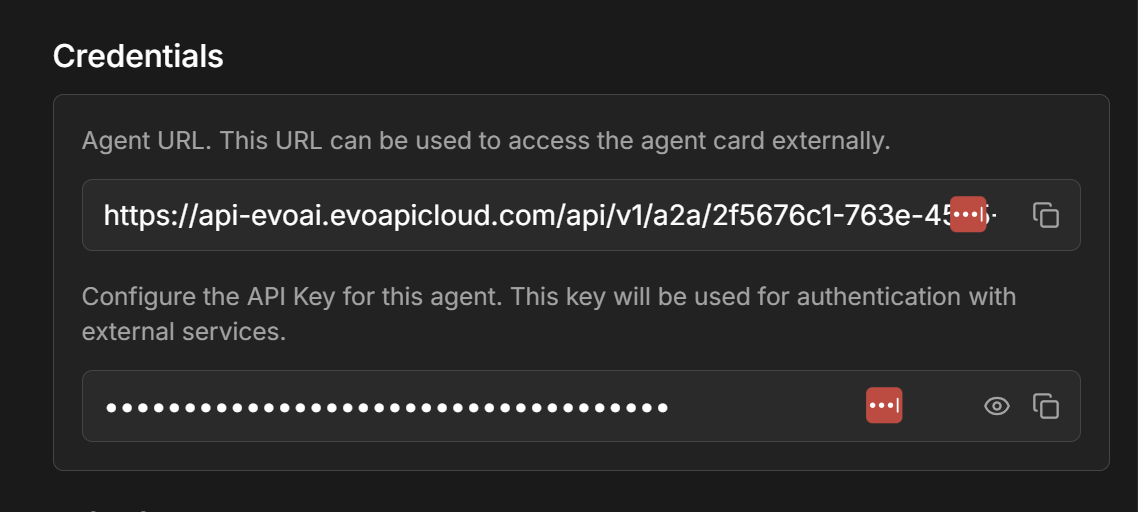
In the agent settings screen, you will find:
**API Key:**
* Unique key generated automatically
* Used for authentication in A2A calls
* Format: `evo_agent_xxxxxxxxxxxxxxxx`
**Agent URL:**
* Specific endpoint for A2A communication
* Format: `https://app.evo-ai.co/api/a2a/agent/{agent_id}`
* Used for direct calls to the agent
 These credentials are unique to each agent and remain valid as long as the agent exists.
## A2A Protocol (Agent 2 Agent)
### Basic Integration
The generated credentials allow external systems to communicate directly with your agents through the A2A protocol.
**Required components:**
* **API Key**: For authentication
* **Agent URL**: Endpoint for communication
* **Request format**: JSON with message and context
For complete details about the A2A protocol, visit the [specific documentation](/a2a-protocol).
**Security features:**
* 🔐 **Unique API Keys** per agent
* 🔄 **Configurable expiration tokens**
* 📊 **Detailed access logs**
* ⚠️ **Automatic rate limiting**
* 🛡️ **Request origin validation**
Keep your API Keys secure. They grant direct access to your agents.
## Troubleshooting
**API Key doesn't work:**
* Check if the API Key is correct and complete
* Confirm that the agent is active
* Test with a simple request first
* Check for extra characters or spaces
**Error 401 - Unauthorized:**
* API Key may be expired or invalid
* Check the Authorization header format
* Confirm you're using "Bearer" before the key
**Error 429 - Rate limit:**
* Too many requests in a short time
* Implement delay between calls
* Consider optimizing usage frequency
**Agent doesn't respond:**
* Check if the agent has API credits
* Confirm that the model is available
* Test the agent directly on the platform
* Check error logs in the dashboard
***
🔐 **Credentials configured!** Now you can integrate your agents with external systems using the A2A protocol securely and efficiently.
These credentials are unique to each agent and remain valid as long as the agent exists.
## A2A Protocol (Agent 2 Agent)
### Basic Integration
The generated credentials allow external systems to communicate directly with your agents through the A2A protocol.
**Required components:**
* **API Key**: For authentication
* **Agent URL**: Endpoint for communication
* **Request format**: JSON with message and context
For complete details about the A2A protocol, visit the [specific documentation](/a2a-protocol).
**Security features:**
* 🔐 **Unique API Keys** per agent
* 🔄 **Configurable expiration tokens**
* 📊 **Detailed access logs**
* ⚠️ **Automatic rate limiting**
* 🛡️ **Request origin validation**
Keep your API Keys secure. They grant direct access to your agents.
## Troubleshooting
**API Key doesn't work:**
* Check if the API Key is correct and complete
* Confirm that the agent is active
* Test with a simple request first
* Check for extra characters or spaces
**Error 401 - Unauthorized:**
* API Key may be expired or invalid
* Check the Authorization header format
* Confirm you're using "Bearer" before the key
**Error 429 - Rate limit:**
* Too many requests in a short time
* Implement delay between calls
* Consider optimizing usage frequency
**Agent doesn't respond:**
* Check if the agent has API credits
* Confirm that the model is available
* Test the agent directly on the platform
* Check error logs in the dashboard
***
🔐 **Credentials configured!** Now you can integrate your agents with external systems using the A2A protocol securely and efficiently.