> ## Documentation Index
> Fetch the complete documentation index at: https://docs.evo-ai.co/llms.txt
> Use this file to discover all available pages before exploring further.
# Workflow Agent
> Build complex workflows with visual interface using LangGraph and React Flow for advanced agent orchestration
## Overview
The **Workflow Agent** is the most advanced and flexible type of agent on the Evo AI platform. Using **LangGraph** as the execution engine and **React Flow** for visual interface, it allows creating complex workflows with multiple node types, conditions, delays, and sophisticated flow control.
Unlike other agent types (Sequential, Parallel, Loop), the Workflow Agent offers granular control over each step of the process, enabling the creation of complex business logic with conditional branching, custom loops, and advanced orchestration.
**Based on LangGraph**: Implementation using [LangGraph](https://langchain-ai.github.io/langgraph/) for workflow execution and React Flow for visual construction interface.
## Key Features
Drag-and-drop construction with React Flow for intuitive workflows
Robust execution based on LangGraph for complex workflows
Agent, Message, Condition and Delay nodes for maximum flexibility
Individual agent testing and complete workflow testing
## Node Types
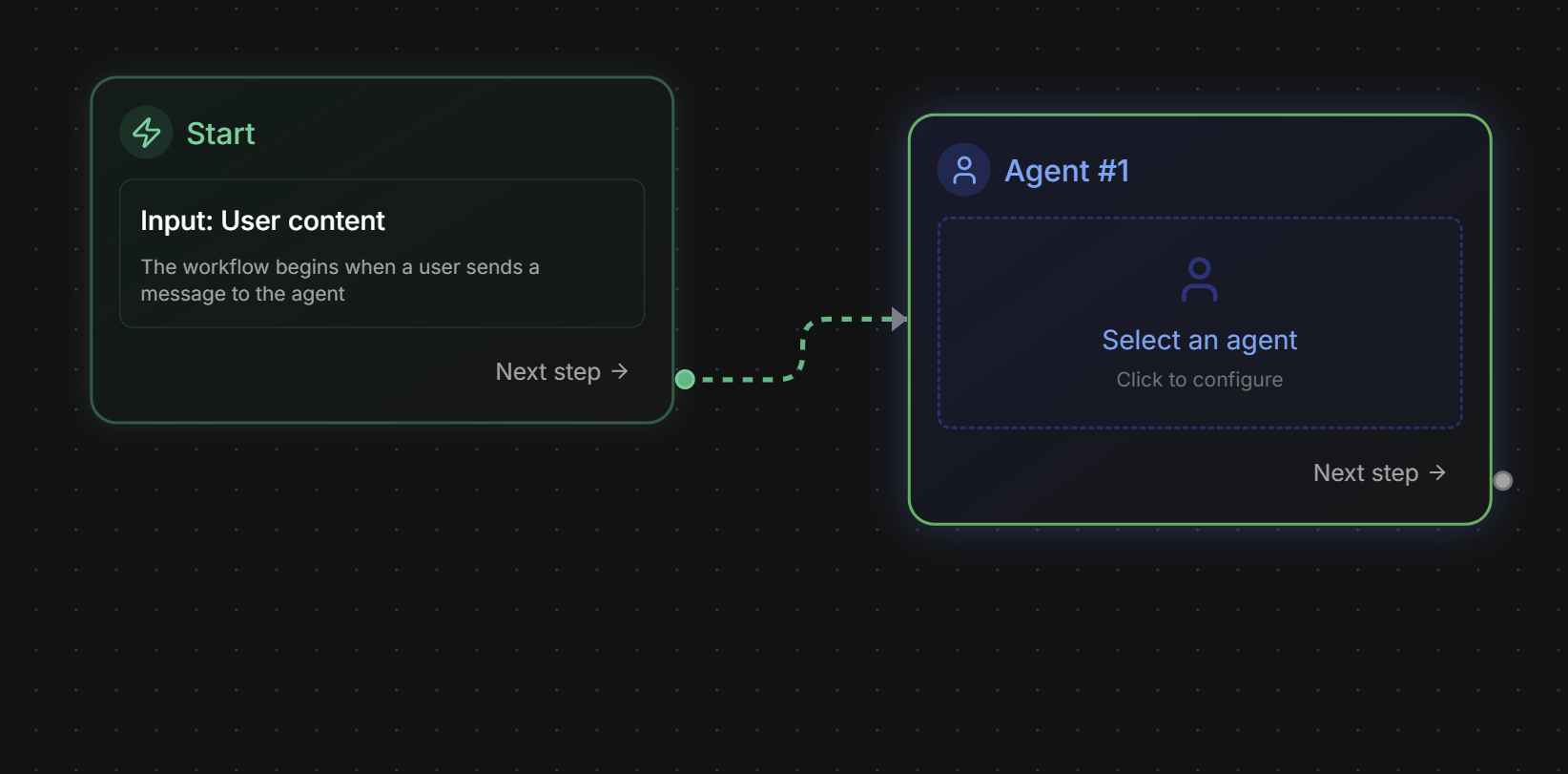
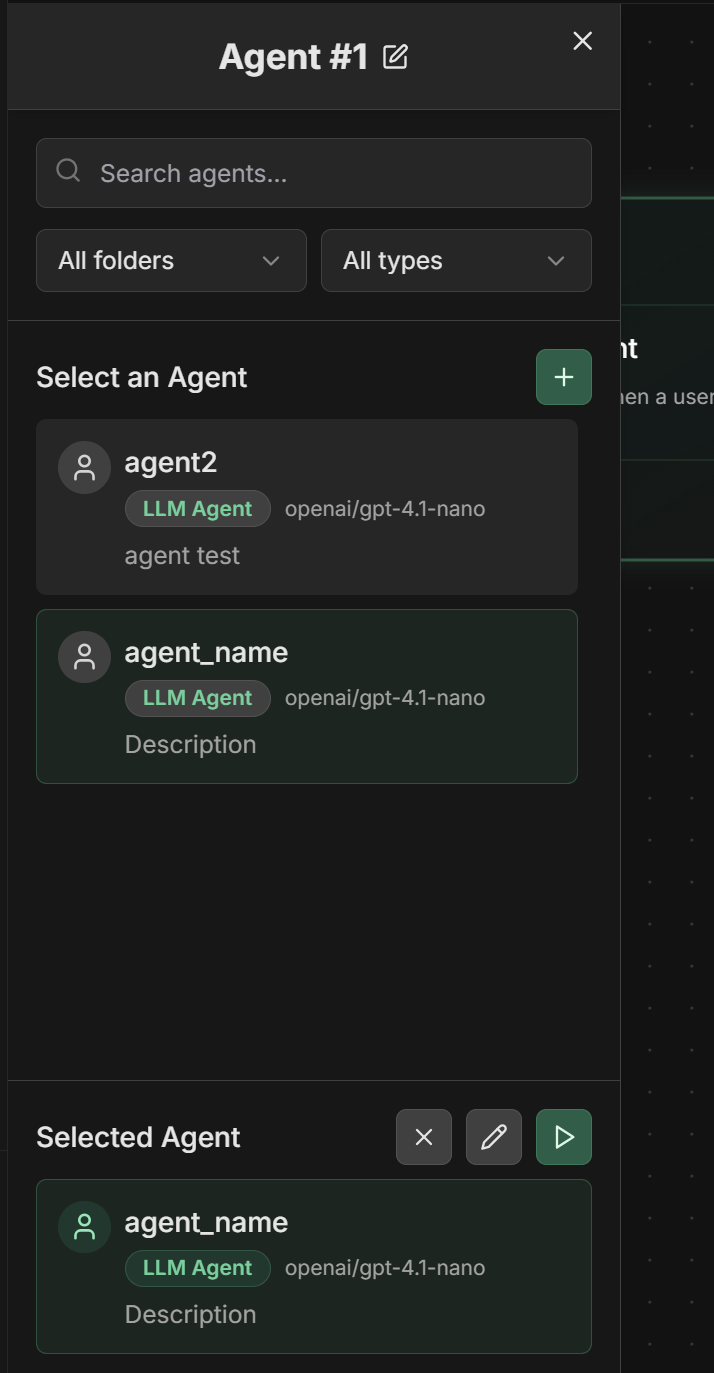
### 1. Agent Node
**Function:** Executes agents (new or existing) as part of the workflow
**Settings:**
* **Select Existing Agent**: Choose from agents already created on the platform
* **Create New Agent**: Inline creation of agent specific to the workflow
* **Edit Agent**: Modification of existing agents
* **Input Mapping**: Input data mapping
* **Output Key**: Key to store result in context
**Usage example:**
```
Agent Node: "Sentiment Analyzer"
- Agent: sentiment_analyzer (existing)
- Input: text from previous output
- Output Key: sentiment_analysis
```
 **Configuration form:**
 ### 2. Message Node
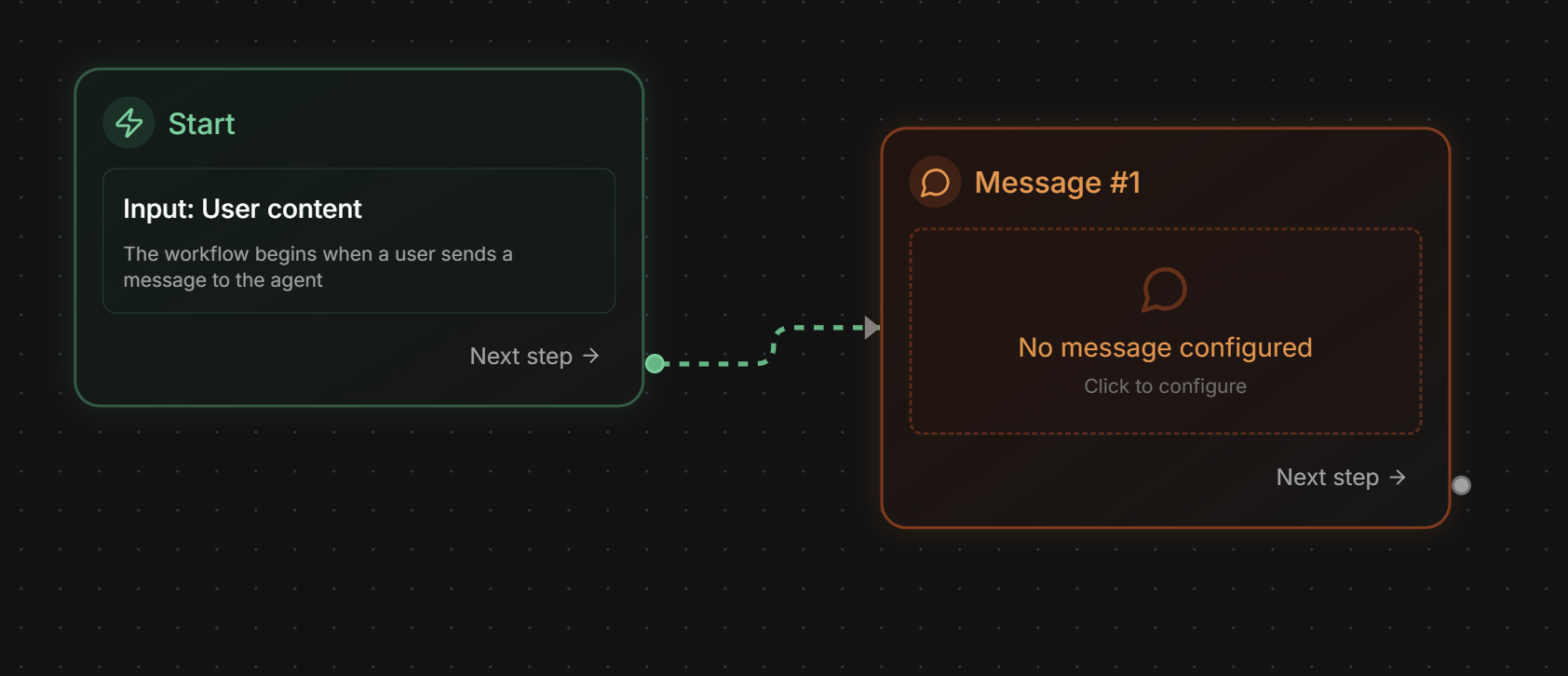
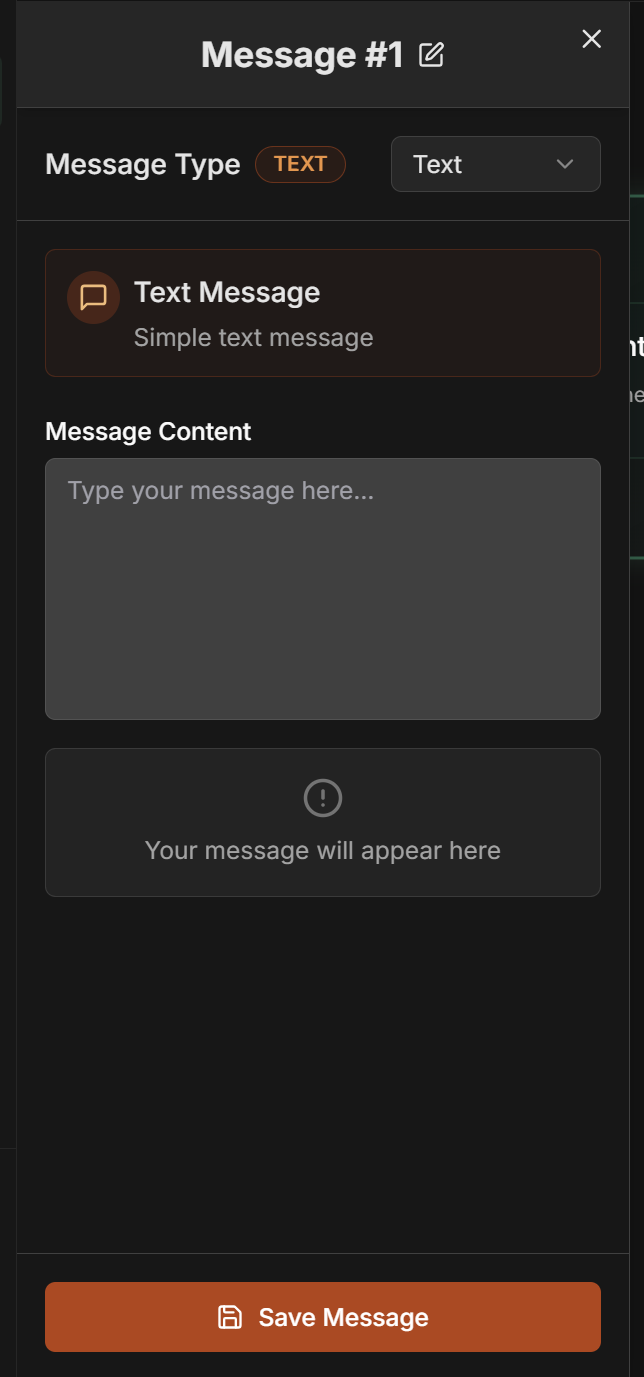
**Function:** Sends direct messages as agent in the flow, ideal for step control
**Settings:**
* **Type**: Message type (currently only "Text" available)
* **Content**: Message content to be sent
**Available type:**
* **Text**: Message in plain text format
**Configuration example:**
```
Type: Text
Content: Starting quality analysis of received content
```
**Practical use cases:**
* **Instructions for next nodes**: Specific guidance for subsequent agents
* **Status messages**: Information about workflow progress
* **Structured data**: Formatted information for processing
* **Context control**: Messages that define context between steps
* **Notifications**: Alerts about specific states or conditions
* **Process logs**: Records of important workflow steps
**Practical examples:**
**Analysis Instruction:**
```
Type: Text
Content: Analyze the document focusing on quality and compliance aspects
```
**Progress Status:**
```
Type: Text
Content: Validation step completed successfully, proceeding to approval
```
**Context for Next Step:**
```
Type: Text
Content: Document classified as high priority, apply accelerated process
```
### 2. Message Node
**Function:** Sends direct messages as agent in the flow, ideal for step control
**Settings:**
* **Type**: Message type (currently only "Text" available)
* **Content**: Message content to be sent
**Available type:**
* **Text**: Message in plain text format
**Configuration example:**
```
Type: Text
Content: Starting quality analysis of received content
```
**Practical use cases:**
* **Instructions for next nodes**: Specific guidance for subsequent agents
* **Status messages**: Information about workflow progress
* **Structured data**: Formatted information for processing
* **Context control**: Messages that define context between steps
* **Notifications**: Alerts about specific states or conditions
* **Process logs**: Records of important workflow steps
**Practical examples:**
**Analysis Instruction:**
```
Type: Text
Content: Analyze the document focusing on quality and compliance aspects
```
**Progress Status:**
```
Type: Text
Content: Validation step completed successfully, proceeding to approval
```
**Context for Next Step:**
```
Type: Text
Content: Document classified as high priority, apply accelerated process
```
 **Configuration form:**
 ### 3. Condition Node
**Function:** Checks output from previous node and directs execution based on conditions
**Condition Type:**
* **Previous output**: Validates the result returned by the previous node (only available type)
**Settings:**
* **Output Field**: Field from previous output to check (Content or Status)
* **Operator**: Comparison operator
* **Comparison Value**: Value for comparison
* **Preview**: Preview of configured condition
**Available Output fields:**
* **Content**: Content of the response from previous node
* **Status**: Execution status of previous node
**Available operators:**
**Existence Verification:**
* **is defined**: Checks if field is defined
* **is not defined**: Checks if field is not defined
**Equality Comparison:**
* **is equal to**: Field equals specified value
* **is not equal to**: Field does not equal specified value
**Content Verification:**
* **contains**: Field contains specified text
* **does not contain**: Field does not contain specified text
* **starts with**: Field starts with specified text
* **ends with**: Field ends with specified text
**Numeric Comparison:**
* **is greater than**: Field is greater than numeric value
* **is greater than or equal to**: Field is greater than or equal to value
* **is less than**: Field is less than numeric value
* **is less than or equal to**: Field is less than or equal to value
**Regular Expressions:**
* **matches the regex**: Field matches regular expression
* **does not match the regex**: Field does not match regex
**Configuration examples:**
**Complete Status Verification:**
```
Condition Type: Previous output
Output Field: Content
Operator: contains
Comparison Value: completed
Preview: Content contains "completed"
```
**Quality Score Verification:**
```
Condition Type: Previous output
Output Field: Content
Operator: contains
Comparison Value: "score": 8
Preview: Content contains "score": 8
```
**Execution Status Verification:**
```
Condition Type: Previous output
Output Field: Status
Operator: is equal to
Comparison Value: success
Preview: Status is equal to "success"
```
**Regex Verification:**
```
Condition Type: Previous output
Output Field: Content
Operator: matches the regex
Comparison Value: "confidence":\s*([0-9.]+)
Preview: Content matches the regex "confidence":\s*([0-9.]+)
```
**How to configure:**
1. Select **"Previous output"** as Condition Type
2. Choose the **Output Field** (Content or Status)
3. Select appropriate **Operator**
4. Enter the **Comparison Value**
5. Check the condition **Preview**
6. Configure True/False paths by connecting outputs
### 3. Condition Node
**Function:** Checks output from previous node and directs execution based on conditions
**Condition Type:**
* **Previous output**: Validates the result returned by the previous node (only available type)
**Settings:**
* **Output Field**: Field from previous output to check (Content or Status)
* **Operator**: Comparison operator
* **Comparison Value**: Value for comparison
* **Preview**: Preview of configured condition
**Available Output fields:**
* **Content**: Content of the response from previous node
* **Status**: Execution status of previous node
**Available operators:**
**Existence Verification:**
* **is defined**: Checks if field is defined
* **is not defined**: Checks if field is not defined
**Equality Comparison:**
* **is equal to**: Field equals specified value
* **is not equal to**: Field does not equal specified value
**Content Verification:**
* **contains**: Field contains specified text
* **does not contain**: Field does not contain specified text
* **starts with**: Field starts with specified text
* **ends with**: Field ends with specified text
**Numeric Comparison:**
* **is greater than**: Field is greater than numeric value
* **is greater than or equal to**: Field is greater than or equal to value
* **is less than**: Field is less than numeric value
* **is less than or equal to**: Field is less than or equal to value
**Regular Expressions:**
* **matches the regex**: Field matches regular expression
* **does not match the regex**: Field does not match regex
**Configuration examples:**
**Complete Status Verification:**
```
Condition Type: Previous output
Output Field: Content
Operator: contains
Comparison Value: completed
Preview: Content contains "completed"
```
**Quality Score Verification:**
```
Condition Type: Previous output
Output Field: Content
Operator: contains
Comparison Value: "score": 8
Preview: Content contains "score": 8
```
**Execution Status Verification:**
```
Condition Type: Previous output
Output Field: Status
Operator: is equal to
Comparison Value: success
Preview: Status is equal to "success"
```
**Regex Verification:**
```
Condition Type: Previous output
Output Field: Content
Operator: matches the regex
Comparison Value: "confidence":\s*([0-9.]+)
Preview: Content matches the regex "confidence":\s*([0-9.]+)
```
**How to configure:**
1. Select **"Previous output"** as Condition Type
2. Choose the **Output Field** (Content or Status)
3. Select appropriate **Operator**
4. Enter the **Comparison Value**
5. Check the condition **Preview**
6. Configure True/False paths by connecting outputs
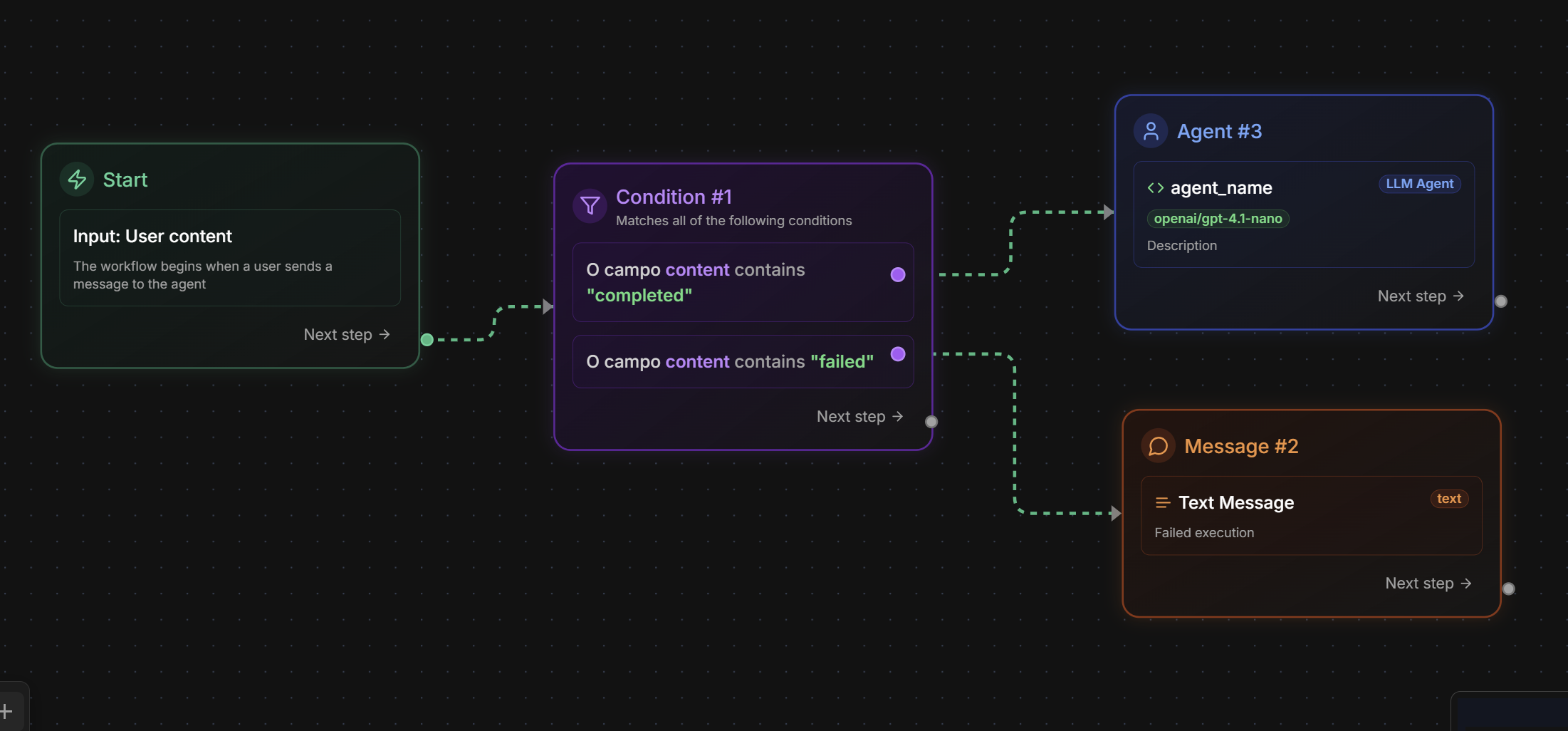 **Configuration form:**
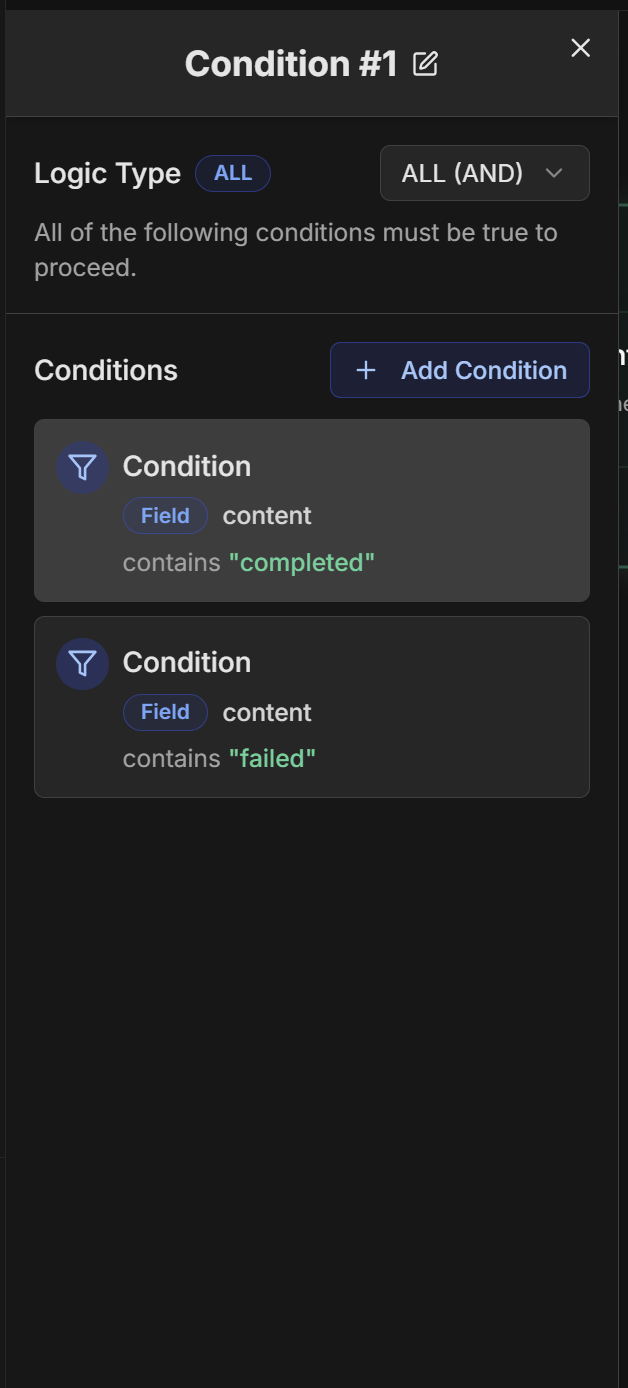 **Condition addition dialog:**
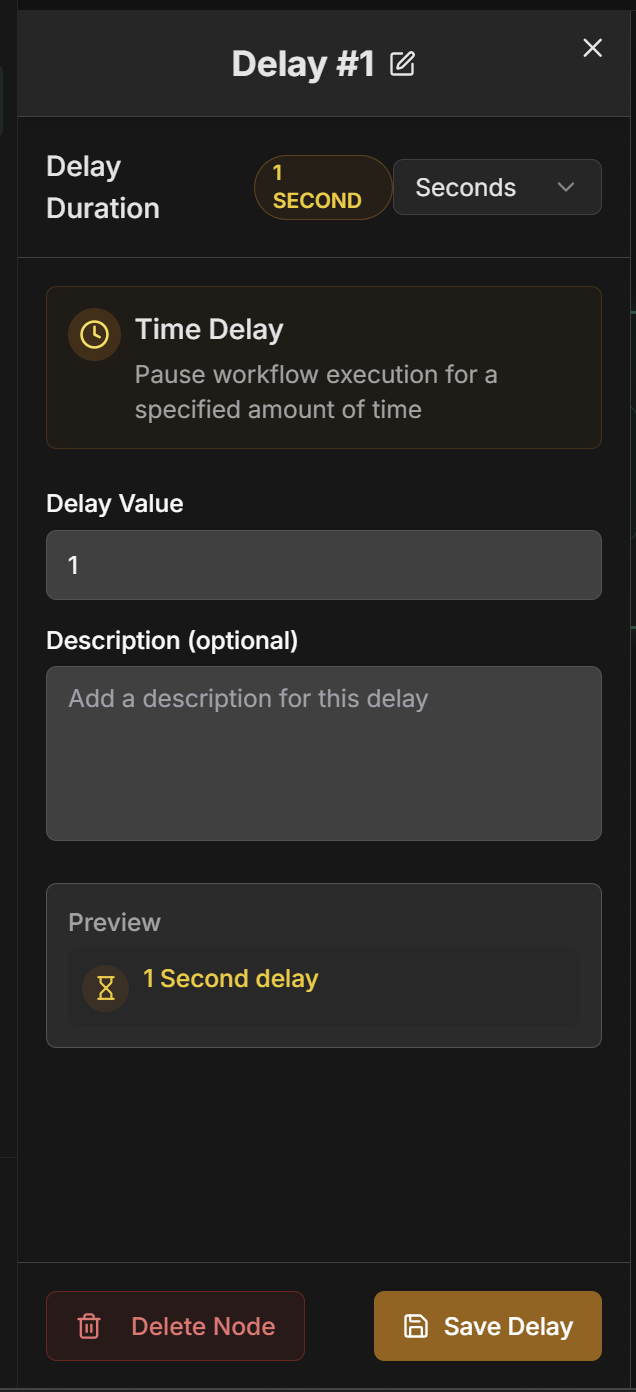
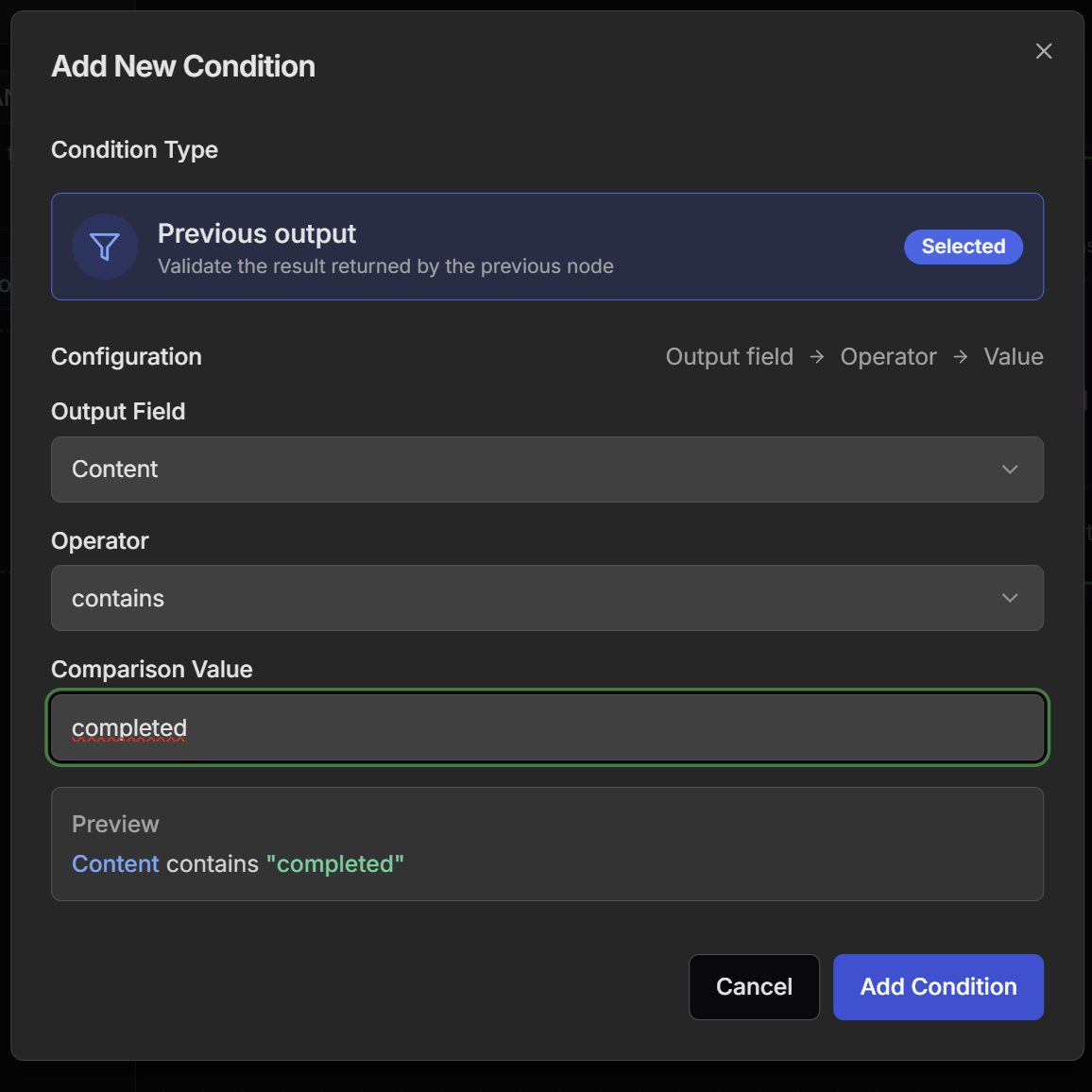 ### 4. Delay Node
**Function:** Adds simple delays in workflow for timing control
**Settings:**
* **Delay Value**: Numeric delay value
* **Time Unit**: Time unit (seconds, minutes, hours, days)
* **Description**: Optional description of delay purpose
**Available Time Units:**
* **Seconds**: For short delays (1-59 seconds)
* **Minutes**: For medium delays (1-59 minutes)
* **Hours**: For long delays (1-23 hours)
* **Days**: For very long delays (1+ days)
**Configuration examples:**
**Rate Limiting Delay:**
```
Delay Value: 30
Time Unit: Seconds
Description: Rate limiting between API calls
```
**Processing Delay:**
```
Delay Value: 5
Time Unit: Minutes
Description: Wait for external processing to complete
```
**Prioritization Delay:**
```
Delay Value: 1
Time Unit: Hours
Description: Delay for low priority leads
```
**Scheduling Delay:**
```
Delay Value: 1
Time Unit: Days
Description: Wait for next business day for processing
```
**Practical use cases:**
* **Rate limiting**: Avoid overloading external APIs
* **Wait for processing**: Time for external systems to process
* **Simulate human time**: Realistic delays in automations
* **Throughput control**: Manage processing speed
* **Scheduling**: Delays for specific times
* **Prioritization**: Different delays based on priority
### 4. Delay Node
**Function:** Adds simple delays in workflow for timing control
**Settings:**
* **Delay Value**: Numeric delay value
* **Time Unit**: Time unit (seconds, minutes, hours, days)
* **Description**: Optional description of delay purpose
**Available Time Units:**
* **Seconds**: For short delays (1-59 seconds)
* **Minutes**: For medium delays (1-59 minutes)
* **Hours**: For long delays (1-23 hours)
* **Days**: For very long delays (1+ days)
**Configuration examples:**
**Rate Limiting Delay:**
```
Delay Value: 30
Time Unit: Seconds
Description: Rate limiting between API calls
```
**Processing Delay:**
```
Delay Value: 5
Time Unit: Minutes
Description: Wait for external processing to complete
```
**Prioritization Delay:**
```
Delay Value: 1
Time Unit: Hours
Description: Delay for low priority leads
```
**Scheduling Delay:**
```
Delay Value: 1
Time Unit: Days
Description: Wait for next business day for processing
```
**Practical use cases:**
* **Rate limiting**: Avoid overloading external APIs
* **Wait for processing**: Time for external systems to process
* **Simulate human time**: Realistic delays in automations
* **Throughput control**: Manage processing speed
* **Scheduling**: Delays for specific times
* **Prioritization**: Different delays based on priority
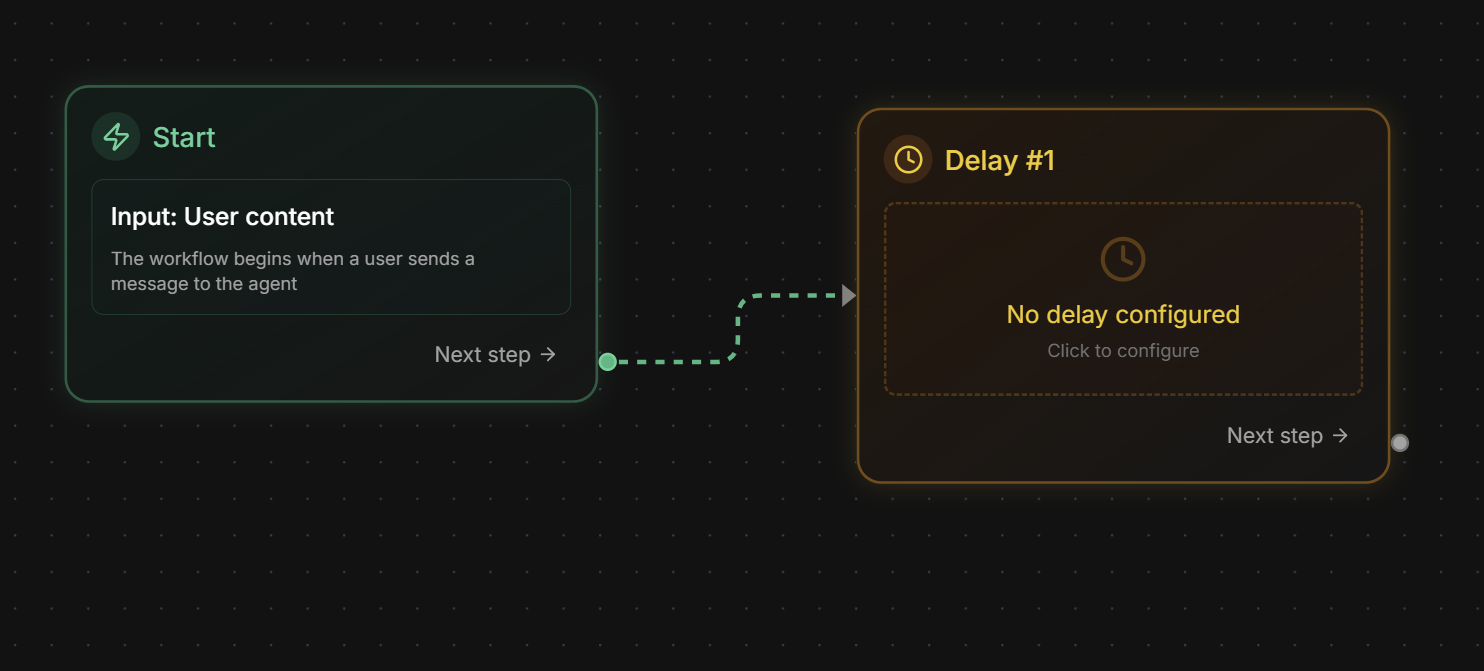 **Configuration form:**
 ## Creating a Workflow Agent
### Step by Step on the Platform
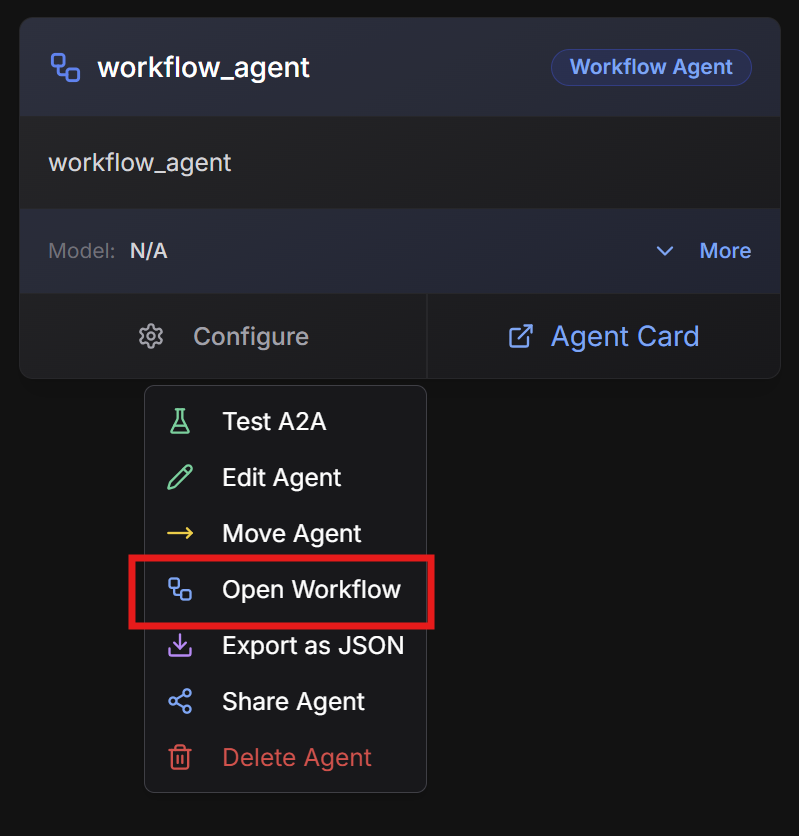
1. On the Evo AI main screen, click **"New Agent"**
2. In the **"Type"** field, select **"Workflow Agent"**
3. You will see the React Flow visual interface
## Creating a Workflow Agent
### Step by Step on the Platform
1. On the Evo AI main screen, click **"New Agent"**
2. In the **"Type"** field, select **"Workflow Agent"**
3. You will see the React Flow visual interface
 **Name:** Descriptive workflow name
```
Example: content_approval_pipeline
```
**Description:** Complex workflow summary
```
Example: Complete workflow for content approval with
automatic analysis, conditional review and final approval
```
**Goal:** Workflow objective
```
Example: Automate content approval process ensuring
quality through multiple verifications and conditional approvals
```
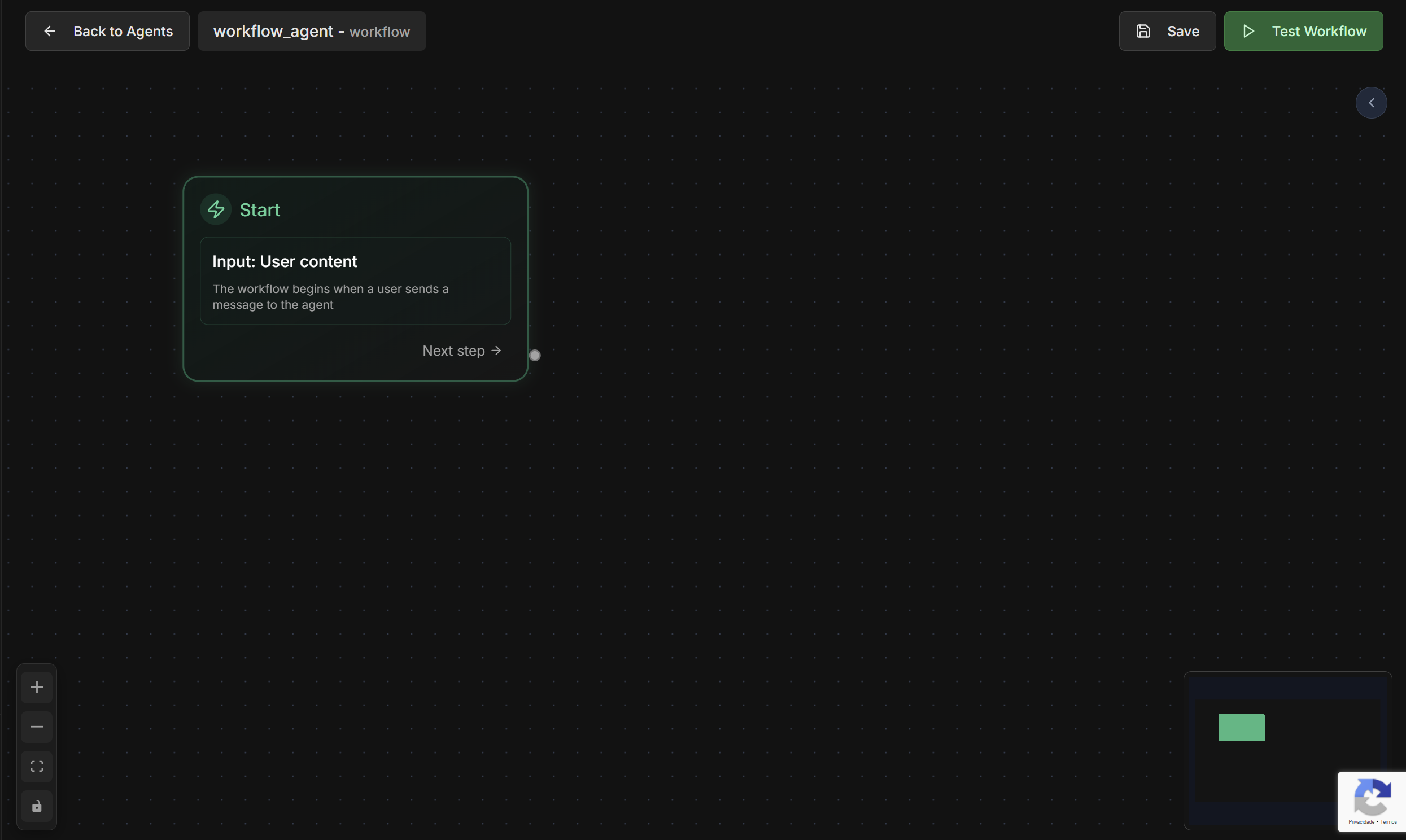
**React Flow Interface:**
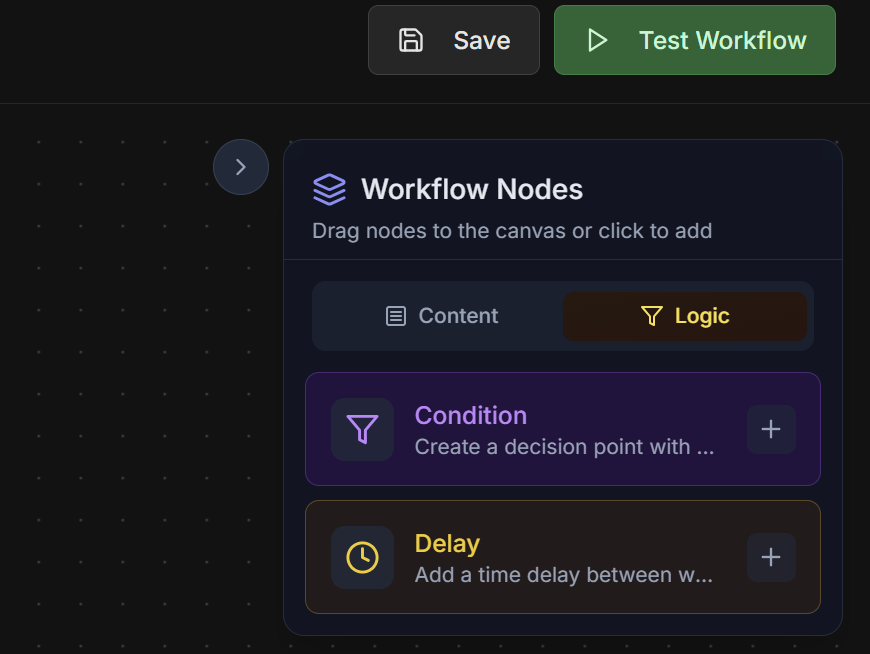
**Node Palette:** Drag nodes from palette to canvas
* 🤖 **Agent Node** - To execute agents
* 💬 **Message Node** - For direct messages
* 🔀 **Condition Node** - For conditional logic
* ⏱️ **Delay Node** - For time delays
**Connections:** Connect nodes by dragging from outputs to inputs
**Configuration:** Double-click any node to configure
**Name:** Descriptive workflow name
```
Example: content_approval_pipeline
```
**Description:** Complex workflow summary
```
Example: Complete workflow for content approval with
automatic analysis, conditional review and final approval
```
**Goal:** Workflow objective
```
Example: Automate content approval process ensuring
quality through multiple verifications and conditional approvals
```
**React Flow Interface:**
**Node Palette:** Drag nodes from palette to canvas
* 🤖 **Agent Node** - To execute agents
* 💬 **Message Node** - For direct messages
* 🔀 **Condition Node** - For conditional logic
* ⏱️ **Delay Node** - For time delays
**Connections:** Connect nodes by dragging from outputs to inputs
**Configuration:** Double-click any node to configure
 **Content Nodes Menu:**
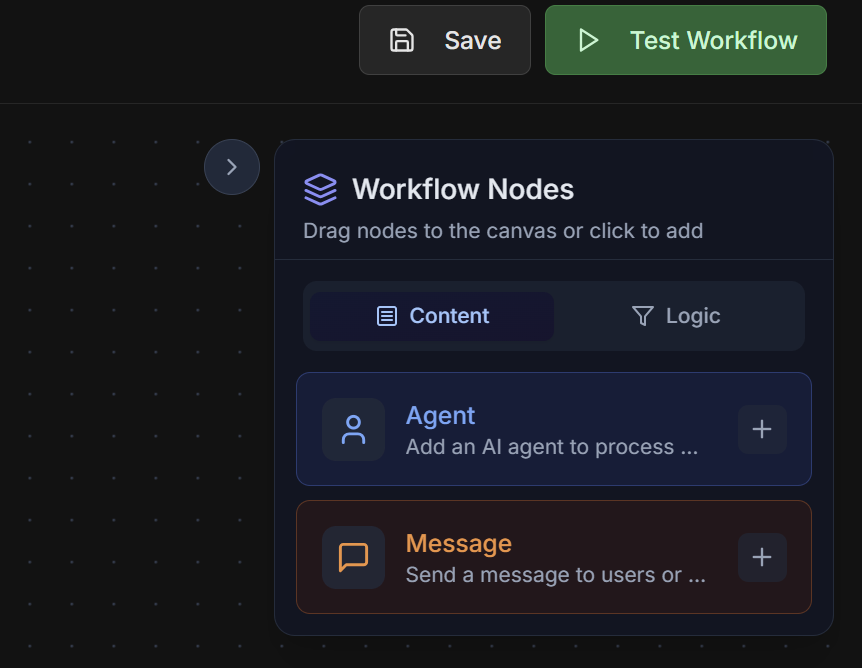 **Logic Nodes Menu:**
 **For each node in the workflow:**
**Agent Nodes:**
* Select existing agent or create new
* Configure input mapping
* Define output key
**Message Nodes:**
* Write message content
* Use context variables
* Configure message type
**Condition Nodes:**
* Define verification logic
* Configure true/false paths
* Test conditions
**Delay Nodes:**
* Configure duration
* Define skip conditions
* Configure dynamic delays
**Connections between nodes:**
* Drag from one node's output to the next's input
* Validate that all connections make sense
* Configure multiple outputs for Condition Nodes
**Automatic validation:**
* Infinite loop verification
* Data type validation
* Orphan node checking
* Complete path verification
**Start and End nodes:**
* Every workflow needs a Start node
* Configure End nodes for different scenarios
## Practical Examples
### 1. Content Approval Pipeline
**Objective:** Automate content approval with multiple verifications
**Workflow flow:**
```
START
↓
[Message: Initial Instruction]
↓
[Agent: Quality Analyzer]
↓
[Condition: Score >= 8.0?]
├─ TRUE → [Agent: Automatic Approval] → [Message: Content Approved] → END
└─ FALSE → [Agent: Manual Review]
↓
[Condition: Approved in Review?]
├─ TRUE → [Message: Content Approved] → END
└─ FALSE → [Agent: Correction Request]
↓
[Delay: 1 hour]
↓
[back to Quality Analyzer]
```
**Detailed configuration:**
**1. Message Node: "Initial Instruction"**
```
Type: Text
Content: Starting quality analysis of received content
```
**2. Agent Node: "Quality Analyzer"**
```
Agent: content_quality_analyzer
Input: content and quality criteria
Output Key: quality_analysis
```
**3. Condition Node: "Score >= 8.0?"**
```
Condition Type: Previous output
Output Field: Content
Operator: contains
Comparison Value: score >= 8.0
Preview: Content contains "score": 8
```
**4. Agent Node: "Automatic Approval"**
```
Agent: auto_approver
Input: content and quality analysis
Output Key: approval_result
```
**5. Agent Node: "Manual Review"**
```
Agent: manual_reviewer
Input: content and identified issues
Output Key: manual_review
```
**6. Condition Node: "Approved in Review?"**
```
Condition Type: Previous output
Output Field: Status
Operator: is equal to
Comparison Value: approved
Preview: Status is equal to "approved"
```
**7. Delay Node: "1 hour"**
```
Delay Value: 1
Time Unit: Hours
Description: Wait before new analysis
```
### 2. Lead Analysis Workflow
**Objective:** Process leads with intelligent analysis and automatic routing
**Workflow flow:**
```
START
↓
[Agent: Data Enricher]
↓
[Agent: Lead Scorer]
↓
[Condition: Score > 70?]
├─ TRUE → [Condition: Score > 90?]
│ ├─ TRUE → [Agent: VIP Router] → [Delay: 5 min] → [Agent: Notifier] → END
│ └─ FALSE → [Agent: Normal Router] → [Delay: 30 min] → [Agent: Notifier] → END
└─ FALSE → [Message: Lead Discarded] → END
```
**Main nodes:**
**1. Agent Node: "Data Enricher"**
* Enriches lead data with public information
* Output: enriched\_data
**2. Agent Node: "Lead Scorer"**
* Calculates score based on criteria
* Input: enriched\_data
* Output: lead\_score
**3. Condition Node: "Score > 70?"**
* Filters low quality leads
* Condition: score greater than 70
**4. Condition Node: "Score > 90?"**
* Identifies VIP leads
* Condition: score greater than 90
**5. Agent Nodes: "Routers"**
* VIP Router: For senior salespeople
* Normal Router: For standard salespeople
**6. Delay Nodes: "Prioritization"**
* VIP: 5 minutes (high priority)
* Normal: 30 minutes (standard priority)
### 3. Document Processing Workflow
**Objective:** Process documents with validation and automatic approval
**Complex flow with loops:**
```
START
↓
[Agent: Data Extractor]
↓
[Agent: Format Validator]
↓
[Condition: Valid Format?]
├─ FALSE → [Message: Format Error] → END
└─ TRUE → [Agent: Content Analyzer]
↓
[Condition: Complete Content?]
├─ FALSE → [Agent: Data Requester]
│ ↓
│ [Delay: Wait for Response]
│ ↓
│ [Condition: Data Received?]
│ ├─ TRUE → [back to Content Analyzer]
│ └─ FALSE → [Message: Timeout] → END
└─ TRUE → [Agent: Compliance Checker]
↓
[Condition: Compliance OK?]
├─ TRUE → [Agent: Final Approver] → [Message: Document Approved] → END
└─ FALSE → [Agent: Rejecter] → [Message: Document Rejected] → END
```
## Testing Features
### Individual Agent Testing
**Testing individual agents within the workflow:**
**How to use:**
1. Click on any Agent Node in the workflow
2. Select **"Test Agent"** from context menu
3. Configure test inputs
4. Execute isolated test
5. Analyze outputs and performance
**Benefits:**
* Quick validation of individual agents
* Debug specific issues
* Test different inputs
* Verify expected outputs
**Test interface:**
```
Agent Test: content_quality_analyzer
Input:
{
"content": "Sample text for analysis...",
"criteria": ["grammar", "clarity", "engagement"]
}
Expected Output:
{
"score": 8.5,
"issues": [],
"recommendations": [...]
}
```
### Complete Workflow Testing
**Complete workflow testing with real data:**
**How to use:**
1. Click **"Test Workflow"** in the top bar
2. Configure initial workflow inputs
3. Execute complete test
4. Monitor real-time execution
5. Analyze final results
**Test features:**
* **Step-by-step execution**: See each node being executed
* **Data visualization**: Track data flowing between nodes
* **Breakpoints**: Pause execution at specific nodes
* **Detailed logs**: Complete execution records
* **Performance metrics**: Execution time per node
**Test interface:**
```
Workflow Test: content_approval_pipeline
Status: Running
Current Node: Agent - Quality Analyzer
Progress: 3/8 nodes completed
Execution Log:
├── [14:32:15] Start - Workflow initiated
├── [14:32:16] Message - Instruction sent
├── [14:32:17] Agent - Analysis started
└── [14:32:20] Agent - Analysis in progress...
Data Flow:
├── input_content: "Article about AI..."
├── start_message: "Starting analysis..."
└── quality_analysis: { score: 7.5, ... }
```
**Workflow test interface:**
**For each node in the workflow:**
**Agent Nodes:**
* Select existing agent or create new
* Configure input mapping
* Define output key
**Message Nodes:**
* Write message content
* Use context variables
* Configure message type
**Condition Nodes:**
* Define verification logic
* Configure true/false paths
* Test conditions
**Delay Nodes:**
* Configure duration
* Define skip conditions
* Configure dynamic delays
**Connections between nodes:**
* Drag from one node's output to the next's input
* Validate that all connections make sense
* Configure multiple outputs for Condition Nodes
**Automatic validation:**
* Infinite loop verification
* Data type validation
* Orphan node checking
* Complete path verification
**Start and End nodes:**
* Every workflow needs a Start node
* Configure End nodes for different scenarios
## Practical Examples
### 1. Content Approval Pipeline
**Objective:** Automate content approval with multiple verifications
**Workflow flow:**
```
START
↓
[Message: Initial Instruction]
↓
[Agent: Quality Analyzer]
↓
[Condition: Score >= 8.0?]
├─ TRUE → [Agent: Automatic Approval] → [Message: Content Approved] → END
└─ FALSE → [Agent: Manual Review]
↓
[Condition: Approved in Review?]
├─ TRUE → [Message: Content Approved] → END
└─ FALSE → [Agent: Correction Request]
↓
[Delay: 1 hour]
↓
[back to Quality Analyzer]
```
**Detailed configuration:**
**1. Message Node: "Initial Instruction"**
```
Type: Text
Content: Starting quality analysis of received content
```
**2. Agent Node: "Quality Analyzer"**
```
Agent: content_quality_analyzer
Input: content and quality criteria
Output Key: quality_analysis
```
**3. Condition Node: "Score >= 8.0?"**
```
Condition Type: Previous output
Output Field: Content
Operator: contains
Comparison Value: score >= 8.0
Preview: Content contains "score": 8
```
**4. Agent Node: "Automatic Approval"**
```
Agent: auto_approver
Input: content and quality analysis
Output Key: approval_result
```
**5. Agent Node: "Manual Review"**
```
Agent: manual_reviewer
Input: content and identified issues
Output Key: manual_review
```
**6. Condition Node: "Approved in Review?"**
```
Condition Type: Previous output
Output Field: Status
Operator: is equal to
Comparison Value: approved
Preview: Status is equal to "approved"
```
**7. Delay Node: "1 hour"**
```
Delay Value: 1
Time Unit: Hours
Description: Wait before new analysis
```
### 2. Lead Analysis Workflow
**Objective:** Process leads with intelligent analysis and automatic routing
**Workflow flow:**
```
START
↓
[Agent: Data Enricher]
↓
[Agent: Lead Scorer]
↓
[Condition: Score > 70?]
├─ TRUE → [Condition: Score > 90?]
│ ├─ TRUE → [Agent: VIP Router] → [Delay: 5 min] → [Agent: Notifier] → END
│ └─ FALSE → [Agent: Normal Router] → [Delay: 30 min] → [Agent: Notifier] → END
└─ FALSE → [Message: Lead Discarded] → END
```
**Main nodes:**
**1. Agent Node: "Data Enricher"**
* Enriches lead data with public information
* Output: enriched\_data
**2. Agent Node: "Lead Scorer"**
* Calculates score based on criteria
* Input: enriched\_data
* Output: lead\_score
**3. Condition Node: "Score > 70?"**
* Filters low quality leads
* Condition: score greater than 70
**4. Condition Node: "Score > 90?"**
* Identifies VIP leads
* Condition: score greater than 90
**5. Agent Nodes: "Routers"**
* VIP Router: For senior salespeople
* Normal Router: For standard salespeople
**6. Delay Nodes: "Prioritization"**
* VIP: 5 minutes (high priority)
* Normal: 30 minutes (standard priority)
### 3. Document Processing Workflow
**Objective:** Process documents with validation and automatic approval
**Complex flow with loops:**
```
START
↓
[Agent: Data Extractor]
↓
[Agent: Format Validator]
↓
[Condition: Valid Format?]
├─ FALSE → [Message: Format Error] → END
└─ TRUE → [Agent: Content Analyzer]
↓
[Condition: Complete Content?]
├─ FALSE → [Agent: Data Requester]
│ ↓
│ [Delay: Wait for Response]
│ ↓
│ [Condition: Data Received?]
│ ├─ TRUE → [back to Content Analyzer]
│ └─ FALSE → [Message: Timeout] → END
└─ TRUE → [Agent: Compliance Checker]
↓
[Condition: Compliance OK?]
├─ TRUE → [Agent: Final Approver] → [Message: Document Approved] → END
└─ FALSE → [Agent: Rejecter] → [Message: Document Rejected] → END
```
## Testing Features
### Individual Agent Testing
**Testing individual agents within the workflow:**
**How to use:**
1. Click on any Agent Node in the workflow
2. Select **"Test Agent"** from context menu
3. Configure test inputs
4. Execute isolated test
5. Analyze outputs and performance
**Benefits:**
* Quick validation of individual agents
* Debug specific issues
* Test different inputs
* Verify expected outputs
**Test interface:**
```
Agent Test: content_quality_analyzer
Input:
{
"content": "Sample text for analysis...",
"criteria": ["grammar", "clarity", "engagement"]
}
Expected Output:
{
"score": 8.5,
"issues": [],
"recommendations": [...]
}
```
### Complete Workflow Testing
**Complete workflow testing with real data:**
**How to use:**
1. Click **"Test Workflow"** in the top bar
2. Configure initial workflow inputs
3. Execute complete test
4. Monitor real-time execution
5. Analyze final results
**Test features:**
* **Step-by-step execution**: See each node being executed
* **Data visualization**: Track data flowing between nodes
* **Breakpoints**: Pause execution at specific nodes
* **Detailed logs**: Complete execution records
* **Performance metrics**: Execution time per node
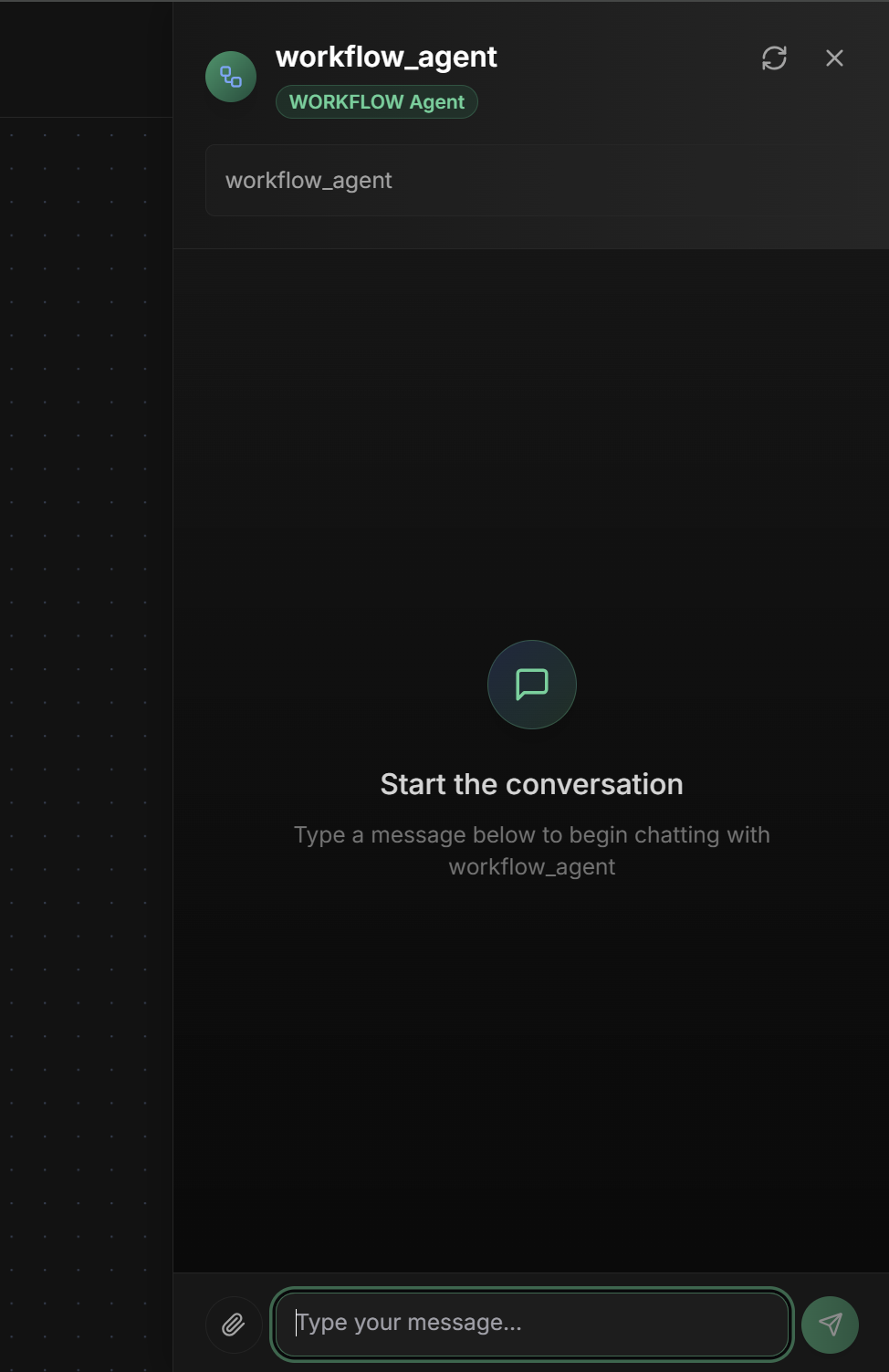
**Test interface:**
```
Workflow Test: content_approval_pipeline
Status: Running
Current Node: Agent - Quality Analyzer
Progress: 3/8 nodes completed
Execution Log:
├── [14:32:15] Start - Workflow initiated
├── [14:32:16] Message - Instruction sent
├── [14:32:17] Agent - Analysis started
└── [14:32:20] Agent - Analysis in progress...
Data Flow:
├── input_content: "Article about AI..."
├── start_message: "Starting analysis..."
└── quality_analysis: { score: 7.5, ... }
```
**Workflow test interface:**
 ## Monitoring and Debugging
### Execution Dashboard
**Visual execution tracking:**
**React Flow Visualization:**
* Active nodes highlighted in green
* Completed nodes marked with ✓
* Error nodes marked with ✗
* Data flow visualized in connections
**Metrics per node:**
```
Node Performance:
├── Agent: Quality Analyzer
│ ├── Executions: 1,247
│ ├── Avg Duration: 3.2s
│ ├── Success Rate: 98.5%
│ └── Last Error: 2 days ago
├── Condition: Score >= 8.0
│ ├── True Path: 65% (812 times)
│ ├── False Path: 35% (435 times)
│ └── Avg Evaluation: 0.1s
└── Delay: 1 hour
├── Skipped: 15% (delays skipped)
├── Executed: 85%
└── Avg Delay: 3600s
```
**Alerts and notifications:**
* Execution failures
* Node timeouts
* Infinite loops detected
* Performance degradation
**Specific debugging tools:**
**1. Visual Breakpoints**
```
- Click any node to add breakpoint
- Execution pauses before node
- Inspect current context state
- Continue step-by-step execution
```
**2. Data Inspector**
```
- Visualize data at each workflow point
- Transformation history
- Data type validation
- Corrupted data detection
```
**3. Execution Replay**
```
- Replay previous executions
- Compare between executions
- Identify regressions
- Analyze failure patterns
```
**4. Performance Profiler**
```
- Identify bottlenecks
- Resource usage analysis
- Optimize slow nodes
- Improvement suggestions
```
## Advanced Settings
### Performance Optimization
**Strategies for efficient workflows:**
**Intelligent Parallelization:**
```
- Identify nodes that can execute in parallel
- Configure parallel branches in workflow
- Use merge nodes to synchronize results
```
**Result Caching:**
```
- Cache outputs from deterministic nodes
- Configure TTL based on data nature
- Invalidate cache when necessary
```
**Resource Management:**
```
- Limit resources per node
- Configure connection pools
- Manage memory between executions
```
**Settings for robust workflows:**
**Error Handling:**
```
- Configure retry policies per node
- Implement fallback paths
- Use circuit breakers for external nodes
```
**State Management:**
```
- Persist state between executions
- Configure automatic checkpoints
- Implement recovery mechanisms
```
**Monitoring and Alerting:**
```
- Configure alerts for failures
- Monitor execution SLAs
- Implement health checks
```
**`Output Key` field in interface:**
The Output Key allows the Workflow Agent to save the final result of the complex workflow in a specific variable in the shared state, making it available to other agents or processes.
**How it works:**
* Configure the `Output Key` field with a descriptive name
* The final workflow result (last executed node) will be saved automatically
* Other agents can access using placeholders `{{output_key_name}}`
* Works in nested workflows, loops and multi-agent systems
**Configuration examples:**
```markdown theme={null}
Output Key: "content_approval_result"
→ Saves final result in state.content_approval_result
Output Key: "lead_processing_complete"
→ Saves final result in state.lead_processing_complete
Output Key: "data_pipeline_result"
→ Saves final result in state.data_pipeline_result
```
**Workflow result:**
```json theme={null}
{
"workflow_summary": {
"total_nodes": 12,
"executed_nodes": 10,
"skipped_nodes": 2,
"execution_time": "2m 15s",
"final_status": "completed"
},
"final_result": {
"decision": "approved",
"confidence": 0.95,
"details": {...}
},
"execution_path": [
"start_node",
"validation_node",
"analysis_node",
"decision_node",
"end_node"
]
}
```
**Usage in other agents:**
```markdown theme={null}
# In subsequent agent instructions:
"Analyze the request: {{user_input}} and use approval result: {{content_approval_result}}"
"Based on processing: {{lead_processing_complete}}"
"Analyze processed data: {{data_pipeline_result}}"
```
**Best practices:**
* Use snake\_case: `workflow_result`, `process_complete`
* Be specific: `credit_approval_workflow` instead of `workflow`
* Document final result structure
* Consider including execution metadata (path, timing, status)
* Use names that reflect business process
* Configure last node to produce structured result
## Best Practices
**Principles for effective workflows:**
* **Modularity**: Divide complex workflows into sub-workflows
* **Idempotence**: Ensure re-executions are safe
* **Observability**: Add adequate logging and monitoring
* **Error handling**: Handle failures gracefully
* **Performance**: Optimize critical paths
**Team practices:**
* **Documentation**: Document purpose of each node
* **Versioning**: Use version control for workflows
* **Testing**: Implement automated tests
* **Code review**: Review workflows before production
* **Monitoring**: Monitor performance and reliability
## Common Use Cases
**Quality Workflows:**
* Automatic quality analysis
* Conditional approval
* Correction loops
**Intelligent Qualification:**
* Data enrichment
* Automatic scoring
* Intelligent routing
**Business Process Automation:**
* Approval workflows
* Document processing
* System integration
**Data Pipelines:**
* Complex ETL
* Multi-step analysis
* Automatic reports
## Next Steps
Compare with simple sequential workflows
Understand basic parallel execution
Explore simple iterative loops
Integrate external agents in workflows
***
The Workflow Agent is the most powerful tool for creating complex automations. Use it when you need granular control over each step of the process and sophisticated business logic with multiple conditions and execution paths.
## Monitoring and Debugging
### Execution Dashboard
**Visual execution tracking:**
**React Flow Visualization:**
* Active nodes highlighted in green
* Completed nodes marked with ✓
* Error nodes marked with ✗
* Data flow visualized in connections
**Metrics per node:**
```
Node Performance:
├── Agent: Quality Analyzer
│ ├── Executions: 1,247
│ ├── Avg Duration: 3.2s
│ ├── Success Rate: 98.5%
│ └── Last Error: 2 days ago
├── Condition: Score >= 8.0
│ ├── True Path: 65% (812 times)
│ ├── False Path: 35% (435 times)
│ └── Avg Evaluation: 0.1s
└── Delay: 1 hour
├── Skipped: 15% (delays skipped)
├── Executed: 85%
└── Avg Delay: 3600s
```
**Alerts and notifications:**
* Execution failures
* Node timeouts
* Infinite loops detected
* Performance degradation
**Specific debugging tools:**
**1. Visual Breakpoints**
```
- Click any node to add breakpoint
- Execution pauses before node
- Inspect current context state
- Continue step-by-step execution
```
**2. Data Inspector**
```
- Visualize data at each workflow point
- Transformation history
- Data type validation
- Corrupted data detection
```
**3. Execution Replay**
```
- Replay previous executions
- Compare between executions
- Identify regressions
- Analyze failure patterns
```
**4. Performance Profiler**
```
- Identify bottlenecks
- Resource usage analysis
- Optimize slow nodes
- Improvement suggestions
```
## Advanced Settings
### Performance Optimization
**Strategies for efficient workflows:**
**Intelligent Parallelization:**
```
- Identify nodes that can execute in parallel
- Configure parallel branches in workflow
- Use merge nodes to synchronize results
```
**Result Caching:**
```
- Cache outputs from deterministic nodes
- Configure TTL based on data nature
- Invalidate cache when necessary
```
**Resource Management:**
```
- Limit resources per node
- Configure connection pools
- Manage memory between executions
```
**Settings for robust workflows:**
**Error Handling:**
```
- Configure retry policies per node
- Implement fallback paths
- Use circuit breakers for external nodes
```
**State Management:**
```
- Persist state between executions
- Configure automatic checkpoints
- Implement recovery mechanisms
```
**Monitoring and Alerting:**
```
- Configure alerts for failures
- Monitor execution SLAs
- Implement health checks
```
**`Output Key` field in interface:**
The Output Key allows the Workflow Agent to save the final result of the complex workflow in a specific variable in the shared state, making it available to other agents or processes.
**How it works:**
* Configure the `Output Key` field with a descriptive name
* The final workflow result (last executed node) will be saved automatically
* Other agents can access using placeholders `{{output_key_name}}`
* Works in nested workflows, loops and multi-agent systems
**Configuration examples:**
```markdown theme={null}
Output Key: "content_approval_result"
→ Saves final result in state.content_approval_result
Output Key: "lead_processing_complete"
→ Saves final result in state.lead_processing_complete
Output Key: "data_pipeline_result"
→ Saves final result in state.data_pipeline_result
```
**Workflow result:**
```json theme={null}
{
"workflow_summary": {
"total_nodes": 12,
"executed_nodes": 10,
"skipped_nodes": 2,
"execution_time": "2m 15s",
"final_status": "completed"
},
"final_result": {
"decision": "approved",
"confidence": 0.95,
"details": {...}
},
"execution_path": [
"start_node",
"validation_node",
"analysis_node",
"decision_node",
"end_node"
]
}
```
**Usage in other agents:**
```markdown theme={null}
# In subsequent agent instructions:
"Analyze the request: {{user_input}} and use approval result: {{content_approval_result}}"
"Based on processing: {{lead_processing_complete}}"
"Analyze processed data: {{data_pipeline_result}}"
```
**Best practices:**
* Use snake\_case: `workflow_result`, `process_complete`
* Be specific: `credit_approval_workflow` instead of `workflow`
* Document final result structure
* Consider including execution metadata (path, timing, status)
* Use names that reflect business process
* Configure last node to produce structured result
## Best Practices
**Principles for effective workflows:**
* **Modularity**: Divide complex workflows into sub-workflows
* **Idempotence**: Ensure re-executions are safe
* **Observability**: Add adequate logging and monitoring
* **Error handling**: Handle failures gracefully
* **Performance**: Optimize critical paths
**Team practices:**
* **Documentation**: Document purpose of each node
* **Versioning**: Use version control for workflows
* **Testing**: Implement automated tests
* **Code review**: Review workflows before production
* **Monitoring**: Monitor performance and reliability
## Common Use Cases
**Quality Workflows:**
* Automatic quality analysis
* Conditional approval
* Correction loops
**Intelligent Qualification:**
* Data enrichment
* Automatic scoring
* Intelligent routing
**Business Process Automation:**
* Approval workflows
* Document processing
* System integration
**Data Pipelines:**
* Complex ETL
* Multi-step analysis
* Automatic reports
## Next Steps
Compare with simple sequential workflows
Understand basic parallel execution
Explore simple iterative loops
Integrate external agents in workflows
***
The Workflow Agent is the most powerful tool for creating complex automations. Use it when you need granular control over each step of the process and sophisticated business logic with multiple conditions and execution paths.