> ## Documentation Index
> Fetch the complete documentation index at: https://docs.evo-ai.co/llms.txt
> Use this file to discover all available pages before exploring further.
# Task Agent
> Assign specific tasks to agents with structured prompts and expected outputs, inspired by CrewAI
## Overview
The **Task Agent** is inspired by **CrewAI's** task functionality, allowing you to assign specific and well-defined tasks to individual agents. Each Task Agent encapsulates a single task with structured prompt, expected output, and responsible agent, creating a clear and focused work unit.
This pattern is fundamental for creating organized agent systems, where each agent has specific and well-defined responsibilities, similar to the "tasks" concept in CrewAI that enables efficient orchestration of specialized agent teams.
**Inspired by CrewAI**: Implementation based on the [CrewAI Tasks](https://docs.crewai.com/core-concepts/Tasks/) concept for structured task assignment to specialized agents.
## Key Features
Each Task Agent encapsulates exactly one specific task
Clear and detailed task prompt for the assigned agent
Clear definition of the expected task result
Selection of specific agent responsible for execution
## When to Use Task Agent
**✅ Use Task Agent when:**
* **Well-defined tasks**: You have a specific and clear task
* **Single responsibility**: One agent should be responsible for one task
* **Structured output**: You know exactly what to expect as a result
* **Specialization**: Agent has specific expertise for the task
* **Simple orchestration**: Task is part of a larger process
**Practical examples:**
* Sentiment analysis of specific text
* Executive summary generation from a report
* Input data validation
* Content translation to specific language
* Information extraction from documents
**❌ Avoid Task Agent when:**
* **Multiple tasks**: Need to execute several related tasks
* **Complex workflow**: Requires conditional logic or loops
* **Agent interaction**: Agents need to collaborate directly
* **Dynamic process**: Workflow changes based on results
* **Too simple task**: Can be solved with direct prompt
## Creating a Task Agent
### Step by Step on Platform
1. On the Evo AI main screen, click **"New Agent"**
2. In the **"Type"** field, select **"Task Agent"**
3. You'll see specific fields for task configuration
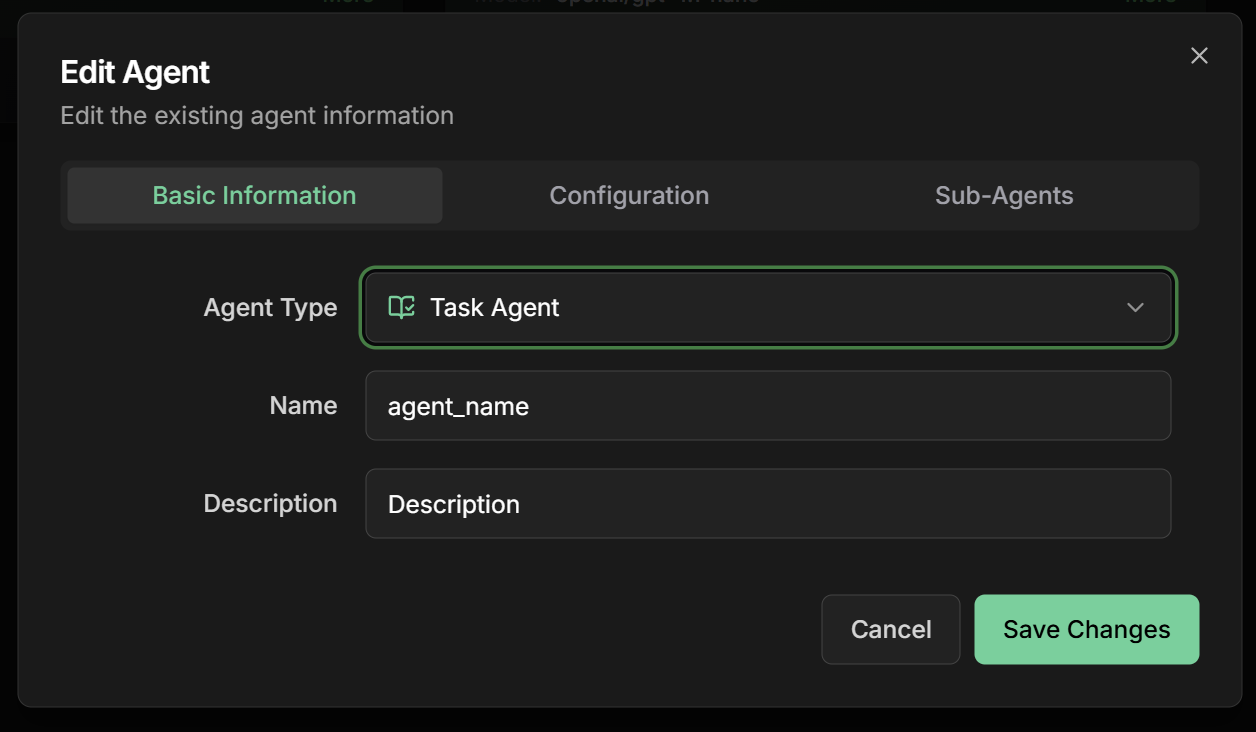 **Name:** Descriptive name of the task
```
Example: sentiment_analysis_reviews
```
**Description:** Summary of the specific task
```
Example: Analyzes sentiment of product reviews to
identify customer satisfaction and improvement points
```
**Goal:** Specific objective of the task
```
Example: Provide accurate sentiment analysis with numerical
score and actionable insights about product reviews
```
**Assigned Agent:** Choose the agent that will execute the task
**Available options:**
* Existing LLM agents on the platform
* Configured A2A agents
* Previously created specialized agents
**Selection criteria:**
* Agent specialization in the task area
* Required technical capabilities
* Historical performance on similar tasks
* Availability and resources
**Example:**
```
Assigned Agent: sentiment_analysis_specialist
- Specialized in sentiment analysis
- Trained on e-commerce data
- High accuracy in emotional classification
```
**Name:** Descriptive name of the task
```
Example: sentiment_analysis_reviews
```
**Description:** Summary of the specific task
```
Example: Analyzes sentiment of product reviews to
identify customer satisfaction and improvement points
```
**Goal:** Specific objective of the task
```
Example: Provide accurate sentiment analysis with numerical
score and actionable insights about product reviews
```
**Assigned Agent:** Choose the agent that will execute the task
**Available options:**
* Existing LLM agents on the platform
* Configured A2A agents
* Previously created specialized agents
**Selection criteria:**
* Agent specialization in the task area
* Required technical capabilities
* Historical performance on similar tasks
* Availability and resources
**Example:**
```
Assigned Agent: sentiment_analysis_specialist
- Specialized in sentiment analysis
- Trained on e-commerce data
- High accuracy in emotional classification
```
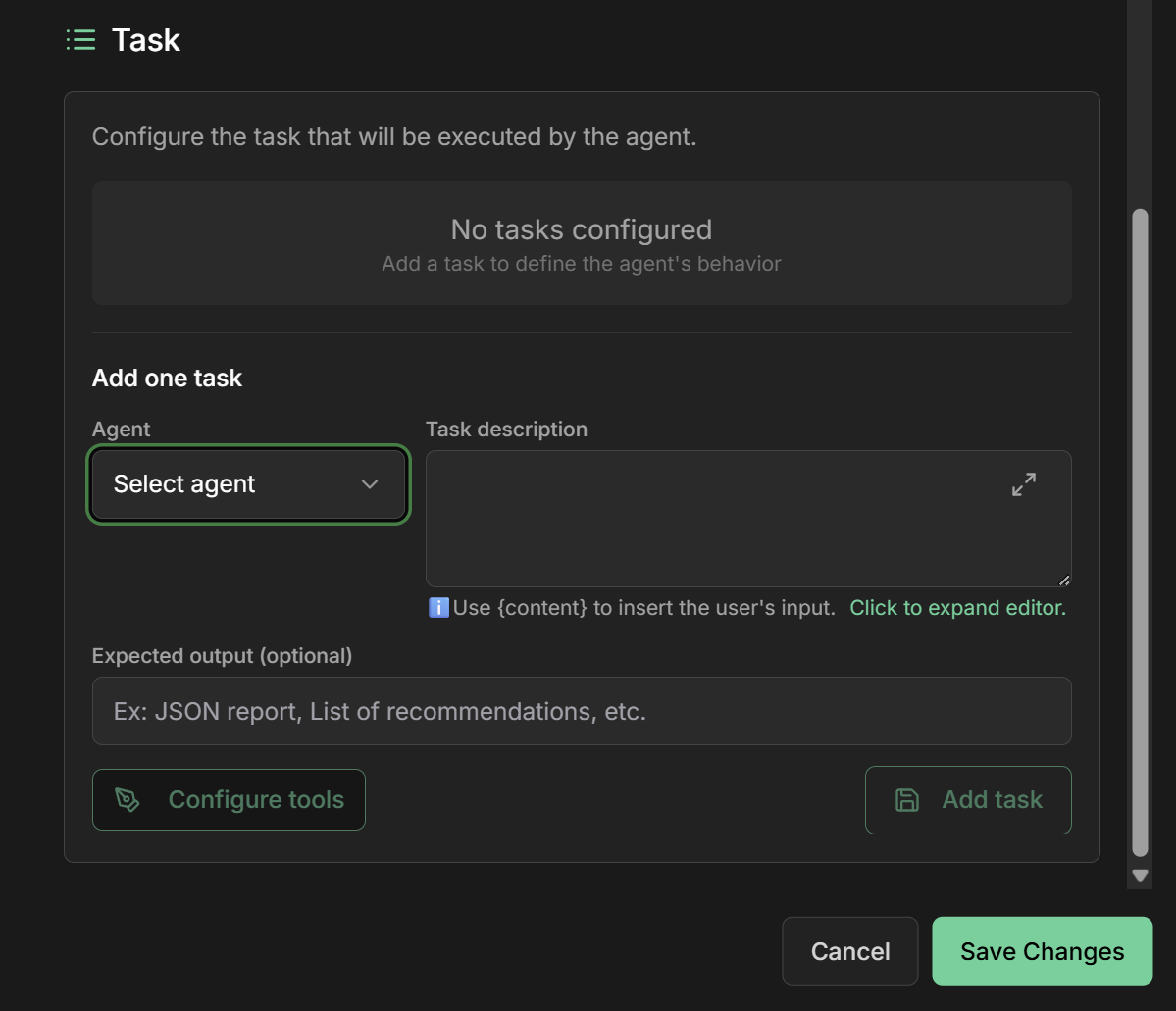 **Task Prompt:** Detailed and specific prompt for the task
**Recommended structure:**
```markdown theme={null}
# Product Review Sentiment Analysis
## Context:
You are a sentiment analysis expert focused on product reviews.
## Task:
Analyze the sentiment of provided reviews and provide detailed insights.
## Input:
- Product reviews in text format
- Product metadata (category, price, etc.)
## Process:
1. Read each review carefully
2. Identify sentiments: positive, negative, neutral
3. Calculate sentiment score (-1 to +1)
4. Identify main themes mentioned
5. Extract actionable insights
## Quality criteria:
- Accuracy in sentiment classification
- Identification of emotional nuances
- Relevant insights for product improvement
- Contextual analysis considering product category
## Analysis format:
For each review, provide:
- Sentiment score
- Classification (positive/negative/neutral)
- Main themes
- Specific aspects mentioned
```
**Expected Output:** Clear and detailed description of expected result
**Expected output structure:**
```json theme={null}
{
"task_summary": {
"total_reviews": 150,
"analysis_date": "2024-01-15",
"product_category": "electronics"
},
"sentiment_analysis": {
"overall_sentiment": {
"score": 0.65,
"classification": "positive",
"confidence": 0.89
},
"distribution": {
"positive": 65,
"neutral": 20,
"negative": 15
}
},
"detailed_insights": {
"positive_themes": [
"product quality",
"fast delivery",
"good value for money"
],
"negative_themes": [
"durability issues",
"customer service"
],
"improvement_suggestions": [
"Improve quality control",
"Support team training"
]
},
"individual_reviews": [
{
"review_id": "rev_001",
"sentiment_score": 0.8,
"classification": "positive",
"key_aspects": ["quality", "price"],
"summary": "Customer satisfied with quality and price"
}
]
}
```
**Output specifications:**
* **Format**: Structured JSON
* **Required fields**: All main fields must be present
* **Data types**: Specify types (string, number, array, object)
* **Validation**: Criteria to validate if output is correct
* **Examples**: Concrete examples of expected format
**Timeout:** Time limit for task execution
```
Recommended: 120-300 seconds (depending on complexity)
```
**Retry Policy:** Retry policy in case of failure
```
Options:
- No Retry (for critical tasks)
- Retry Once (default)
- Retry with Validation (retry if output doesn't meet expected)
```
**Output Validation:** Automatic result validation
```
- Schema Validation (JSON Schema)
- Content Validation (check required fields)
- Quality Checks (verify content quality)
```
**Context Injection:** Additional context injection
```
- Previous Task Results (results from previous tasks)
- System Context (system information)
- User Context (user data)
```
**`Output Key` field in interface:**
The Output Key allows the Task Agent to save the task result in a specific variable in the shared state, making it available for other agents or subsequent tasks.
**How it works:**
* Configure the `Output Key` field with a descriptive name
* The task result will be automatically saved in this variable
* Other agents can access using placeholders `{{output_key_name}}`
* Works in workflows, loops, and multi-agent systems
**Configuration examples:**
```markdown theme={null}
Output Key: "sentiment_analysis"
→ Saves result in state.sentiment_analysis
Output Key: "executive_summary"
→ Saves result in state.executive_summary
Output Key: "validated_data"
→ Saves result in state.validated_data
```
**Use in subsequent tasks:**
```markdown theme={null}
# In Task Prompts of other tasks:
"Analyze the request: {{user_input}} and base on analysis: {{sentiment_analysis}}"
"Use this summary: {{executive_summary}}"
"Process the data: {{validated_data}}"
```
**Best practices:**
* Use snake\_case: `task_result`, `processed_data`
* Be specific: `form_validation` instead of `validation`
* Avoid conflicts with other state variables
* Document output format in instructions
* Use names that reflect task content
## Practical Examples
### 1. Product Review Sentiment Analysis
**Scenario:** Analyze sentiment of product reviews for e-commerce
**Task Agent Configuration:**
**Basic Information:**
* **Name:** `sentiment_analysis_task`
* **Description:** `Detailed sentiment analysis of product reviews`
* **Goal:** `Provide actionable insights about customer satisfaction`
**Agent Assignment:**
* **Assigned Agent:** `sentiment_specialist_v2`
* **Agent Type:** Specialized LLM Agent
* **Specialization:** Sentiment analysis in Portuguese
**Task Prompt:**
```markdown theme={null}
# Task: Product Review Sentiment Analysis
You are an e-commerce sentiment analysis expert.
## Input received:
- List of product reviews
- Product metadata (name, category, price)
## Your mission:
1. Analyze each review individually
2. Calculate sentiment score (-1 to +1)
3. Classify as positive/neutral/negative
4. Identify specific aspects mentioned
5. Extract insights for product improvement
## Focus on:
- Classification accuracy
- Identifying nuances
- Actionable insights
- Contextual analysis
```
**Expected Output:**
```json theme={null}
{
"summary": {
"total_reviews": "number",
"overall_sentiment": "number (-1 to 1)",
"classification": "positive|neutral|negative"
},
"insights": {
"positive_aspects": ["array of strings"],
"negative_aspects": ["array of strings"],
"improvement_suggestions": ["array of strings"]
},
"detailed_analysis": [
{
"review_id": "string",
"sentiment_score": "number",
"classification": "string",
"key_aspects": ["array"],
"summary": "string"
}
]
}
```
### 2. Executive Summary Generation
**Scenario:** Generate executive summary of long reports
**Task Agent Configuration:**
**Basic Information:**
* **Name:** `executive_summary_task`
* **Description:** `Generation of concise and informative executive summaries`
* **Goal:** `Create summaries that capture key points for decision-making`
**Agent Assignment:**
* **Assigned Agent:** `document_summarizer_pro`
* **Specialization:** Corporate document summarization
**Task Prompt:**
```markdown theme={null}
# Task: Executive Summary Generation
You are an expert in creating executive summaries for corporate leadership.
## Input:
- Complete report (long text)
- Business context
- Target audience (C-level, managers, etc.)
## Objective:
Create executive summary that enables quick and informed decision-making.
## Required structure:
1. **Current Situation** (2-3 sentences)
2. **Key Findings** (3-5 points)
3. **Recommendations** (2-4 specific actions)
4. **Next Steps** (timeline and responsible parties)
## Criteria:
- Maximum 300 words
- Executive language (clear and direct)
- Focus on actions and results
- Quantitative data when relevant
```
**Expected Output:**
```json theme={null}
{
"executive_summary": {
"current_situation": "string (2-3 sentences)",
"key_findings": [
"string (finding 1)",
"string (finding 2)",
"string (finding 3)"
],
"recommendations": [
{
"action": "string",
"priority": "high|medium|low",
"impact": "string",
"effort": "string"
}
],
"next_steps": [
{
"action": "string",
"timeline": "string",
"responsible": "string"
}
]
},
"metadata": {
"word_count": "number",
"reading_time": "string",
"confidence_score": "number"
}
}
```
### 3. Input Data Validation
**Scenario:** Validate form data before processing
**Task Agent Configuration:**
**Basic Information:**
* **Name:** `data_validation_task`
* **Description:** `Intelligent validation of input data`
* **Goal:** `Ensure data quality and completeness before processing`
**Agent Assignment:**
* **Assigned Agent:** `data_validator_agent`
* **Specialization:** Data validation and cleaning
**Task Prompt:**
```markdown theme={null}
# Task: Input Data Validation
You are an expert in data validation and quality.
## Input:
- Form data (JSON)
- Validation schema
- Specific business rules
## Required validations:
1. **Format**: Check data types and formats
2. **Completeness**: Identify missing required fields
3. **Consistency**: Verify logic between fields
4. **Quality**: Detect suspicious or invalid data
5. **Security**: Identify potential threats
## For each error found:
- Identify specific field
- Describe the problem
- Suggest correction when possible
- Classify severity (critical/high/medium/low)
```
**Expected Output:**
```json theme={null}
{
"validation_result": {
"is_valid": "boolean",
"overall_score": "number (0-100)",
"total_errors": "number",
"total_warnings": "number"
},
"field_validation": {
"field_name": {
"is_valid": "boolean",
"errors": ["array of error messages"],
"warnings": ["array of warning messages"],
"suggestions": ["array of suggestions"]
}
},
"errors": [
{
"field": "string",
"type": "format|required|consistency|quality|security",
"severity": "critical|high|medium|low",
"message": "string",
"suggestion": "string"
}
],
"cleaned_data": {
"description": "Data with automatic fixes applied",
"data": "object with cleaned values"
}
}
```
## Integration with Other Agents
### Using Task Agents in Workflows
**Example: Content Processing Pipeline**
```markdown theme={null}
Sequential Workflow:
1. **Task Agent: Data Extraction**
- Agent: data_extractor
- Task: Extract information from document
- Output: structured_data
2. **Task Agent: Validation**
- Agent: data_validator
- Task: Validate extracted data
- Input: {{structured_data}}
- Output: validation_result
3. **Task Agent: Enrichment**
- Agent: data_enricher
- Task: Enrich with external data
- Input: {{structured_data}}
- Output: enriched_data
4. **Task Agent: Report Generation**
- Agent: report_generator
- Task: Generate final report
- Input: {{enriched_data}}
- Output: final_report
```
**Example: Complete Product Analysis**
```markdown theme={null}
Parallel Workflow:
Execute simultaneously:
- **Task Agent: Price Analysis**
- Agent: price_analyzer
- Task: Analyze price competitiveness
- **Task Agent: Review Analysis**
- Agent: sentiment_analyzer
- Task: Analyze customer sentiment
- **Task Agent: Specification Analysis**
- Agent: spec_analyzer
- Task: Compare technical specifications
- **Task Agent: Availability Analysis**
- Agent: availability_checker
- Task: Check stock and availability
Results are aggregated into unified report.
```
**Example: Complex Visual Workflow**
```markdown theme={null}
Workflow with Task Agents as nodes:
Start → Task Agent (Extraction) → Condition (Valid Data?)
↓ ↓
Task Agent (Validation) Task Agent (Correction)
↓ ↓
Task Agent (Processing) ← ← ← ← ← ← ← ←
↓
Task Agent (Report) → End
Each Task Agent has specific and well-defined responsibility.
```
## Monitoring and Performance
### Tracking Task Agents
**Specific metrics for Task Agents:**
**Execution Metrics:**
```
Task Agent: sentiment_analysis_task
Performance Overview:
├── Total Executions: 2,847
├── Success Rate: 97.2%
├── Avg Execution Time: 4.3s
├── Avg Output Quality: 8.7/10
└── Last 24h: 156 executions
Output Validation:
├── Schema Compliance: 99.1%
├── Content Quality: 94.5%
├── Expected Format: 98.8%
└── Validation Failures: 2.8%
Agent Performance:
├── Agent: sentiment_specialist_v2
├── Specialization Match: 95%
├── Task Completion Rate: 97.2%
└── Quality Consistency: 92.1%
```
**Common issues with Task Agents:**
**1. Output Format Mismatch**
```
Symptom: Agent returns different format than expected
Cause: Prompt not specific enough
Solution: Refine prompt with concrete examples
```
**2. Task Scope Creep**
```
Symptom: Agent executes beyond task scope
Cause: Prompt too broad or ambiguous
Solution: Define clear task boundaries
```
**3. Quality Inconsistency**
```
Symptom: Quality varies between executions
Cause: Agent not specialized or inconsistent prompt
Solution: Use more specialized agent or improve prompt
```
**4. Performance Degradation**
```
Symptom: Execution time increasing
Cause: Agent overloaded or task too complex
Solution: Optimize task or use more powerful agent
```
## Best Practices
**Principles for effective Task Agents:**
* **Single responsibility**: One specific and well-defined task
* **Clear prompt**: Precise and unambiguous instructions
* **Structured output**: Well-specified output format
* **Appropriate agent**: Choose agent with appropriate specialization
* **Robust validation**: Clear criteria to validate result
**Task-agent matching:**
* **Text analysis**: Use agents specialized in NLP
* **Data processing**: Use agents with analytical capabilities
* **Content generation**: Use creative and specialized agents
* **Validation**: Use agents focused on quality and precision
* **Translation**: Use specialized multilingual agents
**Ensuring consistent execution:**
* **Testing**: Test tasks with different inputs
* **Validation**: Implement automatic output validation
* **Monitoring**: Continuously monitor performance and quality
* **Feedback loop**: Use results to improve prompts
* **Version control**: Maintain history of task changes
## Common Use Cases
**Analytical Tasks:**
* Sentiment analysis
* Entity extraction
* Text classification
* Document summarization
**Data Tasks:**
* Input validation
* Data cleaning
* Format transformation
* Information enrichment
**Creative Tasks:**
* Summary generation
* Report creation
* Text translation
* Document formatting
**Control Tasks:**
* Compliance verification
* Quality control
* Data auditing
* Rule validation
## Next Steps
Use Task Agents in complex visual workflows
Combine Task Agents in ordered sequences
Understand the agents that execute tasks
Use external agents as task executors
***
The Task Agent is perfect for creating well-defined and specialized work units. Use it when you want to assign specific responsibilities to specialized agents, following the CrewAI pattern for efficient organization of agent teams.
**Task Prompt:** Detailed and specific prompt for the task
**Recommended structure:**
```markdown theme={null}
# Product Review Sentiment Analysis
## Context:
You are a sentiment analysis expert focused on product reviews.
## Task:
Analyze the sentiment of provided reviews and provide detailed insights.
## Input:
- Product reviews in text format
- Product metadata (category, price, etc.)
## Process:
1. Read each review carefully
2. Identify sentiments: positive, negative, neutral
3. Calculate sentiment score (-1 to +1)
4. Identify main themes mentioned
5. Extract actionable insights
## Quality criteria:
- Accuracy in sentiment classification
- Identification of emotional nuances
- Relevant insights for product improvement
- Contextual analysis considering product category
## Analysis format:
For each review, provide:
- Sentiment score
- Classification (positive/negative/neutral)
- Main themes
- Specific aspects mentioned
```
**Expected Output:** Clear and detailed description of expected result
**Expected output structure:**
```json theme={null}
{
"task_summary": {
"total_reviews": 150,
"analysis_date": "2024-01-15",
"product_category": "electronics"
},
"sentiment_analysis": {
"overall_sentiment": {
"score": 0.65,
"classification": "positive",
"confidence": 0.89
},
"distribution": {
"positive": 65,
"neutral": 20,
"negative": 15
}
},
"detailed_insights": {
"positive_themes": [
"product quality",
"fast delivery",
"good value for money"
],
"negative_themes": [
"durability issues",
"customer service"
],
"improvement_suggestions": [
"Improve quality control",
"Support team training"
]
},
"individual_reviews": [
{
"review_id": "rev_001",
"sentiment_score": 0.8,
"classification": "positive",
"key_aspects": ["quality", "price"],
"summary": "Customer satisfied with quality and price"
}
]
}
```
**Output specifications:**
* **Format**: Structured JSON
* **Required fields**: All main fields must be present
* **Data types**: Specify types (string, number, array, object)
* **Validation**: Criteria to validate if output is correct
* **Examples**: Concrete examples of expected format
**Timeout:** Time limit for task execution
```
Recommended: 120-300 seconds (depending on complexity)
```
**Retry Policy:** Retry policy in case of failure
```
Options:
- No Retry (for critical tasks)
- Retry Once (default)
- Retry with Validation (retry if output doesn't meet expected)
```
**Output Validation:** Automatic result validation
```
- Schema Validation (JSON Schema)
- Content Validation (check required fields)
- Quality Checks (verify content quality)
```
**Context Injection:** Additional context injection
```
- Previous Task Results (results from previous tasks)
- System Context (system information)
- User Context (user data)
```
**`Output Key` field in interface:**
The Output Key allows the Task Agent to save the task result in a specific variable in the shared state, making it available for other agents or subsequent tasks.
**How it works:**
* Configure the `Output Key` field with a descriptive name
* The task result will be automatically saved in this variable
* Other agents can access using placeholders `{{output_key_name}}`
* Works in workflows, loops, and multi-agent systems
**Configuration examples:**
```markdown theme={null}
Output Key: "sentiment_analysis"
→ Saves result in state.sentiment_analysis
Output Key: "executive_summary"
→ Saves result in state.executive_summary
Output Key: "validated_data"
→ Saves result in state.validated_data
```
**Use in subsequent tasks:**
```markdown theme={null}
# In Task Prompts of other tasks:
"Analyze the request: {{user_input}} and base on analysis: {{sentiment_analysis}}"
"Use this summary: {{executive_summary}}"
"Process the data: {{validated_data}}"
```
**Best practices:**
* Use snake\_case: `task_result`, `processed_data`
* Be specific: `form_validation` instead of `validation`
* Avoid conflicts with other state variables
* Document output format in instructions
* Use names that reflect task content
## Practical Examples
### 1. Product Review Sentiment Analysis
**Scenario:** Analyze sentiment of product reviews for e-commerce
**Task Agent Configuration:**
**Basic Information:**
* **Name:** `sentiment_analysis_task`
* **Description:** `Detailed sentiment analysis of product reviews`
* **Goal:** `Provide actionable insights about customer satisfaction`
**Agent Assignment:**
* **Assigned Agent:** `sentiment_specialist_v2`
* **Agent Type:** Specialized LLM Agent
* **Specialization:** Sentiment analysis in Portuguese
**Task Prompt:**
```markdown theme={null}
# Task: Product Review Sentiment Analysis
You are an e-commerce sentiment analysis expert.
## Input received:
- List of product reviews
- Product metadata (name, category, price)
## Your mission:
1. Analyze each review individually
2. Calculate sentiment score (-1 to +1)
3. Classify as positive/neutral/negative
4. Identify specific aspects mentioned
5. Extract insights for product improvement
## Focus on:
- Classification accuracy
- Identifying nuances
- Actionable insights
- Contextual analysis
```
**Expected Output:**
```json theme={null}
{
"summary": {
"total_reviews": "number",
"overall_sentiment": "number (-1 to 1)",
"classification": "positive|neutral|negative"
},
"insights": {
"positive_aspects": ["array of strings"],
"negative_aspects": ["array of strings"],
"improvement_suggestions": ["array of strings"]
},
"detailed_analysis": [
{
"review_id": "string",
"sentiment_score": "number",
"classification": "string",
"key_aspects": ["array"],
"summary": "string"
}
]
}
```
### 2. Executive Summary Generation
**Scenario:** Generate executive summary of long reports
**Task Agent Configuration:**
**Basic Information:**
* **Name:** `executive_summary_task`
* **Description:** `Generation of concise and informative executive summaries`
* **Goal:** `Create summaries that capture key points for decision-making`
**Agent Assignment:**
* **Assigned Agent:** `document_summarizer_pro`
* **Specialization:** Corporate document summarization
**Task Prompt:**
```markdown theme={null}
# Task: Executive Summary Generation
You are an expert in creating executive summaries for corporate leadership.
## Input:
- Complete report (long text)
- Business context
- Target audience (C-level, managers, etc.)
## Objective:
Create executive summary that enables quick and informed decision-making.
## Required structure:
1. **Current Situation** (2-3 sentences)
2. **Key Findings** (3-5 points)
3. **Recommendations** (2-4 specific actions)
4. **Next Steps** (timeline and responsible parties)
## Criteria:
- Maximum 300 words
- Executive language (clear and direct)
- Focus on actions and results
- Quantitative data when relevant
```
**Expected Output:**
```json theme={null}
{
"executive_summary": {
"current_situation": "string (2-3 sentences)",
"key_findings": [
"string (finding 1)",
"string (finding 2)",
"string (finding 3)"
],
"recommendations": [
{
"action": "string",
"priority": "high|medium|low",
"impact": "string",
"effort": "string"
}
],
"next_steps": [
{
"action": "string",
"timeline": "string",
"responsible": "string"
}
]
},
"metadata": {
"word_count": "number",
"reading_time": "string",
"confidence_score": "number"
}
}
```
### 3. Input Data Validation
**Scenario:** Validate form data before processing
**Task Agent Configuration:**
**Basic Information:**
* **Name:** `data_validation_task`
* **Description:** `Intelligent validation of input data`
* **Goal:** `Ensure data quality and completeness before processing`
**Agent Assignment:**
* **Assigned Agent:** `data_validator_agent`
* **Specialization:** Data validation and cleaning
**Task Prompt:**
```markdown theme={null}
# Task: Input Data Validation
You are an expert in data validation and quality.
## Input:
- Form data (JSON)
- Validation schema
- Specific business rules
## Required validations:
1. **Format**: Check data types and formats
2. **Completeness**: Identify missing required fields
3. **Consistency**: Verify logic between fields
4. **Quality**: Detect suspicious or invalid data
5. **Security**: Identify potential threats
## For each error found:
- Identify specific field
- Describe the problem
- Suggest correction when possible
- Classify severity (critical/high/medium/low)
```
**Expected Output:**
```json theme={null}
{
"validation_result": {
"is_valid": "boolean",
"overall_score": "number (0-100)",
"total_errors": "number",
"total_warnings": "number"
},
"field_validation": {
"field_name": {
"is_valid": "boolean",
"errors": ["array of error messages"],
"warnings": ["array of warning messages"],
"suggestions": ["array of suggestions"]
}
},
"errors": [
{
"field": "string",
"type": "format|required|consistency|quality|security",
"severity": "critical|high|medium|low",
"message": "string",
"suggestion": "string"
}
],
"cleaned_data": {
"description": "Data with automatic fixes applied",
"data": "object with cleaned values"
}
}
```
## Integration with Other Agents
### Using Task Agents in Workflows
**Example: Content Processing Pipeline**
```markdown theme={null}
Sequential Workflow:
1. **Task Agent: Data Extraction**
- Agent: data_extractor
- Task: Extract information from document
- Output: structured_data
2. **Task Agent: Validation**
- Agent: data_validator
- Task: Validate extracted data
- Input: {{structured_data}}
- Output: validation_result
3. **Task Agent: Enrichment**
- Agent: data_enricher
- Task: Enrich with external data
- Input: {{structured_data}}
- Output: enriched_data
4. **Task Agent: Report Generation**
- Agent: report_generator
- Task: Generate final report
- Input: {{enriched_data}}
- Output: final_report
```
**Example: Complete Product Analysis**
```markdown theme={null}
Parallel Workflow:
Execute simultaneously:
- **Task Agent: Price Analysis**
- Agent: price_analyzer
- Task: Analyze price competitiveness
- **Task Agent: Review Analysis**
- Agent: sentiment_analyzer
- Task: Analyze customer sentiment
- **Task Agent: Specification Analysis**
- Agent: spec_analyzer
- Task: Compare technical specifications
- **Task Agent: Availability Analysis**
- Agent: availability_checker
- Task: Check stock and availability
Results are aggregated into unified report.
```
**Example: Complex Visual Workflow**
```markdown theme={null}
Workflow with Task Agents as nodes:
Start → Task Agent (Extraction) → Condition (Valid Data?)
↓ ↓
Task Agent (Validation) Task Agent (Correction)
↓ ↓
Task Agent (Processing) ← ← ← ← ← ← ← ←
↓
Task Agent (Report) → End
Each Task Agent has specific and well-defined responsibility.
```
## Monitoring and Performance
### Tracking Task Agents
**Specific metrics for Task Agents:**
**Execution Metrics:**
```
Task Agent: sentiment_analysis_task
Performance Overview:
├── Total Executions: 2,847
├── Success Rate: 97.2%
├── Avg Execution Time: 4.3s
├── Avg Output Quality: 8.7/10
└── Last 24h: 156 executions
Output Validation:
├── Schema Compliance: 99.1%
├── Content Quality: 94.5%
├── Expected Format: 98.8%
└── Validation Failures: 2.8%
Agent Performance:
├── Agent: sentiment_specialist_v2
├── Specialization Match: 95%
├── Task Completion Rate: 97.2%
└── Quality Consistency: 92.1%
```
**Common issues with Task Agents:**
**1. Output Format Mismatch**
```
Symptom: Agent returns different format than expected
Cause: Prompt not specific enough
Solution: Refine prompt with concrete examples
```
**2. Task Scope Creep**
```
Symptom: Agent executes beyond task scope
Cause: Prompt too broad or ambiguous
Solution: Define clear task boundaries
```
**3. Quality Inconsistency**
```
Symptom: Quality varies between executions
Cause: Agent not specialized or inconsistent prompt
Solution: Use more specialized agent or improve prompt
```
**4. Performance Degradation**
```
Symptom: Execution time increasing
Cause: Agent overloaded or task too complex
Solution: Optimize task or use more powerful agent
```
## Best Practices
**Principles for effective Task Agents:**
* **Single responsibility**: One specific and well-defined task
* **Clear prompt**: Precise and unambiguous instructions
* **Structured output**: Well-specified output format
* **Appropriate agent**: Choose agent with appropriate specialization
* **Robust validation**: Clear criteria to validate result
**Task-agent matching:**
* **Text analysis**: Use agents specialized in NLP
* **Data processing**: Use agents with analytical capabilities
* **Content generation**: Use creative and specialized agents
* **Validation**: Use agents focused on quality and precision
* **Translation**: Use specialized multilingual agents
**Ensuring consistent execution:**
* **Testing**: Test tasks with different inputs
* **Validation**: Implement automatic output validation
* **Monitoring**: Continuously monitor performance and quality
* **Feedback loop**: Use results to improve prompts
* **Version control**: Maintain history of task changes
## Common Use Cases
**Analytical Tasks:**
* Sentiment analysis
* Entity extraction
* Text classification
* Document summarization
**Data Tasks:**
* Input validation
* Data cleaning
* Format transformation
* Information enrichment
**Creative Tasks:**
* Summary generation
* Report creation
* Text translation
* Document formatting
**Control Tasks:**
* Compliance verification
* Quality control
* Data auditing
* Rule validation
## Next Steps
Use Task Agents in complex visual workflows
Combine Task Agents in ordered sequences
Understand the agents that execute tasks
Use external agents as task executors
***
The Task Agent is perfect for creating well-defined and specialized work units. Use it when you want to assign specific responsibilities to specialized agents, following the CrewAI pattern for efficient organization of agent teams.