> ## Documentation Index
> Fetch the complete documentation index at: https://docs.evo-ai.co/llms.txt
> Use this file to discover all available pages before exploring further.
# Sequential Agent
> Configure agents that execute sub-agents in ordered sequence for structured processes
## Overview
The **Sequential Agent** is a type of workflow agent that executes sub-agents in a predefined and ordered sequence. Each sub-agent is executed only after the previous one has successfully completed its task, creating a structured processing pipeline.
This type of agent is ideal for processes that need to follow specific steps, where each step depends on the result of the previous one, such as approval pipelines, multi-step data processing, or validation workflows.
**Based on Google ADK**: Implementation following the standards of the [Google Agent Development Kit](https://google.github.io/adk-docs/agents/multi-agents/) for sequential agents.
## Key Features
Sub-agents execute in specific order, one after another
Each step depends on the success of the previous step
Data passes from one sub-agent to the next automatically
Pipeline stops if a step fails, avoiding unnecessary processing
## When to Use Sequential Agent
**✅ Use Sequential Agent when:**
* **Processes with dependent steps**: Each step needs the result of the previous one
* **Approval pipelines**: Cascading validations
* **Data processing**: Sequential transformations
* **Validation workflows**: Checks in specific order
* **Onboarding processes**: Steps that must be completed in order
**Practical examples:**
* Order processing pipeline
* Document approval workflow
* Lead analysis process
* Quality verification system
* New user integration flow
**❌ Avoid Sequential Agent when:**
* **Independent tasks**: Sub-agents don't depend on each other
* **Parallel processing**: Speed is more important than order
* **Flexible workflows**: Order may vary based on conditions
* **Simple tasks**: A single LLM agent would suffice
## Creating a Sequential Agent
### Step by Step on the Platform
1. On the Evo AI main screen, click **"New Agent"**
2. In the **"Type"** field, select **"Sequential Agent"**
3. You'll see specific fields for sequential configuration
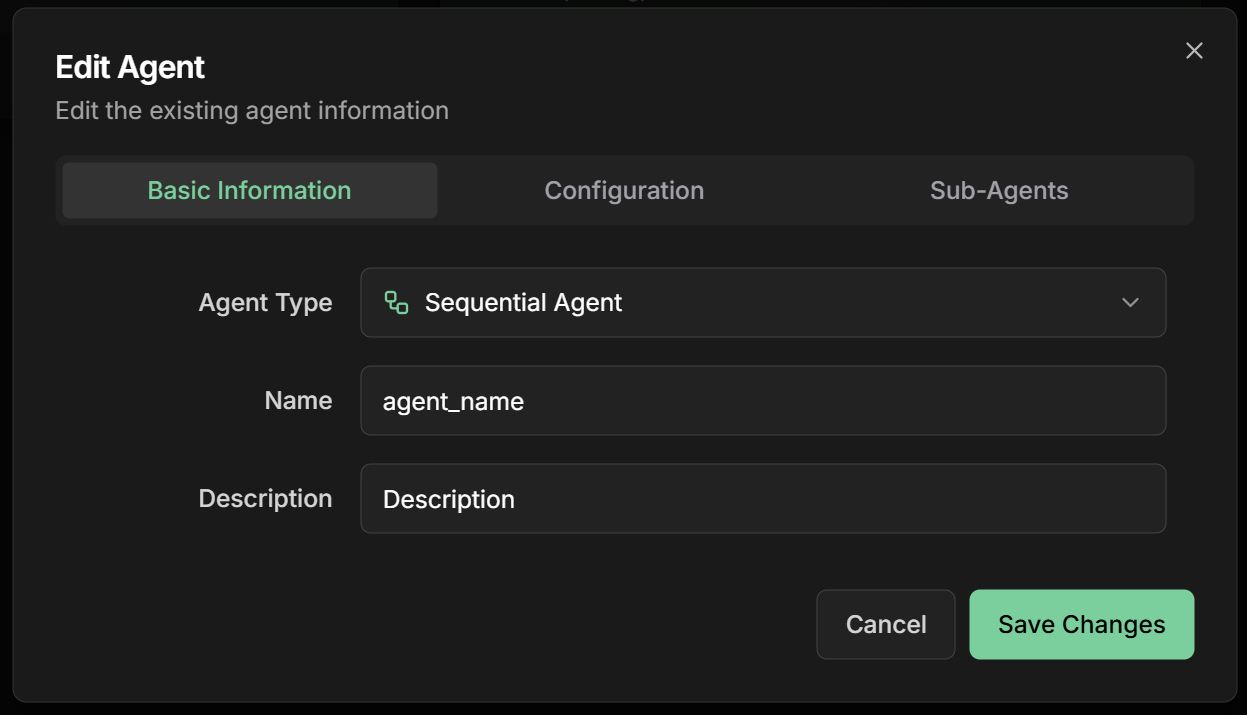 **Name:** Descriptive name of the pipeline
```
Example: order_processing_pipeline
```
**Description:** Summary of the sequential process
```
Example: Complete pipeline to process orders from
validation to delivery confirmation
```
**Goal:** Objective of the sequential pipeline
```
Example: Process orders in a structured and reliable way,
ensuring all necessary validations
```
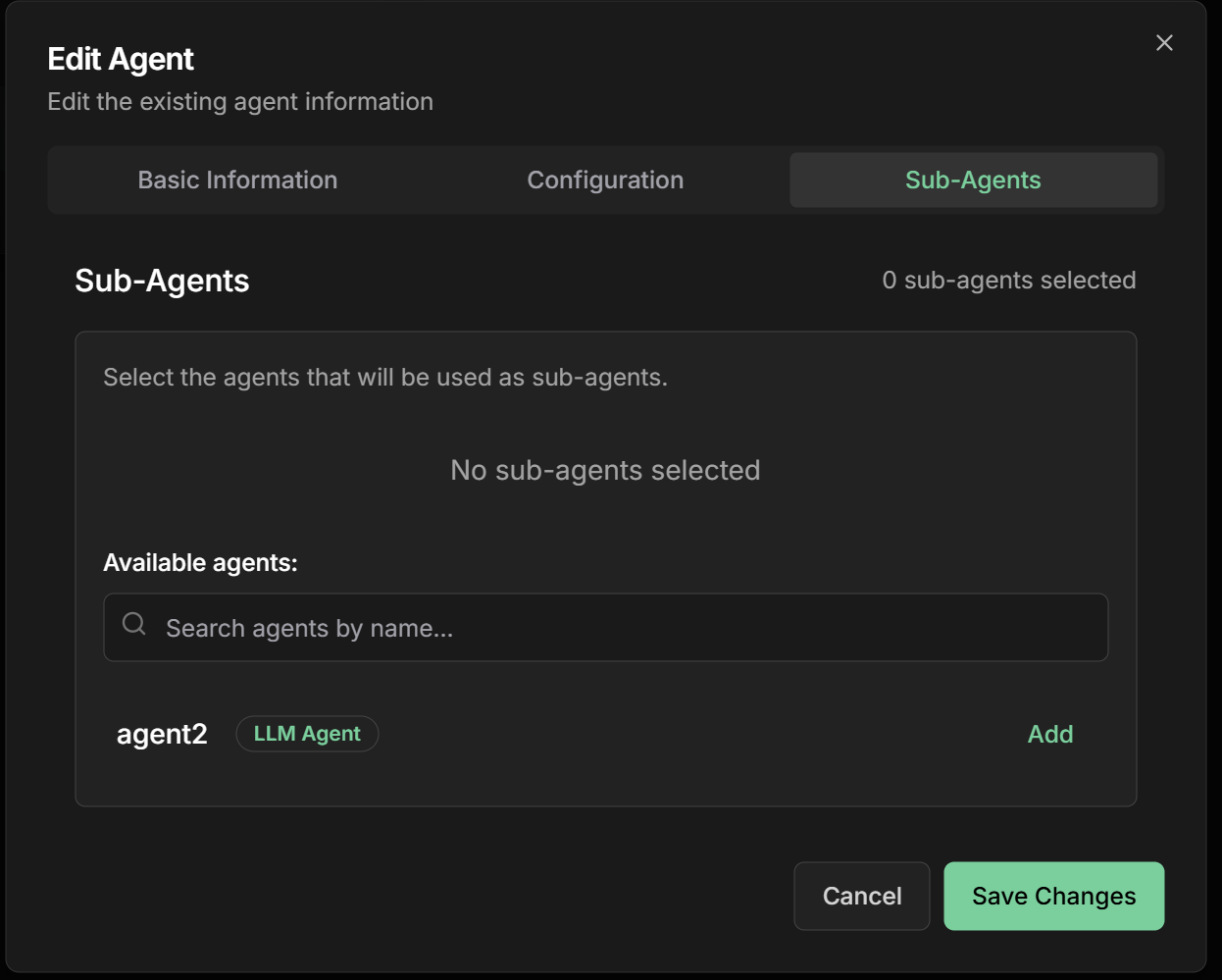
**Sub-Agents:** Add agents in execution order
**⚠️ Important:** The order of sub-agents defines the execution sequence
**Example order processing pipeline:**
1. **Data Validator** - Verifies order information
2. **Inventory Checker** - Confirms availability
3. **Price Calculator** - Calculates values and discounts
4. **Payment Processor** - Processes transaction
5. **Delivery Scheduler** - Defines logistics
**Name:** Descriptive name of the pipeline
```
Example: order_processing_pipeline
```
**Description:** Summary of the sequential process
```
Example: Complete pipeline to process orders from
validation to delivery confirmation
```
**Goal:** Objective of the sequential pipeline
```
Example: Process orders in a structured and reliable way,
ensuring all necessary validations
```
**Sub-Agents:** Add agents in execution order
**⚠️ Important:** The order of sub-agents defines the execution sequence
**Example order processing pipeline:**
1. **Data Validator** - Verifies order information
2. **Inventory Checker** - Confirms availability
3. **Price Calculator** - Calculates values and discounts
4. **Payment Processor** - Processes transaction
5. **Delivery Scheduler** - Defines logistics
 **Instructions:** How the agent should coordinate the sequence
```markdown theme={null}
# Order Processing Pipeline
Execute sub-agents in defined order to process orders:
## Execution sequence:
1. **Validator**: Validate order data
2. **Inventory**: Check product availability
3. **Pricing**: Calculate final values with discounts
4. **Payment**: Process financial transaction
5. **Delivery**: Schedule delivery logistics
## Important rules:
- Stop execution if any step fails
- Pass complete context between steps
- Log progress of each step
- Notify about failures immediately
## In case of failure:
- Identify the step that failed
- Provide specific error details
- Suggest corrective actions when possible
```
**Timeout per Step:** Time limit for each sub-agent
```
Recommended: 300 seconds (5 minutes)
```
**Retry Policy:** Retry policy in case of failure
```
Options: No Retry / Retry Once / Retry Twice
```
**Error Handling:** How to handle errors
```
- Stop on First Error (recommended)
- Continue on Non-Critical Errors
- Log and Continue
```
**Output Aggregation:** How to combine results
```
- Combine All Outputs
- Last Agent Output Only
- Custom Aggregation
```
## Practical Examples
### 1. Order Processing Pipeline
**Objective:** Process e-commerce orders in a structured way
**Sub-Agents in sequence:**
**1. Order Validator**
* **Name:** `order_validator`
* **Description:** `Validates order data and customer information`
* **Instructions:**
```markdown theme={null}
Validate the received order:
- Complete and valid customer data
- Products exist in catalog
- Quantities are valid
- Delivery address is correct
If everything is valid, pass to next step.
If there's an error, stop pipeline and report details.
```
**2. Inventory Checker**
* **Name:** `inventory_checker`
* **Description:** `Verifies product availability in stock`
* **Instructions:**
```markdown theme={null}
Check inventory for the validated order:
- Confirm availability of each product
- Verify requested quantities
- Reserve products if available
- Suggest alternatives if unavailable
```
**3. Price Calculator**
* **Name:** `price_calculator`
* **Description:** `Calculates final prices with discounts and taxes`
* **Instructions:**
```markdown theme={null}
Calculate order values:
- Base product prices
- Applicable discounts
- Taxes and fees
- Shipping based on address
- Final total value
```
**4. Payment Processor**
* **Name:** `payment_processor`
* **Description:** `Processes order payment`
* **Instructions:**
```markdown theme={null}
Process payment:
- Validate payment method
- Execute transaction
- Confirm approval
- Generate receipt
```
**5. Delivery Scheduler**
* **Name:** `delivery_scheduler`
* **Description:** `Schedules order delivery`
* **Instructions:**
```markdown theme={null}
Schedule delivery:
- Calculate delivery timeframe
- Define carrier
- Generate tracking code
- Send confirmation to customer
```
### 2. Lead Analysis Pipeline
**Objective:** Analyze and qualify sales leads
**Sub-Agents in sequence:**
**1. Data Enricher**
* **Name:** `data_enricher`
* **Description:** `Enriches lead data with public information`
* **Output Key:** `enriched_data`
**2. Lead Scorer**
* **Name:** `lead_scorer`
* **Description:** `Calculates lead score based on criteria`
* **Instructions:** `Analyze the request {{user_input}} and use data from {{enriched_data}} to calculate score`
* **Output Key:** `lead_score`
**3. Classifier**
* **Name:** `lead_classifier`
* **Description:** `Classifies lead as HOT/WARM/COLD`
* **Instructions:** `Classify based on {{lead_score}}`
* **Output Key:** `classification`
**4. Router**
* **Name:** `lead_router`
* **Description:** `Routes lead to appropriate salesperson`
* **Instructions:** `Route based on {{classification}}`
* **Output Key:** `assignment`
### 3. Document Approval Pipeline
**Objective:** Approve documents through multiple validations
**Sub-Agents in sequence:**
**1. Format Checker**
* Validates document format and structure
**2. Content Analyzer**
* Analyzes content and completeness
**3. Compliance Checker**
* Verifies compliance with regulations
**4. Final Approver**
* Makes final approval decision
**5. Notifier**
* Sends notifications about the result
## Monitoring and Debugging
### Tracking Execution
**Important metrics:**
* **Current progress**: Which step is executing
* **Time per step**: Duration of each sub-agent
* **Success rate**: Percentage of completed pipelines
* **Failure points**: Where pipeline fails most
* **Throughput**: How many pipelines per hour
**Real-time visualization:**
* Status of each step (Pending/Running/Completed/Failed)
* Detailed logs from each sub-agent
* Data passed between steps
**When a pipeline fails:**
1. **Identify the step**: Which sub-agent failed
2. **Analyze logs**: Specific error messages
3. **Check data**: Input received by sub-agent
4. **Test in isolation**: Run sub-agent separately
5. **Adjust configuration**: Modify instructions if necessary
**Useful logs:**
```
[SEQUENTIAL] Starting pipeline: order_processing_pipeline
[STEP 1/5] Executing: order_validator
[STEP 1/5] Completed successfully
[STEP 2/5] Executing: inventory_checker
[STEP 2/5] ERROR: Product XYZ not found in inventory
[SEQUENTIAL] Pipeline stopped due to error in step 2
```
## Advanced Configurations
### Flow Control
**Conditional steps based on results:**
```markdown theme={null}
# Pipeline with Conditions
Execute steps based on conditions:
1. **Analyzer**: Always execute
2. **Simple Approver**: If value < $1000
3. **Manager Approver**: If value >= $1000
4. **Notifier**: Always execute
Analyze the initial request {{user_input}} and use {{order_value}} to decide flow.
```
**Time and retry configuration:**
* **Step Timeout**: 300s (default)
* **Total Pipeline Timeout**: 1800s (30 min)
* **Retry Policy**: Retry once on failure
* **Retry Delay**: 30s between retries
**For critical steps:**
* Increase timeout for complex operations
* Configure retry only for temporary failures
* Use circuit breaker for persistent failures
**Saving progress:**
* **Checkpoint after each step**: Allows restart from failure point
* **Shared state**: Data available to all steps
* **Rollback capability**: Undo steps if necessary
* **Audit trail**: Complete execution history
**`Output Key` field in the interface:**
The Output Key allows the Sequential Agent to save the final result of the sequential workflow in a specific variable in the shared state, making it available to other agents or processes.
**How it works:**
* Configure the `Output Key` field with a descriptive name
* The final workflow result will be automatically saved in that variable
* Other agents can access using placeholders `{{output_key_name}}`
* Works in nested workflows, loops, and multi-agent systems
**Configuration examples:**
```markdown theme={null}
Output Key: "processed_order"
→ Saves final result in state.processed_order
Output Key: "complete_approval"
→ Saves final result in state.complete_approval
Output Key: "etl_pipeline_result"
→ Saves final result in state.etl_pipeline_result
```
**Consolidated result:**
```markdown theme={null}
# The Sequential Agent automatically:
- Collects results from all sub-agents
- Consolidates into a structured final result
- Includes status of each step
- Saves in state with specified key
```
**Usage in other agents:**
```markdown theme={null}
# In subsequent agent instructions:
"Analyze the original order: {{user_input}} and use the processed order: {{processed_order}}"
"Based on the approval: {{complete_approval}}"
"Analyze the results: {{etl_pipeline_result}}"
```
**Best practices:**
* Use snake\_case: `workflow_result`, `complete_process`
* Be specific: `credit_approval_result` instead of `result`
* Document final result structure
* Consider including metadata (time, status, steps)
* Use names that reflect the complete process
## Best Practices
**Fundamental principles:**
* **Atomic steps**: Each sub-agent should have a clear responsibility
* **Idempotency**: Running the same step multiple times should be safe
* **Early validation**: Fail fast on invalid data
* **Detailed logging**: Record input and output of each step
* **Appropriate timeouts**: Avoid steps that get "stuck"
**Recovery strategies:**
* **Fail fast**: Stop immediately on critical errors
* **Graceful degradation**: Continue with reduced functionality when possible
* **Retry logic**: Retry only for temporary failures
* **Circuit breaker**: Avoid cascade failures
* **Dead letter queue**: Store failures for later analysis
**Speed optimization:**
* **Minimize data transfer**: Pass only necessary data
* **Cache results**: Avoid recalculating static data
* **Internal parallelization**: Use parallel processing within steps when possible
* **Monitoring**: Identify bottlenecks through metrics
* **Load balancing**: Distribute load across instances
## Common Use Cases
**Order Pipeline:**
* Validation → Inventory → Pricing → Payment → Delivery
* Guarantees order and dependencies
**Approval Workflow:**
* Analysis → Review → Approval → Notification
* Structured quality control
**User Integration:**
* Registration → Verification → Setup → Training
* Guided step-by-step experience
**ETL Pipeline:**
* Extract → Transform → Validate → Load
* Structured data processing
## Next Steps
Learn about parallel execution of sub-agents
Explore agents that execute in iterative loops
Return to the fundamentals of intelligent agents
Explore advanced agent configurations
***
The Sequential Agent is fundamental for creating structured and reliable workflows. Use it when you need to ensure steps are executed in specific order, with each step depending on the success of the previous one.
**Instructions:** How the agent should coordinate the sequence
```markdown theme={null}
# Order Processing Pipeline
Execute sub-agents in defined order to process orders:
## Execution sequence:
1. **Validator**: Validate order data
2. **Inventory**: Check product availability
3. **Pricing**: Calculate final values with discounts
4. **Payment**: Process financial transaction
5. **Delivery**: Schedule delivery logistics
## Important rules:
- Stop execution if any step fails
- Pass complete context between steps
- Log progress of each step
- Notify about failures immediately
## In case of failure:
- Identify the step that failed
- Provide specific error details
- Suggest corrective actions when possible
```
**Timeout per Step:** Time limit for each sub-agent
```
Recommended: 300 seconds (5 minutes)
```
**Retry Policy:** Retry policy in case of failure
```
Options: No Retry / Retry Once / Retry Twice
```
**Error Handling:** How to handle errors
```
- Stop on First Error (recommended)
- Continue on Non-Critical Errors
- Log and Continue
```
**Output Aggregation:** How to combine results
```
- Combine All Outputs
- Last Agent Output Only
- Custom Aggregation
```
## Practical Examples
### 1. Order Processing Pipeline
**Objective:** Process e-commerce orders in a structured way
**Sub-Agents in sequence:**
**1. Order Validator**
* **Name:** `order_validator`
* **Description:** `Validates order data and customer information`
* **Instructions:**
```markdown theme={null}
Validate the received order:
- Complete and valid customer data
- Products exist in catalog
- Quantities are valid
- Delivery address is correct
If everything is valid, pass to next step.
If there's an error, stop pipeline and report details.
```
**2. Inventory Checker**
* **Name:** `inventory_checker`
* **Description:** `Verifies product availability in stock`
* **Instructions:**
```markdown theme={null}
Check inventory for the validated order:
- Confirm availability of each product
- Verify requested quantities
- Reserve products if available
- Suggest alternatives if unavailable
```
**3. Price Calculator**
* **Name:** `price_calculator`
* **Description:** `Calculates final prices with discounts and taxes`
* **Instructions:**
```markdown theme={null}
Calculate order values:
- Base product prices
- Applicable discounts
- Taxes and fees
- Shipping based on address
- Final total value
```
**4. Payment Processor**
* **Name:** `payment_processor`
* **Description:** `Processes order payment`
* **Instructions:**
```markdown theme={null}
Process payment:
- Validate payment method
- Execute transaction
- Confirm approval
- Generate receipt
```
**5. Delivery Scheduler**
* **Name:** `delivery_scheduler`
* **Description:** `Schedules order delivery`
* **Instructions:**
```markdown theme={null}
Schedule delivery:
- Calculate delivery timeframe
- Define carrier
- Generate tracking code
- Send confirmation to customer
```
### 2. Lead Analysis Pipeline
**Objective:** Analyze and qualify sales leads
**Sub-Agents in sequence:**
**1. Data Enricher**
* **Name:** `data_enricher`
* **Description:** `Enriches lead data with public information`
* **Output Key:** `enriched_data`
**2. Lead Scorer**
* **Name:** `lead_scorer`
* **Description:** `Calculates lead score based on criteria`
* **Instructions:** `Analyze the request {{user_input}} and use data from {{enriched_data}} to calculate score`
* **Output Key:** `lead_score`
**3. Classifier**
* **Name:** `lead_classifier`
* **Description:** `Classifies lead as HOT/WARM/COLD`
* **Instructions:** `Classify based on {{lead_score}}`
* **Output Key:** `classification`
**4. Router**
* **Name:** `lead_router`
* **Description:** `Routes lead to appropriate salesperson`
* **Instructions:** `Route based on {{classification}}`
* **Output Key:** `assignment`
### 3. Document Approval Pipeline
**Objective:** Approve documents through multiple validations
**Sub-Agents in sequence:**
**1. Format Checker**
* Validates document format and structure
**2. Content Analyzer**
* Analyzes content and completeness
**3. Compliance Checker**
* Verifies compliance with regulations
**4. Final Approver**
* Makes final approval decision
**5. Notifier**
* Sends notifications about the result
## Monitoring and Debugging
### Tracking Execution
**Important metrics:**
* **Current progress**: Which step is executing
* **Time per step**: Duration of each sub-agent
* **Success rate**: Percentage of completed pipelines
* **Failure points**: Where pipeline fails most
* **Throughput**: How many pipelines per hour
**Real-time visualization:**
* Status of each step (Pending/Running/Completed/Failed)
* Detailed logs from each sub-agent
* Data passed between steps
**When a pipeline fails:**
1. **Identify the step**: Which sub-agent failed
2. **Analyze logs**: Specific error messages
3. **Check data**: Input received by sub-agent
4. **Test in isolation**: Run sub-agent separately
5. **Adjust configuration**: Modify instructions if necessary
**Useful logs:**
```
[SEQUENTIAL] Starting pipeline: order_processing_pipeline
[STEP 1/5] Executing: order_validator
[STEP 1/5] Completed successfully
[STEP 2/5] Executing: inventory_checker
[STEP 2/5] ERROR: Product XYZ not found in inventory
[SEQUENTIAL] Pipeline stopped due to error in step 2
```
## Advanced Configurations
### Flow Control
**Conditional steps based on results:**
```markdown theme={null}
# Pipeline with Conditions
Execute steps based on conditions:
1. **Analyzer**: Always execute
2. **Simple Approver**: If value < $1000
3. **Manager Approver**: If value >= $1000
4. **Notifier**: Always execute
Analyze the initial request {{user_input}} and use {{order_value}} to decide flow.
```
**Time and retry configuration:**
* **Step Timeout**: 300s (default)
* **Total Pipeline Timeout**: 1800s (30 min)
* **Retry Policy**: Retry once on failure
* **Retry Delay**: 30s between retries
**For critical steps:**
* Increase timeout for complex operations
* Configure retry only for temporary failures
* Use circuit breaker for persistent failures
**Saving progress:**
* **Checkpoint after each step**: Allows restart from failure point
* **Shared state**: Data available to all steps
* **Rollback capability**: Undo steps if necessary
* **Audit trail**: Complete execution history
**`Output Key` field in the interface:**
The Output Key allows the Sequential Agent to save the final result of the sequential workflow in a specific variable in the shared state, making it available to other agents or processes.
**How it works:**
* Configure the `Output Key` field with a descriptive name
* The final workflow result will be automatically saved in that variable
* Other agents can access using placeholders `{{output_key_name}}`
* Works in nested workflows, loops, and multi-agent systems
**Configuration examples:**
```markdown theme={null}
Output Key: "processed_order"
→ Saves final result in state.processed_order
Output Key: "complete_approval"
→ Saves final result in state.complete_approval
Output Key: "etl_pipeline_result"
→ Saves final result in state.etl_pipeline_result
```
**Consolidated result:**
```markdown theme={null}
# The Sequential Agent automatically:
- Collects results from all sub-agents
- Consolidates into a structured final result
- Includes status of each step
- Saves in state with specified key
```
**Usage in other agents:**
```markdown theme={null}
# In subsequent agent instructions:
"Analyze the original order: {{user_input}} and use the processed order: {{processed_order}}"
"Based on the approval: {{complete_approval}}"
"Analyze the results: {{etl_pipeline_result}}"
```
**Best practices:**
* Use snake\_case: `workflow_result`, `complete_process`
* Be specific: `credit_approval_result` instead of `result`
* Document final result structure
* Consider including metadata (time, status, steps)
* Use names that reflect the complete process
## Best Practices
**Fundamental principles:**
* **Atomic steps**: Each sub-agent should have a clear responsibility
* **Idempotency**: Running the same step multiple times should be safe
* **Early validation**: Fail fast on invalid data
* **Detailed logging**: Record input and output of each step
* **Appropriate timeouts**: Avoid steps that get "stuck"
**Recovery strategies:**
* **Fail fast**: Stop immediately on critical errors
* **Graceful degradation**: Continue with reduced functionality when possible
* **Retry logic**: Retry only for temporary failures
* **Circuit breaker**: Avoid cascade failures
* **Dead letter queue**: Store failures for later analysis
**Speed optimization:**
* **Minimize data transfer**: Pass only necessary data
* **Cache results**: Avoid recalculating static data
* **Internal parallelization**: Use parallel processing within steps when possible
* **Monitoring**: Identify bottlenecks through metrics
* **Load balancing**: Distribute load across instances
## Common Use Cases
**Order Pipeline:**
* Validation → Inventory → Pricing → Payment → Delivery
* Guarantees order and dependencies
**Approval Workflow:**
* Analysis → Review → Approval → Notification
* Structured quality control
**User Integration:**
* Registration → Verification → Setup → Training
* Guided step-by-step experience
**ETL Pipeline:**
* Extract → Transform → Validate → Load
* Structured data processing
## Next Steps
Learn about parallel execution of sub-agents
Explore agents that execute in iterative loops
Return to the fundamentals of intelligent agents
Explore advanced agent configurations
***
The Sequential Agent is fundamental for creating structured and reliable workflows. Use it when you need to ensure steps are executed in specific order, with each step depending on the success of the previous one.