> ## Documentation Index
> Fetch the complete documentation index at: https://docs.evo-ai.co/llms.txt
> Use this file to discover all available pages before exploring further.
# Parallel Agent
> Configure agents that execute sub-agents simultaneously for maximum efficiency and speed
## Overview
The **Parallel Agent** is a type of workflow agent that executes multiple sub-agents simultaneously, enabling parallel processing of independent tasks. Unlike the Sequential Agent, all sub-agents are started at the same time and execute concurrently.
This type of agent is ideal when you have tasks that don't depend on each other and can be executed in parallel, resulting in significant reduction of total processing time.
**Based on Google ADK**: Implementation following the standards of the [Google Agent Development Kit](https://google.github.io/adk-docs/agents/multi-agents/) for parallel agents.
## Key Features
All sub-agents execute at the same time, independently
Total time is determined by the slowest sub-agent, not by the sum
Sub-agents don't depend on each other to execute
Combines results from all sub-agents at the end
## When to Use Parallel Agent
**✅ Use Parallel Agent when:**
* **Independent tasks**: Sub-agents don't need data from each other
* **Information gathering**: Fetch data from multiple sources simultaneously
* **Parallel analyses**: Different types of analysis on the same dataset
* **Multiple validations**: Checks that can be done in parallel
* **Batch processing**: Divide large work into smaller parts
**Practical examples:**
* Product analysis (price + reviews + specifications)
* Data verification (format + content + compliance)
* Market research (competitors + trends + pricing)
* User validation (email + phone + documents)
* Report generation (sales + marketing + financial)
**❌ Avoid Parallel Agent when:**
* **Sequential dependencies**: One task needs the result of another
* **Limited resources**: System doesn't support multiple simultaneous executions
* **Order matters**: Execution sequence is critical
* **Shared state**: Sub-agents modify the same data
* **Very fast tasks**: Parallelization overhead doesn't pay off
## Creating a Parallel Agent
### Step by Step on the Platform
1. On the Evo AI main screen, click **"New Agent"**
2. In the **"Type"** field, select **"Parallel Agent"**
3. You'll see specific fields for parallel configuration
 **Name:** Descriptive name of the parallel agent
```
Example: complete_product_analysis
```
**Description:** Summary of parallel processing
```
Example: Complete product analysis collecting information
from prices, reviews, specifications and availability simultaneously
```
**Goal:** Objective of parallel processing
```
Example: Provide comprehensive product analysis in minimum time,
collecting data from multiple sources simultaneously
```
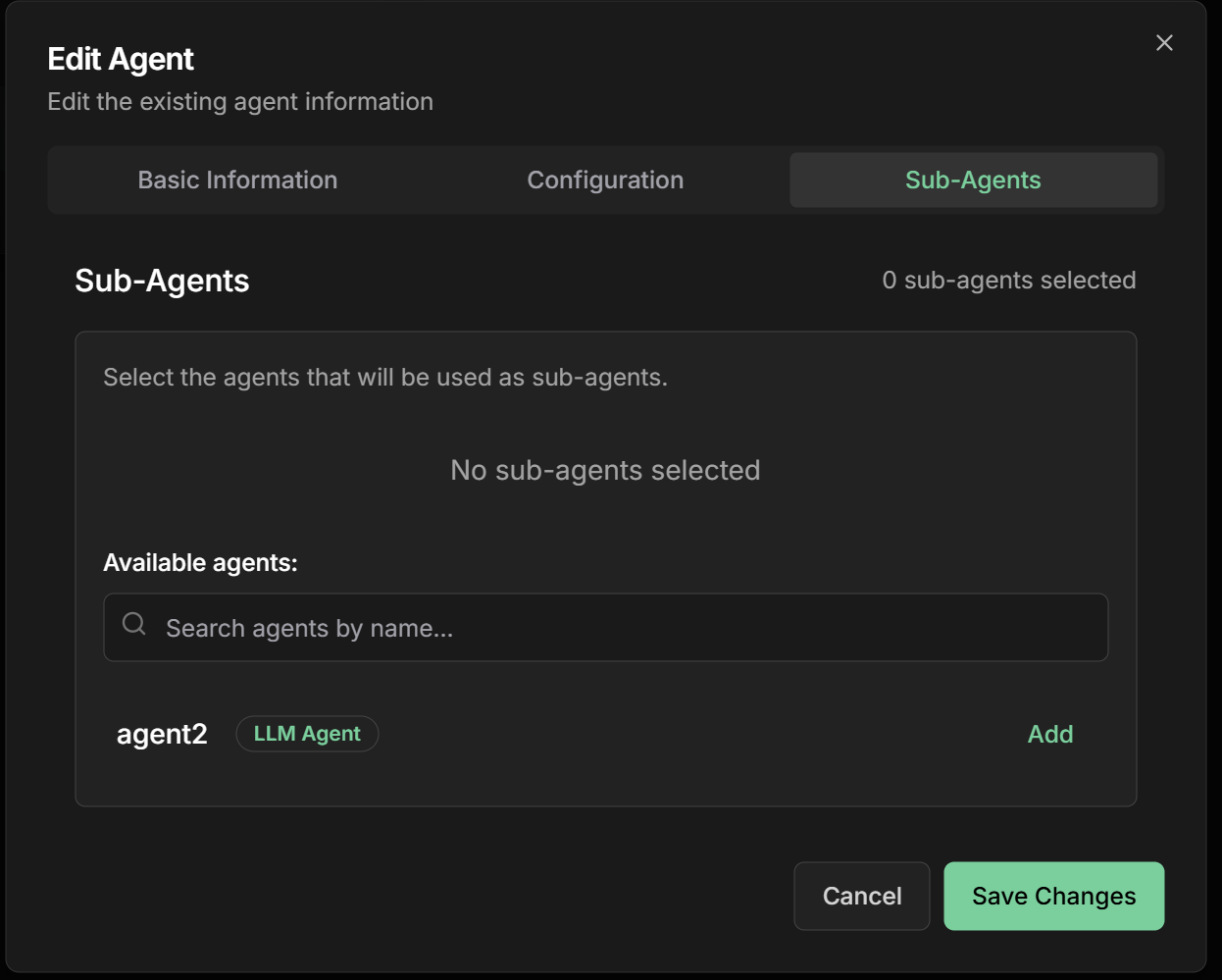
**Sub-Agents:** Add all agents that will execute in parallel
**💡 Tip:** Order doesn't matter, as all execute simultaneously
**Product analysis example:**
* **Price Analyzer** - Compares prices across different stores
* **Review Collector** - Fetches customer reviews
* **Specification Checker** - Collects technical data
* **Stock Checker** - Verifies availability
**Name:** Descriptive name of the parallel agent
```
Example: complete_product_analysis
```
**Description:** Summary of parallel processing
```
Example: Complete product analysis collecting information
from prices, reviews, specifications and availability simultaneously
```
**Goal:** Objective of parallel processing
```
Example: Provide comprehensive product analysis in minimum time,
collecting data from multiple sources simultaneously
```
**Sub-Agents:** Add all agents that will execute in parallel
**💡 Tip:** Order doesn't matter, as all execute simultaneously
**Product analysis example:**
* **Price Analyzer** - Compares prices across different stores
* **Review Collector** - Fetches customer reviews
* **Specification Checker** - Collects technical data
* **Stock Checker** - Verifies availability
 **Instructions:** How the agent should coordinate parallel execution
```markdown theme={null}
# Complete Product Analysis
Execute all sub-agents simultaneously for comprehensive analysis:
## Parallel sub-agents:
- **Prices**: Analyze prices across multiple stores
- **Reviews**: Collect and analyze customer reviews
- **Specifications**: Obtain detailed technical data
- **Stock**: Check real-time availability
## Execution rules:
- Start all sub-agents simultaneously
- Wait for all to complete before finishing
- Combine results into unified report
- Continue even if one sub-agent fails (optional)
## Output format:
Combine all results into a structured report with:
- Executive summary
- Data from each analysis
- Recommendations based on all data
```
**Global Timeout:** Time limit for entire parallel processing
```
Recommended: 600 seconds (10 minutes)
```
**Failure Policy:** How to handle sub-agent failures
```
- Fail if Any Fails (more strict)
- Continue if Some Succeed (more flexible)
- Always Continue (more resilient)
```
**Concurrency Limit:** Limit of simultaneous sub-agents
```
- No Limit (default)
- Max 5 Concurrent
- Max 10 Concurrent
```
**Result Aggregation:** How to combine results
```
- Merge All Results
- Structured Report
- Custom Aggregation
```
## Practical Examples
### 1. Complete Product Analysis
**Objective:** Analyze product by collecting data from multiple sources
**Sub-Agents executing in parallel:**
**1. Price Analyzer**
* **Name:** `price_analyzer`
* **Description:** `Compares product prices across different online stores`
* **Instructions:**
```markdown theme={null}
Analyze the request {{user_input}} and search prices for product {{product_name}}:
- Search main e-commerce sites
- Compare prices and conditions
- Identify best value for money
- Check active promotions
```
* **Output Key:** `price_analysis`
**2. Review Collector**
* **Name:** `review_collector`
* **Description:** `Collects and analyzes customer reviews`
* **Instructions:**
```markdown theme={null}
Based on request {{user_input}}, collect reviews for product {{product_name}}:
- Search reviews across multiple platforms
- Analyze general sentiment
- Identify strengths and weaknesses
- Calculate average satisfaction score
```
* **Output Key:** `review_analysis`
**3. Specification Checker**
* **Name:** `spec_checker`
* **Description:** `Collects detailed technical specifications`
* **Instructions:**
```markdown theme={null}
Considering request {{user_input}}, collect specifications for product {{product_name}}:
- Complete technical data
- Comparison with similar products
- Certifications and standards
- Compatibility and requirements
```
* **Output Key:** `spec_analysis`
**4. Availability Checker**
* **Name:** `availability_checker`
* **Description:** `Checks stock and availability`
* **Instructions:**
```markdown theme={null}
For request {{user_input}}, check availability of product {{product_name}}:
- Stock status in stores
- Delivery times
- Availability regions
- Alternatives if unavailable
```
* **Output Key:** `availability_analysis`
### 2. Complete User Verification
**Objective:** Verify user data across multiple dimensions
**Sub-Agents executing in parallel:**
**1. Email Validator**
* **Name:** `email_validator`
* **Description:** `Validates email format and existence`
* **Output Key:** `email_validation`
**2. Phone Verifier**
* **Name:** `phone_verifier`
* **Description:** `Verifies phone format and validity`
* **Output Key:** `phone_validation`
**3. Document Analyzer**
* **Name:** `document_analyzer`
* **Description:** `Analyzes and validates provided documents`
* **Output Key:** `document_validation`
**4. Address Verifier**
* **Name:** `address_verifier`
* **Description:** `Validates and normalizes address`
* **Output Key:** `address_validation`
**5. Background Checker**
* **Name:** `background_checker`
* **Description:** `Checks history and reputation`
* **Output Key:** `background_check`
### 3. Comprehensive Market Research
**Objective:** Conduct complete market research
**Sub-Agents executing in parallel:**
**1. Competitor Analyzer**
* Analyzes main competitors and strategies
**2. Trend Researcher**
* Identifies market and consumption trends
**3. Price Analyzer**
* Maps price ranges and positioning
**4. Feedback Collector**
* Collects customer opinions and feedback
**5. Opportunity Analyzer**
* Identifies market gaps and opportunities
## Monitoring and Performance
### Tracking Parallel Execution
**Specific metrics for parallel execution:**
* **Individual progress**: Real-time status of each sub-agent
* **Execution time**: Duration of each sub-agent
* **Parallel efficiency**: Speedup achieved vs. sequential execution
* **Resource utilization**: CPU, memory, network during execution
* **Success rate**: How many sub-agents complete successfully
**Real-time visualization:**
```
Sub-Agent Status:
├── price_analyzer [RUNNING] 45s
├── review_collector [COMPLETED] 32s ✓
├── spec_checker [RUNNING] 51s
└── availability_check [FAILED] 28s ✗
Overall Progress: 75% (3/4 completed)
Estimated Time Remaining: 15s
```
**Efficiency metrics:**
**Speedup Calculation:**
```
Sequential Time: 180s (45+32+51+52)
Parallel Time: 52s (maximum among all)
Speedup: 3.46x (180/52)
Efficiency: 86.5% (3.46/4)
```
**Identified bottlenecks:**
* Slowest sub-agent determines total time
* Shared resources can cause contention
* Network I/O can be limiting
**Suggested optimizations:**
* Balance load among sub-agents
* Optimize slowest sub-agent
* Consider caching for frequent data
**Common issues in parallel execution:**
**1. Resource Contention**
```
Symptom: All sub-agents slow
Cause: Competition for CPU/memory/network
Solution: Reduce concurrency or optimize resources
```
**2. Intermittent Failures**
```
Symptom: Sub-agents fail randomly
Cause: Rate limiting or timeouts
Solution: Implement retry and backoff
```
**3. Inconsistent Results**
```
Symptom: Results vary between executions
Cause: Race conditions or dynamic data
Solution: Synchronization or data snapshots
```
## Advanced Configurations
### Concurrency Control
**Concurrency settings:**
**Max Concurrent Agents:** Limit of simultaneous sub-agents
```
- Unlimited (default)
- 5 concurrent (for limited resources)
- 10 concurrent (balanced)
- 20 concurrent (high capacity)
```
**Resource Allocation:** Resource allocation per sub-agent
```
- CPU Limit: 1 core per agent
- Memory Limit: 512MB per agent
- Network Bandwidth: 10Mbps per agent
```
**Queue Management:** Queue management when there's a limit
```
- FIFO (First In, First Out)
- Priority-based (based on priority)
- Round-robin (balanced distribution)
```
**Failure policies:**
**Fail Fast Policy:**
```markdown theme={null}
If any sub-agent fails:
- Stop all others immediately
- Return error to user
- Use for critical operations
```
**Best Effort Policy:**
```markdown theme={null}
If some sub-agents fail:
- Continue with working ones
- Return partial results
- Indicate which ones failed
```
**Retry Policy:**
```markdown theme={null}
For temporary failures:
- Automatic retry 1-3 times
- Exponential backoff
- Progressive timeout
```
**Combination strategies:**
**Simple Merge:**
```json theme={null}
{
"price_analysis": {...},
"review_analysis": {...},
"spec_analysis": {...},
"availability_analysis": {...}
}
```
**Structured Report:**
```json theme={null}
{
"summary": "Complete product analysis...",
"details": {
"pricing": {...},
"reviews": {...},
"specifications": {...},
"availability": {...}
},
"recommendations": [...]
}
```
**Custom Aggregation:**
```markdown theme={null}
Define custom logic to combine results:
- Prioritize more reliable data
- Resolve conflicts between sources
- Calculate derived metrics
- Generate combined insights
```
**`Output Key` field in the interface:**
The Output Key allows the Parallel Agent to save the aggregated result of all sub-agents executed in parallel into a specific variable in the shared state.
**How it works:**
* Configure the `Output Key` field with a descriptive name
* Results from all sub-agents are collected and aggregated
* The final aggregated result is automatically saved in the specified variable
* Other agents can access using placeholders `{{output_key_name}}`
**Configuration examples:**
```markdown theme={null}
Output Key: "complete_product_analysis"
→ Saves aggregated result in state.complete_product_analysis
Output Key: "complete_user_verification"
→ Saves aggregated result in state.complete_user_verification
Output Key: "consolidated_market_research"
→ Saves aggregated result in state.consolidated_market_research
```
**Aggregated result structure:**
```json theme={null}
{
"execution_summary": {
"total_agents": 4,
"successful": 4,
"failed": 0,
"execution_time": "45s"
},
"results": {
"price_analysis": {...},
"review_analysis": {...},
"spec_analysis": {...},
"availability_analysis": {...}
},
"aggregated_insights": "Combined insights from all agents"
}
```
**Usage in other agents:**
```markdown theme={null}
# In subsequent agent instructions:
"Analyze the request: {{user_input}} and use the complete analysis: {{complete_product_analysis}}"
"Based on the verification: {{complete_user_verification}}"
"Consider the research: {{consolidated_market_research}}"
```
**Best practices:**
* Use snake\_case: `parallel_result`, `aggregated_analysis`
* Be specific: `multiple_user_verification` instead of `verification`
* Document aggregated result structure
* Consider including execution metadata
* Use names that reflect the parallel nature of the process
## Best Practices
**Principles for parallel execution:**
* **Independence**: Sub-agents should not depend on each other
* **Idempotence**: Multiple execution should be safe
* **Appropriate timeouts**: Prevent one sub-agent from blocking all
* **Adequate granularity**: Neither too small nor too large
* **Balance**: Sub-agents with similar execution time
**Strategies for maximum efficiency:**
* **Profile first**: Measure before optimizing
* **Identify bottlenecks**: Slowest sub-agent determines total time
* **Smart caching**: Avoid reprocessing identical data
* **Batch operations**: Group similar operations
* **Resource pooling**: Reuse connections and resources
**Ensuring robust execution:**
* **Circuit breakers**: Avoid failure cascades
* **Health checks**: Monitor sub-agent health
* **Graceful degradation**: Continue with reduced functionality
* **Retry logic**: Retry only for temporary failures
* **Monitoring**: Alerts for performance issues
## Common Use Cases
**Parallel Processing:**
* Multiple analyses on the same dataset
* Data collection from various sources
* Independent validations
**Multiple Validation:**
* Email, phone, documents
* Background checks
* Address validation
**Comprehensive Collection:**
* Competitor analysis
* Market trends
* Customer feedback
**Continuous Surveillance:**
* Multiple metrics
* Different systems
* Parallel alerts
## Next Steps
Learn about ordered sequential execution
Explore agents that execute in iterative loops
Back to the fundamentals of intelligent agents
Explore advanced agent configurations
***
The Parallel Agent is essential for maximizing efficiency when you have independent tasks. Use it to drastically reduce total processing time by executing multiple operations simultaneously.
**Instructions:** How the agent should coordinate parallel execution
```markdown theme={null}
# Complete Product Analysis
Execute all sub-agents simultaneously for comprehensive analysis:
## Parallel sub-agents:
- **Prices**: Analyze prices across multiple stores
- **Reviews**: Collect and analyze customer reviews
- **Specifications**: Obtain detailed technical data
- **Stock**: Check real-time availability
## Execution rules:
- Start all sub-agents simultaneously
- Wait for all to complete before finishing
- Combine results into unified report
- Continue even if one sub-agent fails (optional)
## Output format:
Combine all results into a structured report with:
- Executive summary
- Data from each analysis
- Recommendations based on all data
```
**Global Timeout:** Time limit for entire parallel processing
```
Recommended: 600 seconds (10 minutes)
```
**Failure Policy:** How to handle sub-agent failures
```
- Fail if Any Fails (more strict)
- Continue if Some Succeed (more flexible)
- Always Continue (more resilient)
```
**Concurrency Limit:** Limit of simultaneous sub-agents
```
- No Limit (default)
- Max 5 Concurrent
- Max 10 Concurrent
```
**Result Aggregation:** How to combine results
```
- Merge All Results
- Structured Report
- Custom Aggregation
```
## Practical Examples
### 1. Complete Product Analysis
**Objective:** Analyze product by collecting data from multiple sources
**Sub-Agents executing in parallel:**
**1. Price Analyzer**
* **Name:** `price_analyzer`
* **Description:** `Compares product prices across different online stores`
* **Instructions:**
```markdown theme={null}
Analyze the request {{user_input}} and search prices for product {{product_name}}:
- Search main e-commerce sites
- Compare prices and conditions
- Identify best value for money
- Check active promotions
```
* **Output Key:** `price_analysis`
**2. Review Collector**
* **Name:** `review_collector`
* **Description:** `Collects and analyzes customer reviews`
* **Instructions:**
```markdown theme={null}
Based on request {{user_input}}, collect reviews for product {{product_name}}:
- Search reviews across multiple platforms
- Analyze general sentiment
- Identify strengths and weaknesses
- Calculate average satisfaction score
```
* **Output Key:** `review_analysis`
**3. Specification Checker**
* **Name:** `spec_checker`
* **Description:** `Collects detailed technical specifications`
* **Instructions:**
```markdown theme={null}
Considering request {{user_input}}, collect specifications for product {{product_name}}:
- Complete technical data
- Comparison with similar products
- Certifications and standards
- Compatibility and requirements
```
* **Output Key:** `spec_analysis`
**4. Availability Checker**
* **Name:** `availability_checker`
* **Description:** `Checks stock and availability`
* **Instructions:**
```markdown theme={null}
For request {{user_input}}, check availability of product {{product_name}}:
- Stock status in stores
- Delivery times
- Availability regions
- Alternatives if unavailable
```
* **Output Key:** `availability_analysis`
### 2. Complete User Verification
**Objective:** Verify user data across multiple dimensions
**Sub-Agents executing in parallel:**
**1. Email Validator**
* **Name:** `email_validator`
* **Description:** `Validates email format and existence`
* **Output Key:** `email_validation`
**2. Phone Verifier**
* **Name:** `phone_verifier`
* **Description:** `Verifies phone format and validity`
* **Output Key:** `phone_validation`
**3. Document Analyzer**
* **Name:** `document_analyzer`
* **Description:** `Analyzes and validates provided documents`
* **Output Key:** `document_validation`
**4. Address Verifier**
* **Name:** `address_verifier`
* **Description:** `Validates and normalizes address`
* **Output Key:** `address_validation`
**5. Background Checker**
* **Name:** `background_checker`
* **Description:** `Checks history and reputation`
* **Output Key:** `background_check`
### 3. Comprehensive Market Research
**Objective:** Conduct complete market research
**Sub-Agents executing in parallel:**
**1. Competitor Analyzer**
* Analyzes main competitors and strategies
**2. Trend Researcher**
* Identifies market and consumption trends
**3. Price Analyzer**
* Maps price ranges and positioning
**4. Feedback Collector**
* Collects customer opinions and feedback
**5. Opportunity Analyzer**
* Identifies market gaps and opportunities
## Monitoring and Performance
### Tracking Parallel Execution
**Specific metrics for parallel execution:**
* **Individual progress**: Real-time status of each sub-agent
* **Execution time**: Duration of each sub-agent
* **Parallel efficiency**: Speedup achieved vs. sequential execution
* **Resource utilization**: CPU, memory, network during execution
* **Success rate**: How many sub-agents complete successfully
**Real-time visualization:**
```
Sub-Agent Status:
├── price_analyzer [RUNNING] 45s
├── review_collector [COMPLETED] 32s ✓
├── spec_checker [RUNNING] 51s
└── availability_check [FAILED] 28s ✗
Overall Progress: 75% (3/4 completed)
Estimated Time Remaining: 15s
```
**Efficiency metrics:**
**Speedup Calculation:**
```
Sequential Time: 180s (45+32+51+52)
Parallel Time: 52s (maximum among all)
Speedup: 3.46x (180/52)
Efficiency: 86.5% (3.46/4)
```
**Identified bottlenecks:**
* Slowest sub-agent determines total time
* Shared resources can cause contention
* Network I/O can be limiting
**Suggested optimizations:**
* Balance load among sub-agents
* Optimize slowest sub-agent
* Consider caching for frequent data
**Common issues in parallel execution:**
**1. Resource Contention**
```
Symptom: All sub-agents slow
Cause: Competition for CPU/memory/network
Solution: Reduce concurrency or optimize resources
```
**2. Intermittent Failures**
```
Symptom: Sub-agents fail randomly
Cause: Rate limiting or timeouts
Solution: Implement retry and backoff
```
**3. Inconsistent Results**
```
Symptom: Results vary between executions
Cause: Race conditions or dynamic data
Solution: Synchronization or data snapshots
```
## Advanced Configurations
### Concurrency Control
**Concurrency settings:**
**Max Concurrent Agents:** Limit of simultaneous sub-agents
```
- Unlimited (default)
- 5 concurrent (for limited resources)
- 10 concurrent (balanced)
- 20 concurrent (high capacity)
```
**Resource Allocation:** Resource allocation per sub-agent
```
- CPU Limit: 1 core per agent
- Memory Limit: 512MB per agent
- Network Bandwidth: 10Mbps per agent
```
**Queue Management:** Queue management when there's a limit
```
- FIFO (First In, First Out)
- Priority-based (based on priority)
- Round-robin (balanced distribution)
```
**Failure policies:**
**Fail Fast Policy:**
```markdown theme={null}
If any sub-agent fails:
- Stop all others immediately
- Return error to user
- Use for critical operations
```
**Best Effort Policy:**
```markdown theme={null}
If some sub-agents fail:
- Continue with working ones
- Return partial results
- Indicate which ones failed
```
**Retry Policy:**
```markdown theme={null}
For temporary failures:
- Automatic retry 1-3 times
- Exponential backoff
- Progressive timeout
```
**Combination strategies:**
**Simple Merge:**
```json theme={null}
{
"price_analysis": {...},
"review_analysis": {...},
"spec_analysis": {...},
"availability_analysis": {...}
}
```
**Structured Report:**
```json theme={null}
{
"summary": "Complete product analysis...",
"details": {
"pricing": {...},
"reviews": {...},
"specifications": {...},
"availability": {...}
},
"recommendations": [...]
}
```
**Custom Aggregation:**
```markdown theme={null}
Define custom logic to combine results:
- Prioritize more reliable data
- Resolve conflicts between sources
- Calculate derived metrics
- Generate combined insights
```
**`Output Key` field in the interface:**
The Output Key allows the Parallel Agent to save the aggregated result of all sub-agents executed in parallel into a specific variable in the shared state.
**How it works:**
* Configure the `Output Key` field with a descriptive name
* Results from all sub-agents are collected and aggregated
* The final aggregated result is automatically saved in the specified variable
* Other agents can access using placeholders `{{output_key_name}}`
**Configuration examples:**
```markdown theme={null}
Output Key: "complete_product_analysis"
→ Saves aggregated result in state.complete_product_analysis
Output Key: "complete_user_verification"
→ Saves aggregated result in state.complete_user_verification
Output Key: "consolidated_market_research"
→ Saves aggregated result in state.consolidated_market_research
```
**Aggregated result structure:**
```json theme={null}
{
"execution_summary": {
"total_agents": 4,
"successful": 4,
"failed": 0,
"execution_time": "45s"
},
"results": {
"price_analysis": {...},
"review_analysis": {...},
"spec_analysis": {...},
"availability_analysis": {...}
},
"aggregated_insights": "Combined insights from all agents"
}
```
**Usage in other agents:**
```markdown theme={null}
# In subsequent agent instructions:
"Analyze the request: {{user_input}} and use the complete analysis: {{complete_product_analysis}}"
"Based on the verification: {{complete_user_verification}}"
"Consider the research: {{consolidated_market_research}}"
```
**Best practices:**
* Use snake\_case: `parallel_result`, `aggregated_analysis`
* Be specific: `multiple_user_verification` instead of `verification`
* Document aggregated result structure
* Consider including execution metadata
* Use names that reflect the parallel nature of the process
## Best Practices
**Principles for parallel execution:**
* **Independence**: Sub-agents should not depend on each other
* **Idempotence**: Multiple execution should be safe
* **Appropriate timeouts**: Prevent one sub-agent from blocking all
* **Adequate granularity**: Neither too small nor too large
* **Balance**: Sub-agents with similar execution time
**Strategies for maximum efficiency:**
* **Profile first**: Measure before optimizing
* **Identify bottlenecks**: Slowest sub-agent determines total time
* **Smart caching**: Avoid reprocessing identical data
* **Batch operations**: Group similar operations
* **Resource pooling**: Reuse connections and resources
**Ensuring robust execution:**
* **Circuit breakers**: Avoid failure cascades
* **Health checks**: Monitor sub-agent health
* **Graceful degradation**: Continue with reduced functionality
* **Retry logic**: Retry only for temporary failures
* **Monitoring**: Alerts for performance issues
## Common Use Cases
**Parallel Processing:**
* Multiple analyses on the same dataset
* Data collection from various sources
* Independent validations
**Multiple Validation:**
* Email, phone, documents
* Background checks
* Address validation
**Comprehensive Collection:**
* Competitor analysis
* Market trends
* Customer feedback
**Continuous Surveillance:**
* Multiple metrics
* Different systems
* Parallel alerts
## Next Steps
Learn about ordered sequential execution
Explore agents that execute in iterative loops
Back to the fundamentals of intelligent agents
Explore advanced agent configurations
***
The Parallel Agent is essential for maximizing efficiency when you have independent tasks. Use it to drastically reduce total processing time by executing multiple operations simultaneously.