> ## Documentation Index
> Fetch the complete documentation index at: https://docs.evo-ai.co/llms.txt
> Use this file to discover all available pages before exploring further.
# Loop Agent
> Configure agents that execute sub-agents in iterative loops for continuous refinement and improvement
## Overview
The **Loop Agent** is a type of workflow agent that executes sub-agents in an iterative cycle until a stop condition is met. This pattern is ideal for processes that need continuous refinement, iterative improvement, or multiple attempts until achieving a satisfactory result.
Unlike Sequential and Parallel agents, the Loop Agent repeats the execution of sub-agents multiple times, allowing each iteration to improve the result based on feedback from the previous iteration.
**Based on Google ADK**: Implementation following the patterns of the [Google Agent Development Kit](https://google.github.io/adk-docs/agents/multi-agents/) for iterative agents.
## Key Features
Repeats sub-agent execution until stop condition is met
Each iteration can improve the result based on the previous one
Stop control via automatic tool in instructions
Customizable stop criteria via instructions
## exit\_loop Tool - Stop Control
**Important**: The Loop Agent allows you to **select which sub-agents** can use the `exit_loop` tool. During sub-agent configuration, you define which ones have the power to stop the loop.
**How it works:**
* In each sub-agent configuration, you can **enable the use of the `exit_loop` tool**
* Only selected sub-agents can decide to stop the loop
* The tool accepts parameters to document the reason for stopping
* Allows granular control over who can finalize the iterative process
**Configuration in the interface:**
* ✅ **Sub-agents with exit\_loop**: Can use the tool to stop the loop
* ❌ **Sub-agents without exit\_loop**: Execute normally without stopping power
**How to use exit\_loop:**
```markdown theme={null}
exit_loop()
```
The `exit_loop` function accepts no arguments. It simply signals that the loop should stop.
## Output Keys - State Sharing
**Final Response**: The sub-agent that has the **Output Key defined as `loop_output`** will be used to generate the **final response** presented to the user at the end of the loop.
**Agent types with Output Key:**
* **LLM Agent**: Saves language model response
* **Task Agent**: Saves task execution result
* **Workflow Agent**: Saves executed workflow result
* **A2A Agent**: Saves Agent-to-Agent protocol response
**Special Output Key - `loop_output`:**
* ⭐ **`loop_output`** - Sub-agent that generates final response presented to user
* This agent is executed **after all iterations** to consolidate result
* This agent's response is presented to the user as the final result
* Only **one sub-agent** can have `loop_output` as output\_key
**How it works:**
1. Configure the **Output Key** of each sub-agent
2. The result is automatically saved in the loop state
3. Use placeholders `{{output_key_name}}` in instructions to access data
4. State persists across all loop iterations
5. **At the end**, the agent with `loop_output` consolidates the final response
**Example flow:**
```markdown theme={null}
Iteration 1:
- Generator (output_key: "content") → saves to state.content
- Analyzer reads {{user_input}} and {{content}} → analyzes and saves to state.analysis
Iteration 2:
- Generator reads {{user_input}}, {{content}} and {{analysis}} → refines and updates state.content
- Analyzer reads updated {{content}} → new analysis
End of Loop:
- Finalizer (output_key: "loop_output") → generates final response based on entire state
```
## When to Use Loop Agent
**✅ Use Loop Agent when:**
* **Iterative refinement**: Improve result with each attempt
* **Optimization**: Seek best solution through iterations
* **Validation with retry**: Try until achieving valid result
* **Incremental learning**: Improve based on feedback
* **Convergence**: Iterate until reaching quality criteria
**Practical examples:**
* Content refinement until desired quality is achieved
* Parameter optimization through trials
* Code generation with iterative corrections
* Multi-round negotiation
* Analysis with feedback-based refinement
**❌ Avoid Loop Agent when:**
* **Single result**: Process only needs to execute once
* **No possible improvement**: Iterations don't add value
* **Limited resources**: Multiple executions are too costly
* **Time critical**: No time for multiple attempts
* **Deterministic**: Result will always be the same
## Creating a Loop Agent
### Step-by-Step on the Platform
1. On the Evo AI main screen, click **"New Agent"**
2. In the **"Type"** field, select **"Loop Agent"**
3. You'll see specific fields for loop configuration
 **Name:** Descriptive name for the loop agent
```
Example: iterative_content_refiner
```
**Description:** Summary of the iterative process
```
Example: Refines marketing content through multiple
iterations until achieving desired quality and effectiveness
```
**Goal:** Objective of the iterative process
```
Example: Produce high-quality content through
continuous refinement based on analysis and feedback
```
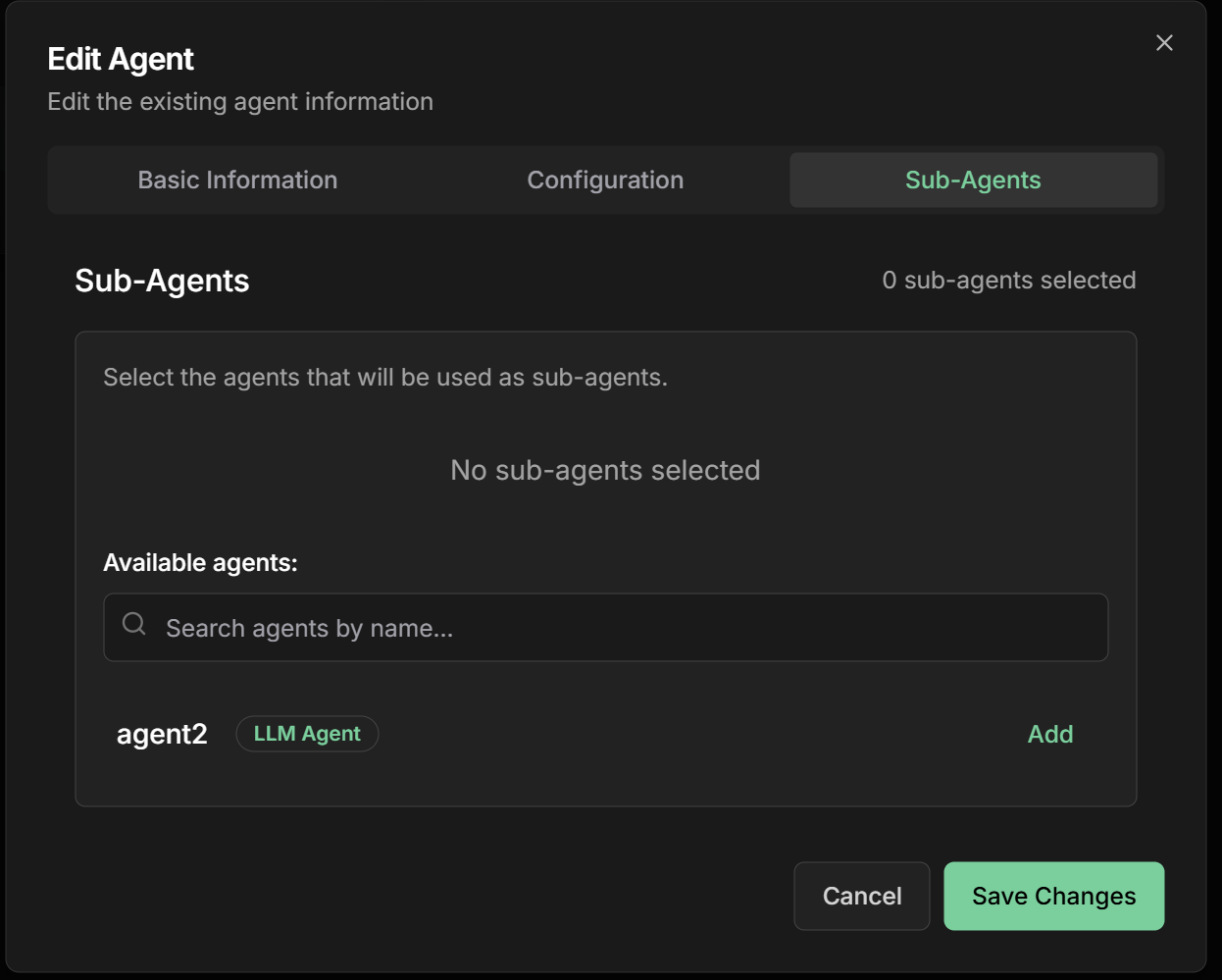
**Sub-Agents:** Add agents that will execute in each iteration
**💡 Important:** Sub-agent order defines sequence within each iteration
**🛑 Stop Control:** For each sub-agent, you can enable the use of `exit_loop` tool
**🎯 Final Response:** One sub-agent must have `output_key: "loop_output"` to generate final response
**Content refinement example:**
1. **Content Generator** - Creates or refines content
2. **Quality Analyzer** - Evaluates content quality
3. **Feedback Collector** - Identifies improvement points
4. **Criteria Checker** - Decides whether to continue (🛑 **can use exit\_loop**)
5. **Finalizer** - Generates final response (🎯 **output\_key: "loop\_output"**)
**Name:** Descriptive name for the loop agent
```
Example: iterative_content_refiner
```
**Description:** Summary of the iterative process
```
Example: Refines marketing content through multiple
iterations until achieving desired quality and effectiveness
```
**Goal:** Objective of the iterative process
```
Example: Produce high-quality content through
continuous refinement based on analysis and feedback
```
**Sub-Agents:** Add agents that will execute in each iteration
**💡 Important:** Sub-agent order defines sequence within each iteration
**🛑 Stop Control:** For each sub-agent, you can enable the use of `exit_loop` tool
**🎯 Final Response:** One sub-agent must have `output_key: "loop_output"` to generate final response
**Content refinement example:**
1. **Content Generator** - Creates or refines content
2. **Quality Analyzer** - Evaluates content quality
3. **Feedback Collector** - Identifies improvement points
4. **Criteria Checker** - Decides whether to continue (🛑 **can use exit\_loop**)
5. **Finalizer** - Generates final response (🎯 **output\_key: "loop\_output"**)
 **Instructions:** How the agent should coordinate iterations
```markdown theme={null}
# Iterative Content Refiner
Execute refinement iterations until achieving desired quality:
## Process per iteration:
1. **Generator**: Create or refine content based on previous feedback
2. **Analyzer**: Evaluate quality across multiple dimensions
3. **Feedback**: Identify specific improvement points
4. **Checker**: Determine if quality is satisfactory
## Stop criteria - USE exit_loop when:
- Quality score >= 8.0 AND all dimensions >= 7.0
- Improvement < 0.1 between consecutive iterations
- Maximum of 5 iterations reached
## How to use exit_loop:
```
exit\_loop()
```
## Between iterations:
- Maintain current content context
- Accumulate feedback from all iterations
- Track progress and improvements
- Avoid quality regressions
```
**Output Key:** Field available for all agent types
**Agent types that support output\_key:**
* ✅ **LLM Agent** - Saves model response to state
* ✅ **Task Agent** - Saves task result to state
* ✅ **Workflow Agent** - Saves workflow result to state
* ✅ **A2A Agent** - Saves A2A protocol response to state
**Special Output Key:**
* ⭐ **`loop_output`** - Sub-agent that generates final response presented to user
**How to configure:**
```markdown theme={null}
For each sub-agent, define where to save the result:
Content Generator:
- Output Key: "current_content"
Quality Analyzer:
- Output Key: "quality_analysis"
Feedback Collector:
- Output Key: "improvement_feedback"
Criteria Checker:
- Output Key: "stop_decision"
- ✅ Can use exit_loop: Enabled
Final Finalizer:
- Output Key: "loop_output" ⭐
- Function: Generate final response for user
```
**Usage in instructions:**
```markdown theme={null}
Use placeholders {{output_key_name}} to access data:
"Analyze the request: {{user_input}} and this content: {{current_content}}"
"Based on analysis: {{quality_analysis}}"
"Implement feedback: {{improvement_feedback}}"
For Finalizer (loop_output):
"Consolidate entire process: {{current_content}}, {{quality_analysis}}, {{improvement_feedback}} and generate final response for user about {{user_input}}"
```
**Instructions:** How the agent should coordinate iterations
```markdown theme={null}
# Iterative Content Refiner
Execute refinement iterations until achieving desired quality:
## Process per iteration:
1. **Generator**: Create or refine content based on previous feedback
2. **Analyzer**: Evaluate quality across multiple dimensions
3. **Feedback**: Identify specific improvement points
4. **Checker**: Determine if quality is satisfactory
## Stop criteria - USE exit_loop when:
- Quality score >= 8.0 AND all dimensions >= 7.0
- Improvement < 0.1 between consecutive iterations
- Maximum of 5 iterations reached
## How to use exit_loop:
```
exit\_loop()
```
## Between iterations:
- Maintain current content context
- Accumulate feedback from all iterations
- Track progress and improvements
- Avoid quality regressions
```
**Output Key:** Field available for all agent types
**Agent types that support output\_key:**
* ✅ **LLM Agent** - Saves model response to state
* ✅ **Task Agent** - Saves task result to state
* ✅ **Workflow Agent** - Saves workflow result to state
* ✅ **A2A Agent** - Saves A2A protocol response to state
**Special Output Key:**
* ⭐ **`loop_output`** - Sub-agent that generates final response presented to user
**How to configure:**
```markdown theme={null}
For each sub-agent, define where to save the result:
Content Generator:
- Output Key: "current_content"
Quality Analyzer:
- Output Key: "quality_analysis"
Feedback Collector:
- Output Key: "improvement_feedback"
Criteria Checker:
- Output Key: "stop_decision"
- ✅ Can use exit_loop: Enabled
Final Finalizer:
- Output Key: "loop_output" ⭐
- Function: Generate final response for user
```
**Usage in instructions:**
```markdown theme={null}
Use placeholders {{output_key_name}} to access data:
"Analyze the request: {{user_input}} and this content: {{current_content}}"
"Based on analysis: {{quality_analysis}}"
"Implement feedback: {{improvement_feedback}}"
For Finalizer (loop_output):
"Consolidate entire process: {{current_content}}, {{quality_analysis}}, {{improvement_feedback}} and generate final response for user about {{user_input}}"
```
 **Control via `exit_loop` Tool:**
During sub-agent configuration, you **select which ones can use the `exit_loop` tool**. Only enabled sub-agents have the power to stop the loop.
**Configuration in interface:**
```markdown theme={null}
For each sub-agent, you'll see an option:
✅ "Can use exit_loop" - Enable/Disable
Example:
- Content Generator: ❌ Cannot stop
- Quality Analyzer: ❌ Cannot stop
- Criteria Checker: ✅ Can stop the loop
- Finalizer: ❌ Doesn't need to stop (executes at end)
```
**How it works:**
```markdown theme={null}
Only sub-agents with permission can use exit_loop.
The agent should use the tool when stop condition is met.
In enabled sub-agent instructions:
"If quality criteria are met, use exit_loop()"
```
**Example stop instruction:**
```markdown theme={null}
## For Criteria Checker
Based on analysis {{quality_analysis}}, check criteria:
USE exit_loop when:
- Quality score >= 8.0 AND
- All dimensions >= 7.0 AND
- Improvement < 0.1 between iterations
Usage example:
exit_loop()
```
**Control via `exit_loop` Tool:**
During sub-agent configuration, you **select which ones can use the `exit_loop` tool**. Only enabled sub-agents have the power to stop the loop.
**Configuration in interface:**
```markdown theme={null}
For each sub-agent, you'll see an option:
✅ "Can use exit_loop" - Enable/Disable
Example:
- Content Generator: ❌ Cannot stop
- Quality Analyzer: ❌ Cannot stop
- Criteria Checker: ✅ Can stop the loop
- Finalizer: ❌ Doesn't need to stop (executes at end)
```
**How it works:**
```markdown theme={null}
Only sub-agents with permission can use exit_loop.
The agent should use the tool when stop condition is met.
In enabled sub-agent instructions:
"If quality criteria are met, use exit_loop()"
```
**Example stop instruction:**
```markdown theme={null}
## For Criteria Checker
Based on analysis {{quality_analysis}}, check criteria:
USE exit_loop when:
- Quality score >= 8.0 AND
- All dimensions >= 7.0 AND
- Improvement < 0.1 between iterations
Usage example:
exit_loop()
```
 ## Practical Examples
### 1. Marketing Content Refinement
**Objective:** Refine content until achieving high quality and effectiveness
**Sub-Agents in each iteration:**
**1. Content Generator**
* **Name:** `content_generator`
* **Description:** `Generates or refines content based on feedback`
* **Instructions:**
```markdown theme={null}
If first iteration:
- Generate initial content based on request {{user_input}}
If subsequent iteration:
- Refine current content based on feedback {{previous_feedback}}
- Maintain identified strengths
- Improve specific weaknesses
Focus on: clarity, persuasion, target audience fit
```
* **Output Key:** `current_content`
**2. Quality Analyzer**
* **Name:** `quality_analyzer`
* **Description:** `Evaluates content quality across multiple dimensions`
* **Instructions:**
```markdown theme={null}
Analyze generated content in {{current_content}}:
Evaluation dimensions (score 1-10):
1. **Clarity**: Is message clear and understandable?
2. **Persuasion**: Is content convincing and engaging?
3. **Target audience**: Suitable for defined audience?
4. **Grammar**: Correct and fluent language?
5. **Call-to-action**: Is CTA clear and effective?
Calculate average score and identify strengths/weaknesses.
```
* **Output Key:** `quality_analysis`
**3. Feedback Collector**
* **Name:** `feedback_collector`
* **Description:** `Identifies specific improvements based on analysis`
* **Instructions:**
```markdown theme={null}
Based on quality analysis {{quality_analysis}}:
For each dimension with score < 8:
- Identify specific problems
- Suggest concrete improvements
- Prioritize by impact
Generate actionable feedback for next iteration.
```
* **Output Key:** `improvement_feedback`
**4. Criteria Checker**
* **Name:** `criteria_checker`
* **Description:** `Decides whether to continue iterating or use exit_loop`
* **✅ Can use exit\_loop:** Enabled
* **Instructions:**
```markdown theme={null}
Check stop criteria based on analysis {{quality_analysis}}:
USE exit_loop if:
- Average score >= 8.0 AND all dimensions >= 7.0
- Improvement since last iteration < 0.1
- Reached maximum iterations
Usage example:
exit_loop()
Continue iterating if there's still potential for significant improvement.
```
* **Output Key:** `stop_decision`
**5. Finalizer**
* **Name:** `final_consolidator`
* **Description:** `Generates consolidated final response for user`
* **✅ Can use exit\_loop:** Disabled (executes after loop)
* **Instructions:**
```markdown theme={null}
Consolidate entire refinement process to respond to user about {{user_input}}:
Based on:
- Final content: {{current_content}}
- Quality analysis: {{quality_analysis}}
- Applied feedback: {{improvement_feedback}}
- Final decision: {{stop_decision}}
Present final result clearly and completely.
```
* **Output Key:** `loop_output` ⭐
### 2. Optimization with Different Agent Types
**Objective:** Optimize parameters using different agent types
**Sub-Agents in each iteration:**
**1. Parameter Adjuster (LLM Agent)**
* **Type:** `LLM Agent`
* **Description:** Adjusts parameters based on previous performance
* **Instructions:** `Analyze request {{user_input}} and previous performance: {{previous_performance}}. Adjust parameters to improve results.`
* **Output Key:** `current_parameters`
**2. Performance Simulator (Task Agent)**
* **Type:** `Task Agent`
* **Description:** Executes simulation with new parameters
* **Task:** Campaign simulation with parameters in `{{current_parameters}}`
* **Output Key:** `simulated_performance`
**3. Data Analyzer (A2A Agent)**
* **Type:** `A2A Agent`
* **Description:** Analyzes data via external protocol
* **Endpoint:** Analysis system that receives `{{simulated_performance}}`
* **Output Key:** `detailed_analysis`
**4. Convergence Decider (LLM Agent)**
* **Type:** `LLM Agent`
* **Description:** Decides if satisfactory optimization achieved
* **✅ Can use exit\_loop:** Enabled
* **Instructions:** `Based on analysis {{detailed_analysis}}, if improvement < 5% use exit_loop.`
* **Output Key:** `optimization_decision`
**5. Final Consolidator (LLM Agent)**
* **Type:** `LLM Agent`
* **Description:** Generates final response with optimized parameters
* **✅ Can use exit\_loop:** Disabled
* **Instructions:** `Based on complete optimization {{current_parameters}} and {{detailed_analysis}}, present final result for {{user_input}}.`
* **Output Key:** `loop_output` ⭐
### 3. Development with Workflow Agents
**Objective:** Develop code using complex workflows
**Sub-Agents in each iteration:**
**1. Code Generator (LLM Agent)**
* **Type:** `LLM Agent`
* **Description:** Generates or fixes code based on requirements
* **Instructions:** `Based on request {{user_input}}, generate code for: {{requirements}}. If there are errors in {{test_results}}, fix them.`
* **Output Key:** `current_code`
**2. Testing Pipeline (Workflow Agent)**
* **Type:** `Workflow Agent` (Sequential)
* **Description:** Executes complete testing pipeline
* **Sub-agents:** \[syntax\_validator, test\_executor, coverage\_analyzer]
* **Output Key:** `test_results`
**3. Quality Analyzer (A2A Agent)**
* **Type:** `A2A Agent`
* **Description:** Analyzes quality via external system
* **Endpoint:** Code analysis system that receives `{{current_code}}`
* **Output Key:** `quality_analysis`
**4. Final Checker (LLM Agent)**
* **Type:** `LLM Agent`
* **Description:** Decides if code is ready
* **✅ Can use exit\_loop:** Enabled
* **Instructions:** `Analyze results {{test_results}} and quality {{quality_analysis}}. If all tests passed and quality >= 8, use exit_loop.`
* **Output Key:** `final_check`
**5. Final Deliverer (LLM Agent)**
* **Type:** `LLM Agent`
* **Description:** Delivers final code to user
* **✅ Can use exit\_loop:** Disabled
* **Instructions:** `Present final code {{current_code}} with documentation based on {{test_results}} and {{quality_analysis}} for {{user_input}}.`
* **Output Key:** `loop_output` ⭐
## Advanced Loop Configurations
### Output Keys - Shared State
**Output Key is available for all agent types:**
**LLM Agent:**
```json theme={null}
{
"type": "llm",
"model": "gemini-2.0-flash",
"instructions": "Analyze request {{user_input}} and data {{input_data}}, provide feedback",
"config": {
"output_key": "analysis_feedback"
}
}
```
**Task Agent:**
```json theme={null}
{
"type": "task",
"task_definition": "Process data according to {{user_input}} in {{input_data}}",
"config": {
"output_key": "processed_data"
}
}
```
**Workflow Agent:**
```json theme={null}
{
"type": "workflow",
"workflow_type": "sequential",
"sub_agents": ["agent1", "agent2"],
"config": {
"output_key": "workflow_result"
}
}
```
**A2A Agent:**
```json theme={null}
{
"type": "a2a",
"endpoint": "https://external.api.com/analyze",
"payload": {"data": "{{input_data}}"},
"config": {
"output_key": "external_response"
}
}
```
**How data flows in the loop:**
```markdown theme={null}
Initial state:
{
"requirements": "Create sorting function",
"language": "Python"
}
After Agent 1 (output_key: "code"):
{
"requirements": "Create sorting function",
"language": "Python",
"code": "def sort(list): return sorted(list)"
}
After Agent 2 (output_key: "tests"):
{
"requirements": "Create sorting function",
"language": "Python",
"code": "def sort(list): return sorted(list)",
"tests": "All tests passed"
}
```
**Automatic placeholders:**
* Use `{{code}}` to access previous agent result
* Use `{{tests}}` to access test results
* Use `{{requirements}}` to access initial data
* All data persists between iterations
**Naming:**
* Use snake\_case: `analysis_result`, `processed_data`
* Be descriptive: `quality_feedback` instead of `feedback`
* Avoid conflicts: don't use names already existing in state
**Data structure:**
* Keep data structured when possible
* Use JSON for complex data
* Document expected format in instructions
**Performance:**
* Avoid saving unnecessarily large data
* Clean temporary data when no longer needed
* Use output\_key only when data will be reused
### Stop Control with exit\_loop
**The exit\_loop tool is automatically made available to the agent and should be used in instructions to control when to stop the loop.**
**1. Score-based Stop:**
```markdown theme={null}
# In agent instructions:
Use exit_loop when score reaches threshold:
if quality_score >= 8.0:
exit_loop()
```
**2. Improvement-based Stop:**
```markdown theme={null}
# In agent instructions:
Use exit_loop when improvement is minimal:
if improvement < 0.1:
exit_loop()
```
**3. Criteria-based Stop:**
```markdown theme={null}
# In agent instructions:
Use exit_loop when all criteria are met:
if all_criteria_met:
exit_loop()
```
**4. Custom Condition:**
```markdown theme={null}
# In agent instructions:
Use exit_loop for custom conditions:
if custom_business_rule_satisfied:
exit_loop()
```
**Timeouts by level:**
**Iteration Timeout:** Time limit per iteration
```
- Default: 300s (5 minutes)
- Complex: 600s (10 minutes)
- Simple: 120s (2 minutes)
```
**Total Loop Timeout:** Total loop time limit
```
- Default: 1800s (30 minutes)
- Long: 3600s (1 hour)
- Fast: 900s (15 minutes)
```
**Sub-Agent Timeout:** Time limit per sub-agent
```
- Based on each sub-agent complexity
- Allows individual configuration
- Failover to next sub-agent
```
**Convergence metrics:**
**Progress Tracking:**
```
Iteration 1: Score 5.2 → Improvement: N/A
Iteration 2: Score 6.8 → Improvement: +1.6 (30.8%)
Iteration 3: Score 7.4 → Improvement: +0.6 (8.8%)
Iteration 4: Score 7.6 → Improvement: +0.2 (2.7%)
Convergence detected: Improvement < 5%
```
**Trend Analysis:**
* Detects improvement trends
* Identifies performance plateaus
* Predicts required number of iterations
* Suggests parameter adjustments
### Optimization Strategies
**Speed optimizations:**
**Smart Cache:**
```markdown theme={null}
- Cache deterministic sub-agent results
- Avoid reprocessing identical data
- Invalidate cache when necessary
```
**Early Termination:**
```markdown theme={null}
- Stop as soon as criteria is met
- Don't execute unnecessary sub-agents
- Monitor progress in real-time
```
**Adaptive Timeouts:**
```markdown theme={null}
- Adjust timeouts based on historical performance
- Reduce timeouts for fast iterations
- Increase for complex iterations
```
**State control between iterations:**
**State Management:**
```markdown theme={null}
- Keep only essential data
- Clean temporary data between iterations
- Compress old iteration history
```
**Memory Limits:**
```markdown theme={null}
- Limit memory per iteration
- Garbage collection between iterations
- Alerts for excessive memory usage
```
**Data Persistence:**
```markdown theme={null}
- Save checkpoints each iteration
- Allow restart from failure point
- Maintain complete audit trail
```
## Monitoring and Debugging
### Tracking Iterations
**Real-time visualization:**
```
Loop Agent: iterative_content_refiner
Current Iteration: 3/5
Elapsed Time: 8m 32s
Progress by Iteration:
├── Iteration 1: Score 5.2 [COMPLETED] 2m 15s
├── Iteration 2: Score 6.8 [COMPLETED] 2m 45s
├── Iteration 3: Score 7.4 [RUNNING] 3m 32s
│ ├── content_generator [COMPLETED] ✓
│ ├── quality_analyzer [COMPLETED] ✓
│ ├── feedback_collector [RUNNING]
│ └── criteria_checker [PENDING]
Convergence Trend: ↗️ Improving
Estimated Completion: 2 more iterations
```
**Common problems:**
**1. Infinite Loop**
```
Symptom: Never reaches stop criteria
Cause: Too strict or unattainable criteria
Solution: Adjust thresholds or add max iterations
```
**2. Slow Convergence**
```
Symptom: Many iterations with little improvement
Cause: Insufficient feedback or ineffective sub-agents
Solution: Improve feedback quality or adjust sub-agents
```
**3. Quality Regression**
```
Symptom: Score decreases in later iterations
Cause: Contradictory feedback or overfitting
Solution: Implement regression validation
```
**4. Frequent Timeout**
```
Symptom: Iterations frequently exceed time limit
Cause: Too slow sub-agents or too low timeouts
Solution: Optimize sub-agents or adjust timeouts
```
## Best Practices
**Fundamental principles:**
* **Quality feedback**: Each iteration should provide specific and actionable feedback
* **Clear criteria with exit\_loop**: Define in instructions when to use exit\_loop
* **Multiple stop conditions**: Implement various conditions with exit\_loop
* **Progress monitoring**: Track improvement metrics
* **Regression validation**: Prevent iterations from worsening result
* **Stop documentation**: Use reason parameter to explain why it stopped
**Strategies for fast convergence:**
* **Incremental feedback**: Focus on one improvement at a time
* **Prioritization**: Address most impactful problems first
* **Adaptive learning**: Adjust strategy based on progress
* **Early stopping**: Stop when marginal improvement is low
* **Quality gates**: Validate minimum quality each iteration
**Ensuring stable execution:**
* **Error handling**: Handle sub-agent failures gracefully
* **State persistence**: Save state between iterations
* **Recovery mechanisms**: Allow restart from failure points
* **Resource management**: Monitor CPU, memory and time usage
* **Circuit breakers**: Prevent failure cascades
## Common Use Cases
**Iterative Refinement:**
* Text improvement until desired quality
* Copy optimization for conversion
* Commercial proposal refinement
**Optimal Parameter Search:**
* Marketing campaign tuning
* Price optimization
* System configuration adjustment
**Generation and Correction:**
* Code generation with iterative testing
* Algorithm refinement
* Automatic bug fixing
**Iterative Processes:**
* Automatic contract negotiation
* Proposal refinement
* Commercial terms optimization
## Next Steps
Learn about ordered sequential execution
Explore parallel sub-agent execution
Return to intelligent agent fundamentals
Explore advanced agent configurations
***
The Loop Agent is perfect for processes that need continuous refinement and iterative improvement. Use it when you want to achieve high quality through multiple attempts and constant feedback.
## Practical Examples
### 1. Marketing Content Refinement
**Objective:** Refine content until achieving high quality and effectiveness
**Sub-Agents in each iteration:**
**1. Content Generator**
* **Name:** `content_generator`
* **Description:** `Generates or refines content based on feedback`
* **Instructions:**
```markdown theme={null}
If first iteration:
- Generate initial content based on request {{user_input}}
If subsequent iteration:
- Refine current content based on feedback {{previous_feedback}}
- Maintain identified strengths
- Improve specific weaknesses
Focus on: clarity, persuasion, target audience fit
```
* **Output Key:** `current_content`
**2. Quality Analyzer**
* **Name:** `quality_analyzer`
* **Description:** `Evaluates content quality across multiple dimensions`
* **Instructions:**
```markdown theme={null}
Analyze generated content in {{current_content}}:
Evaluation dimensions (score 1-10):
1. **Clarity**: Is message clear and understandable?
2. **Persuasion**: Is content convincing and engaging?
3. **Target audience**: Suitable for defined audience?
4. **Grammar**: Correct and fluent language?
5. **Call-to-action**: Is CTA clear and effective?
Calculate average score and identify strengths/weaknesses.
```
* **Output Key:** `quality_analysis`
**3. Feedback Collector**
* **Name:** `feedback_collector`
* **Description:** `Identifies specific improvements based on analysis`
* **Instructions:**
```markdown theme={null}
Based on quality analysis {{quality_analysis}}:
For each dimension with score < 8:
- Identify specific problems
- Suggest concrete improvements
- Prioritize by impact
Generate actionable feedback for next iteration.
```
* **Output Key:** `improvement_feedback`
**4. Criteria Checker**
* **Name:** `criteria_checker`
* **Description:** `Decides whether to continue iterating or use exit_loop`
* **✅ Can use exit\_loop:** Enabled
* **Instructions:**
```markdown theme={null}
Check stop criteria based on analysis {{quality_analysis}}:
USE exit_loop if:
- Average score >= 8.0 AND all dimensions >= 7.0
- Improvement since last iteration < 0.1
- Reached maximum iterations
Usage example:
exit_loop()
Continue iterating if there's still potential for significant improvement.
```
* **Output Key:** `stop_decision`
**5. Finalizer**
* **Name:** `final_consolidator`
* **Description:** `Generates consolidated final response for user`
* **✅ Can use exit\_loop:** Disabled (executes after loop)
* **Instructions:**
```markdown theme={null}
Consolidate entire refinement process to respond to user about {{user_input}}:
Based on:
- Final content: {{current_content}}
- Quality analysis: {{quality_analysis}}
- Applied feedback: {{improvement_feedback}}
- Final decision: {{stop_decision}}
Present final result clearly and completely.
```
* **Output Key:** `loop_output` ⭐
### 2. Optimization with Different Agent Types
**Objective:** Optimize parameters using different agent types
**Sub-Agents in each iteration:**
**1. Parameter Adjuster (LLM Agent)**
* **Type:** `LLM Agent`
* **Description:** Adjusts parameters based on previous performance
* **Instructions:** `Analyze request {{user_input}} and previous performance: {{previous_performance}}. Adjust parameters to improve results.`
* **Output Key:** `current_parameters`
**2. Performance Simulator (Task Agent)**
* **Type:** `Task Agent`
* **Description:** Executes simulation with new parameters
* **Task:** Campaign simulation with parameters in `{{current_parameters}}`
* **Output Key:** `simulated_performance`
**3. Data Analyzer (A2A Agent)**
* **Type:** `A2A Agent`
* **Description:** Analyzes data via external protocol
* **Endpoint:** Analysis system that receives `{{simulated_performance}}`
* **Output Key:** `detailed_analysis`
**4. Convergence Decider (LLM Agent)**
* **Type:** `LLM Agent`
* **Description:** Decides if satisfactory optimization achieved
* **✅ Can use exit\_loop:** Enabled
* **Instructions:** `Based on analysis {{detailed_analysis}}, if improvement < 5% use exit_loop.`
* **Output Key:** `optimization_decision`
**5. Final Consolidator (LLM Agent)**
* **Type:** `LLM Agent`
* **Description:** Generates final response with optimized parameters
* **✅ Can use exit\_loop:** Disabled
* **Instructions:** `Based on complete optimization {{current_parameters}} and {{detailed_analysis}}, present final result for {{user_input}}.`
* **Output Key:** `loop_output` ⭐
### 3. Development with Workflow Agents
**Objective:** Develop code using complex workflows
**Sub-Agents in each iteration:**
**1. Code Generator (LLM Agent)**
* **Type:** `LLM Agent`
* **Description:** Generates or fixes code based on requirements
* **Instructions:** `Based on request {{user_input}}, generate code for: {{requirements}}. If there are errors in {{test_results}}, fix them.`
* **Output Key:** `current_code`
**2. Testing Pipeline (Workflow Agent)**
* **Type:** `Workflow Agent` (Sequential)
* **Description:** Executes complete testing pipeline
* **Sub-agents:** \[syntax\_validator, test\_executor, coverage\_analyzer]
* **Output Key:** `test_results`
**3. Quality Analyzer (A2A Agent)**
* **Type:** `A2A Agent`
* **Description:** Analyzes quality via external system
* **Endpoint:** Code analysis system that receives `{{current_code}}`
* **Output Key:** `quality_analysis`
**4. Final Checker (LLM Agent)**
* **Type:** `LLM Agent`
* **Description:** Decides if code is ready
* **✅ Can use exit\_loop:** Enabled
* **Instructions:** `Analyze results {{test_results}} and quality {{quality_analysis}}. If all tests passed and quality >= 8, use exit_loop.`
* **Output Key:** `final_check`
**5. Final Deliverer (LLM Agent)**
* **Type:** `LLM Agent`
* **Description:** Delivers final code to user
* **✅ Can use exit\_loop:** Disabled
* **Instructions:** `Present final code {{current_code}} with documentation based on {{test_results}} and {{quality_analysis}} for {{user_input}}.`
* **Output Key:** `loop_output` ⭐
## Advanced Loop Configurations
### Output Keys - Shared State
**Output Key is available for all agent types:**
**LLM Agent:**
```json theme={null}
{
"type": "llm",
"model": "gemini-2.0-flash",
"instructions": "Analyze request {{user_input}} and data {{input_data}}, provide feedback",
"config": {
"output_key": "analysis_feedback"
}
}
```
**Task Agent:**
```json theme={null}
{
"type": "task",
"task_definition": "Process data according to {{user_input}} in {{input_data}}",
"config": {
"output_key": "processed_data"
}
}
```
**Workflow Agent:**
```json theme={null}
{
"type": "workflow",
"workflow_type": "sequential",
"sub_agents": ["agent1", "agent2"],
"config": {
"output_key": "workflow_result"
}
}
```
**A2A Agent:**
```json theme={null}
{
"type": "a2a",
"endpoint": "https://external.api.com/analyze",
"payload": {"data": "{{input_data}}"},
"config": {
"output_key": "external_response"
}
}
```
**How data flows in the loop:**
```markdown theme={null}
Initial state:
{
"requirements": "Create sorting function",
"language": "Python"
}
After Agent 1 (output_key: "code"):
{
"requirements": "Create sorting function",
"language": "Python",
"code": "def sort(list): return sorted(list)"
}
After Agent 2 (output_key: "tests"):
{
"requirements": "Create sorting function",
"language": "Python",
"code": "def sort(list): return sorted(list)",
"tests": "All tests passed"
}
```
**Automatic placeholders:**
* Use `{{code}}` to access previous agent result
* Use `{{tests}}` to access test results
* Use `{{requirements}}` to access initial data
* All data persists between iterations
**Naming:**
* Use snake\_case: `analysis_result`, `processed_data`
* Be descriptive: `quality_feedback` instead of `feedback`
* Avoid conflicts: don't use names already existing in state
**Data structure:**
* Keep data structured when possible
* Use JSON for complex data
* Document expected format in instructions
**Performance:**
* Avoid saving unnecessarily large data
* Clean temporary data when no longer needed
* Use output\_key only when data will be reused
### Stop Control with exit\_loop
**The exit\_loop tool is automatically made available to the agent and should be used in instructions to control when to stop the loop.**
**1. Score-based Stop:**
```markdown theme={null}
# In agent instructions:
Use exit_loop when score reaches threshold:
if quality_score >= 8.0:
exit_loop()
```
**2. Improvement-based Stop:**
```markdown theme={null}
# In agent instructions:
Use exit_loop when improvement is minimal:
if improvement < 0.1:
exit_loop()
```
**3. Criteria-based Stop:**
```markdown theme={null}
# In agent instructions:
Use exit_loop when all criteria are met:
if all_criteria_met:
exit_loop()
```
**4. Custom Condition:**
```markdown theme={null}
# In agent instructions:
Use exit_loop for custom conditions:
if custom_business_rule_satisfied:
exit_loop()
```
**Timeouts by level:**
**Iteration Timeout:** Time limit per iteration
```
- Default: 300s (5 minutes)
- Complex: 600s (10 minutes)
- Simple: 120s (2 minutes)
```
**Total Loop Timeout:** Total loop time limit
```
- Default: 1800s (30 minutes)
- Long: 3600s (1 hour)
- Fast: 900s (15 minutes)
```
**Sub-Agent Timeout:** Time limit per sub-agent
```
- Based on each sub-agent complexity
- Allows individual configuration
- Failover to next sub-agent
```
**Convergence metrics:**
**Progress Tracking:**
```
Iteration 1: Score 5.2 → Improvement: N/A
Iteration 2: Score 6.8 → Improvement: +1.6 (30.8%)
Iteration 3: Score 7.4 → Improvement: +0.6 (8.8%)
Iteration 4: Score 7.6 → Improvement: +0.2 (2.7%)
Convergence detected: Improvement < 5%
```
**Trend Analysis:**
* Detects improvement trends
* Identifies performance plateaus
* Predicts required number of iterations
* Suggests parameter adjustments
### Optimization Strategies
**Speed optimizations:**
**Smart Cache:**
```markdown theme={null}
- Cache deterministic sub-agent results
- Avoid reprocessing identical data
- Invalidate cache when necessary
```
**Early Termination:**
```markdown theme={null}
- Stop as soon as criteria is met
- Don't execute unnecessary sub-agents
- Monitor progress in real-time
```
**Adaptive Timeouts:**
```markdown theme={null}
- Adjust timeouts based on historical performance
- Reduce timeouts for fast iterations
- Increase for complex iterations
```
**State control between iterations:**
**State Management:**
```markdown theme={null}
- Keep only essential data
- Clean temporary data between iterations
- Compress old iteration history
```
**Memory Limits:**
```markdown theme={null}
- Limit memory per iteration
- Garbage collection between iterations
- Alerts for excessive memory usage
```
**Data Persistence:**
```markdown theme={null}
- Save checkpoints each iteration
- Allow restart from failure point
- Maintain complete audit trail
```
## Monitoring and Debugging
### Tracking Iterations
**Real-time visualization:**
```
Loop Agent: iterative_content_refiner
Current Iteration: 3/5
Elapsed Time: 8m 32s
Progress by Iteration:
├── Iteration 1: Score 5.2 [COMPLETED] 2m 15s
├── Iteration 2: Score 6.8 [COMPLETED] 2m 45s
├── Iteration 3: Score 7.4 [RUNNING] 3m 32s
│ ├── content_generator [COMPLETED] ✓
│ ├── quality_analyzer [COMPLETED] ✓
│ ├── feedback_collector [RUNNING]
│ └── criteria_checker [PENDING]
Convergence Trend: ↗️ Improving
Estimated Completion: 2 more iterations
```
**Common problems:**
**1. Infinite Loop**
```
Symptom: Never reaches stop criteria
Cause: Too strict or unattainable criteria
Solution: Adjust thresholds or add max iterations
```
**2. Slow Convergence**
```
Symptom: Many iterations with little improvement
Cause: Insufficient feedback or ineffective sub-agents
Solution: Improve feedback quality or adjust sub-agents
```
**3. Quality Regression**
```
Symptom: Score decreases in later iterations
Cause: Contradictory feedback or overfitting
Solution: Implement regression validation
```
**4. Frequent Timeout**
```
Symptom: Iterations frequently exceed time limit
Cause: Too slow sub-agents or too low timeouts
Solution: Optimize sub-agents or adjust timeouts
```
## Best Practices
**Fundamental principles:**
* **Quality feedback**: Each iteration should provide specific and actionable feedback
* **Clear criteria with exit\_loop**: Define in instructions when to use exit\_loop
* **Multiple stop conditions**: Implement various conditions with exit\_loop
* **Progress monitoring**: Track improvement metrics
* **Regression validation**: Prevent iterations from worsening result
* **Stop documentation**: Use reason parameter to explain why it stopped
**Strategies for fast convergence:**
* **Incremental feedback**: Focus on one improvement at a time
* **Prioritization**: Address most impactful problems first
* **Adaptive learning**: Adjust strategy based on progress
* **Early stopping**: Stop when marginal improvement is low
* **Quality gates**: Validate minimum quality each iteration
**Ensuring stable execution:**
* **Error handling**: Handle sub-agent failures gracefully
* **State persistence**: Save state between iterations
* **Recovery mechanisms**: Allow restart from failure points
* **Resource management**: Monitor CPU, memory and time usage
* **Circuit breakers**: Prevent failure cascades
## Common Use Cases
**Iterative Refinement:**
* Text improvement until desired quality
* Copy optimization for conversion
* Commercial proposal refinement
**Optimal Parameter Search:**
* Marketing campaign tuning
* Price optimization
* System configuration adjustment
**Generation and Correction:**
* Code generation with iterative testing
* Algorithm refinement
* Automatic bug fixing
**Iterative Processes:**
* Automatic contract negotiation
* Proposal refinement
* Commercial terms optimization
## Next Steps
Learn about ordered sequential execution
Explore parallel sub-agent execution
Return to intelligent agent fundamentals
Explore advanced agent configurations
***
The Loop Agent is perfect for processes that need continuous refinement and iterative improvement. Use it when you want to achieve high quality through multiple attempts and constant feedback.